
d3.js受形状约束的力定向布局
d3.js受形状约束的力定向布局
提问于 2013-02-26 21:52:34
我想知道是否有一种方法可以用d3.js创建一个以力为导向的布局,并以这样的方式限制它的任意形状
- 所有节点都是等价地分布在中的中的形状和
- 边界和节点之间的距离等于节点之间的距离。
我希望已经有这样的解决办法。否则,我的想法是从力定向布局开始,并在每次迭代中检查从节点到边界的距离。你那边有什么建议吗?
回答 1
Stack Overflow用户
发布于 2013-03-27 11:58:51
你的主意也是我的。在滴答函数中,您可以添加额外的力量。这是我的建议(未经测试):
force.on('tick', function(e) {

  node
    .each(calcBorderDistance)
    .attr('transform', function(d) {
      d.x -= e.alpha*(1/Math.pow(d.borderDistance.x,2);
      d.y -= e.alpha*(1/Math.pow(d.borderDistance.y,2);
      return 'translate(' + d.x + ',' + d.y + ')'; // Move node
    });
});

function calcBorderdistance(d) {
  // Insert code here to calculate the distance to the nearest border of your shape
  var x = ..., y = ...;
  d.borderDistance = {'x':x,'y':y};
}本文利用模拟退火很好地绘制图形中的公式与最近的边界函数之间的二次逆距离是松散的。下图说明了本文中的方法如何影响框所包围的绘图节点:
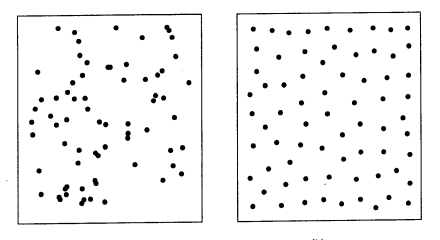
这幅图说明了不同约束条件下的情况,涉及节点之间的链接:
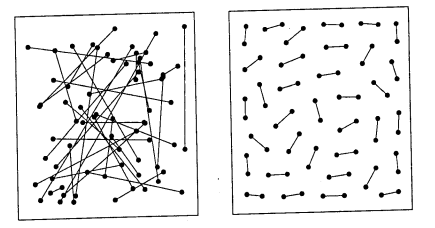
页面原文内容由Stack Overflow提供。腾讯云小微IT领域专用引擎提供翻译支持
原文链接:
https://stackoverflow.com/questions/15100060
复制相关文章
相似问题
腾讯云开发者

Copyright © 2013 - 2026 Tencent Cloud. All Rights Reserved. 腾讯云 版权所有
深圳市腾讯计算机系统有限公司 ICP备案/许可证号:粤B2-20090059  粤公网安备44030502008569号
腾讯云计算(北京)有限责任公司 京ICP证150476号 | 京ICP备11018762号