
Outlook插件中未正确显示的Outlook核糖核酸按钮
Outlook插件中未正确显示的Outlook核糖核酸按钮
提问于 2013-02-23 19:05:18
代码第一:
程序添加按钮到核糖核酸棒:
for (int i = 0; i < titles.Length; i++)
{
    RibbonButton button = this.Factory.CreateRibbonButton();
    button.Visible = false;
    button.Label = titles[i];
    button.Image = OutlookAddIn1.Properties.Resources.Sans_titre_5;
    button.ControlSize = Microsoft.Office.Core.RibbonControlSize.RibbonControlSizeLarge;
    this.group1.Items.Add(button);
}
以编程方式显示/隐藏一些按钮:
private void showOrHide(contact){
    // Building a phone array with the contact infos...
    RibbonButton button = Globals.Ribbons.Ribbon1.ribbonButtons.ElementAt(i).Value;
    button.Visible = button.Enabled = phones[i] != null;
}
--我在所有contactItems.open上绑定了一个事件,它调用了以下方法:
private void Event(ref bool asd)
{
    Outlook.Selection selection = Globals.ThisAddIn.Application.ActiveExplorer().Selection;
    if (selection.OfType<Outlook.ContactItem>().Count() == 1)
    {
        Outlook.ContactItem contact = selection.OfType<Outlook.ContactItem>().FirstOrDefault();
        showOrHide(contact);
    }
}
你能看到,我试图显示/隐藏按钮在我的核糖核酸棒,取决于是否有一个特定的电话号码类型是否。
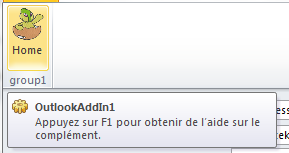
当我第一次打开联系人时,就正确地显示/隐藏了ribbonbuttons:
但是,当我选择另一个联系人(或相同的)时,它会显示我的所有按钮,而不显示标签的图像,即使它们是visible=false:
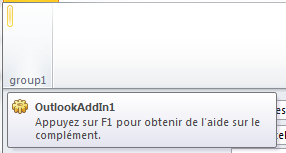
我的猜测是,当我第一次关闭我的联系窗口时,前景会打破我的核糖核酸按钮。所以当我打开另一个的时候,核糖核酸按钮都是乱七八糟的。有人有主意吗?
回答 1
Stack Overflow用户
发布于 2017-02-27 11:04:57
使用这方法向外接程序添加带状控件。它相当可靠。
向解决方案中添加visual中的带状xml,然后可以向带状添加控件,如下所示。
<tab idMso="TabAddIns">
    <group id="ContentGroup" label="Content">
        <button id="textButton" label="Insert Text"
             screentip="Text" onAction="OnTextButton"
             supertip="Inserts text at the cursor location."/>
        <button id="tableButton" label="Insert Table"
             screentip="Table" onAction="OnTableButton"
             supertip="Inserts a table at the cursor location."/>
    </group>
</tab>
您可以为事件定义回调,并在运行时为它们声明标签和其他属性。您可以通过为控件的"getVisible“属性声明回调方法来使带状控件失效并控制其可见性。
页面原文内容由Stack Overflow提供。腾讯云小微IT领域专用引擎提供翻译支持
原文链接:
https://stackoverflow.com/questions/15044398
复制相关文章
相似问题
腾讯云开发者

Copyright © 2013 - 2026 Tencent Cloud. All Rights Reserved. 腾讯云 版权所有
深圳市腾讯计算机系统有限公司 ICP备案/许可证号:粤B2-20090059  粤公网安备44030502008569号
腾讯云计算(北京)有限责任公司 京ICP证150476号 | 京ICP备11018762号