
UICollectionViewCell标签被重复使用和放置错误
我有一个带有原型细胞的UICollectionView。单元格加载并显示图像并显示标签。由于细胞有不同的大小,它们通过CollectionViewFlowLayout改变。效果很好。
当我在模拟器中滚动视图时,标签似乎被重复使用,并被错误地添加到图像上。如何确保这种情况不会发生,并且图像在集合视图上只有一个标签?
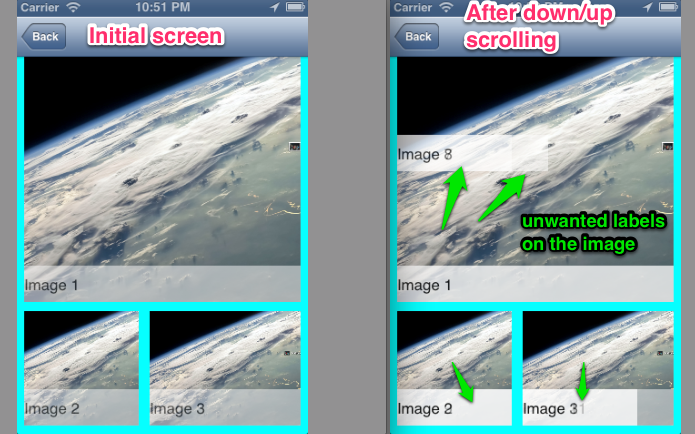
UICollectionView
#pragma mark - Collection view
-(NSInteger)numberOfSectionsInCollectionView:(UICollectionView *)collectionView
{
    self.Data = [NSArray arrayWithObjects:@1, @2, @3, @4, @5, @6, @7, @8, @9, @10, @11, @12, @13, @14, @15, @16, nil];
    return 1;
}
-(NSInteger)collectionView:(UICollectionView *)collectionView numberOfItemsInSection:(NSInteger)section
{
    return self.magazineLayout.count;
}

-(UICollectionViewCell *)collectionView:(UICollectionView *)collectionView cellForItemAtIndexPath:(NSIndexPath *)indexPath
{
    MagazineCell *mCell = (MagazineCell *)[collectionView dequeueReusableCellWithReuseIdentifier:cellID forIndexPath:indexPath];
    int item = [indexPath row];

    mCell.backgroundColor = [UIColor lightGrayColor];

    // Set Image
    UIImage *image;
    image = [UIImage imageNamed:@"testimage.png"];
    mCell.imageView.image = image;


    // Set Label
    NSString *title = [[NSString alloc] initWithFormat:@"Image %@", self.Data[item]];
    [mCell addSubview:[self cellTitle:title indexPath:indexPath]];

    return mCell;
}

// Title will be reused and placed wrongly on pictures !
-(UILabel *)cellTitle:(NSString *)name indexPath:(NSIndexPath *)indexPath {

    CGSize itemSize = [self collectionView:self.collectionView layout:self.collectionView.collectionViewLayout sizeForItemAtIndexPath:indexPath];
    int top = itemSize.height - 40;
    int width = itemSize.width;

    UILabel *title = [[UILabel alloc] initWithFrame:CGRectMake(0, top, width, 40)];
    title.textColor = [UIColor blackColor];
    title.text = name;
    title.backgroundColor = [UIColor whiteColor];
    title.alpha = 0.5f;

    return title;
}编辑:解决方案
viewWithTag工作得很好,但我无法重新定位标签。可悲的是,我认为这是最好的方法。在这里,我的解决方案没有viewWithTag:
-(UICollectionViewCell *)collectionView:(UICollectionView *)collectionView cellForItemAtIndexPath:(NSIndexPath *)indexPath
{
    MagazineCell *mCell = (MagazineCell *)[collectionView dequeueReusableCellWithReuseIdentifier:cellID forIndexPath:indexPath];
    mCell.backgroundColor = [UIColor lightGrayColor];

    // Set Image
    UIImage *image;
    image = [UIImage imageNamed:@"testimage.png"];
    mCell.imageView.image = image;

    [self cellTitleAndBackground:mCell indexPath:indexPath];

    return mCell;
}


-(void)cellTitleAndBackground:(MagazineCell *)mCell indexPath:(NSIndexPath *)indexPath {

    // Get title
    NSString *name = [[NSString alloc] initWithFormat:@"Image %@", self.Data[indexPath.row]];

    // Get current cell size
    CGSize itemSize = [self collectionView:self.collectionView layout:self.collectionView.collectionViewLayout sizeForItemAtIndexPath:indexPath];
    int top = itemSize.height - 40;
    int width = itemSize.width;

    // Create title background
    UILabel *titleBackground = [[UILabel alloc] initWithFrame:CGRectMake(0, top, width, 40)];
    titleBackground.backgroundColor = [UIColor blackColor];
    titleBackground.alpha = 0.2f;
    titleBackground.tag = 70;
    [self removeReusedLabel:mCell tag:70];
    [mCell addSubview:titleBackground];

    // Create titleLabel
    UILabel *titleLabel = [[UILabel alloc] initWithFrame:CGRectMake(8, top-8, width, 40)];
    titleLabel.textColor = [UIColor whiteColor];
    titleLabel.font = [UIFont boldSystemFontOfSize:14];
    titleLabel.text = name;
    titleLabel.backgroundColor = [UIColor clearColor];
    titleLabel.tag = 72;
    [self removeReusedLabel:mCell tag:72];
    [mCell addSubview:titleLabel];
}

-(void)removeReusedLabel:(MagazineCell *)mCell tag:(int)tag {
    UILabel *foundLabelBackground = (UILabel *)[mCell viewWithTag:tag];
    if (foundLabelBackground) [foundLabelBackground removeFromSuperview];
}
干杯--杰里克
回答 2
Stack Overflow用户
发布于 2013-02-19 22:38:45
这是由于单元重用而发生的。如果要像这样添加标签,应该检查从dequeue方法获得的单元格上是否有标签,如果有,则删除它。您可以给标签一个标签,然后使用viewWithTag:查看标签是否存在,然后让它调用removeFromSuperview。我还没有测试过这个,但我认为像这样的东西应该有效:
-(UICollectionViewCell *)collectionView:(UICollectionView *)collectionView cellForItemAtIndexPath:(NSIndexPath *)indexPath
{
    MagazineCell *mCell = (MagazineCell *)[collectionView dequeueReusableCellWithReuseIdentifier:cellID forIndexPath:indexPath];
    UILabel *foundLabel = [mCell viewWithTag:47];
    if (foundLabel) [foundLabel removeFromSuperview];
    .......
在单元格the :indexPath方法中创建标签时,请记住将标签的标记设置为相同的数字。顺便说一句,您应该将此标签添加到单元格的contentView中,而不是单元格本身。
编辑后的:
对代码的这一修改对我来说很好,使用viewWithTag:
-(CGSize)collectionView:(UICollectionView *)collectionView layout:(UICollectionViewLayout *)collectionViewLayout sizeForItemAtIndexPath:(NSIndexPath *)indexPath {
    CGSize cellSize = [self.magazineLayout[indexPath.item] size];
    return cellSize;
}

-(UICollectionViewCell *)collectionView:(UICollectionView *)collectionView cellForItemAtIndexPath:(NSIndexPath *)indexPath {
    MagazineCell *mCell = (MagazineCell *)[collectionView dequeueReusableCellWithReuseIdentifier:@"RDCell" forIndexPath:indexPath];
    mCell.backgroundColor = [UIColor lightGrayColor];
    if ([mCell viewWithTag:47]) [[mCell viewWithTag:47] removeFromSuperview];
    UIImage *image = self.magazineLayout[indexPath.item];
    mCell.imageView.image = image;

    NSString *title = [[NSString alloc] initWithFormat:@"Image %@", self.data[indexPath.item]];
    [mCell addSubview:[self cellTitle:title indexPath:indexPath]];

    return mCell;
}


-(UILabel *)cellTitle:(NSString *)name indexPath:(NSIndexPath *)indexPath {
    CGSize itemSize = [self.magazineLayout[indexPath.item] size];
    int top = itemSize.height - 40;
    int width = itemSize.width;
    UILabel *title = [[UILabel alloc] initWithFrame:CGRectMake(0, top, width, 40)];
    title.textColor = [UIColor blackColor];
    title.text = name;
    title.backgroundColor = [UIColor whiteColor];
    title.alpha = 0.5f;
    title.tag = 47;
    return title;
}
在这个例子中,数组magazineLayout被填充了16张不同大小的图片。
不过,更简单的方法是将标签添加到故事板(或xib)中的自定义单元格中。如果你把它钉在两边和底部,并且把它的高度设置为40,你就会得到你想要的东西,而不需要代码来创建标签或检查它的存在。
Stack Overflow用户
发布于 2014-06-11 12:28:12
我知道答案已经被接受和结束了。但是,为了防止有人偶然发现这个线程,避免这个问题的正确方法是子类UICollectionViewCell,然后使用
[self.collectionView registerClass:[LPCollectionViewCell class] forCellWithReuseIdentifier:cellIdentifier];初始化子类的initWithFrame方法中的所有元素
- (id)initWithFrame:(CGRect)frame
{
    self = [super initWithFrame:frame];
    if (self) {

        self.lblName = [[UILabel alloc] initWithFrame:CGRectMake(0.0, 95.0, 106.0, 20)];
        self.lblName.text = @"";
        self.lblName.textAlignment = NSTextAlignmentCenter;
        [self.lblName setFont:[UIFont fontWithName:@"GothamRounded-Bold" size:10]];
        [self.lblName setTextColor:[UIColor colorWithRed:137.0f/255.0 green:137.0f/255.0 blue:137.0f/255.0 alpha:1.0]];
        [self.lblName setBackgroundColor:[UIColor clearColor]];
        [self addSubview:self.lblName];
}
使元素公开,以便以后可以在集合视图数据源调用中访问该元素。
- (UICollectionViewCell *)collectionView:(UICollectionView *)collectionView cellForItemAtIndexPath:(NSIndexPath *)indexPath {

    LPCollectionViewCell *cell = (LPCollectionViewCell *)[collectionView dequeueReusableCellWithReuseIdentifier:cellIdentifier forIndexPath:indexPath];
    cell.backgroundColor = [UIColor whiteColor];
    [cell.lblName setText:@"This is awesome"];
}
就这样!
https://stackoverflow.com/questions/14968505
复制相似问题
腾讯云开发者

Copyright © 2013 - 2026 Tencent Cloud. All Rights Reserved. 腾讯云 版权所有
深圳市腾讯计算机系统有限公司 ICP备案/许可证号:粤B2-20090059  粤公网安备44030502008569号
腾讯云计算(北京)有限责任公司 京ICP证150476号 | 京ICP备11018762号