
Select2搜索框
Select2搜索框
提问于 2013-02-19 18:40:08
以下功能存在格式化问题。正如您将在下面看到的,它主要起作用,只是搜索框的格式不是我想要的(我希望复制引导功能):
用户可以在搜索框中输入图书标题,在搜索框下的下拉列表中(通过ajax)获取要选择的书籍,并选择一本书。在下拉列表中选择一本书时,表单中将填充该图书信息。就像这样:
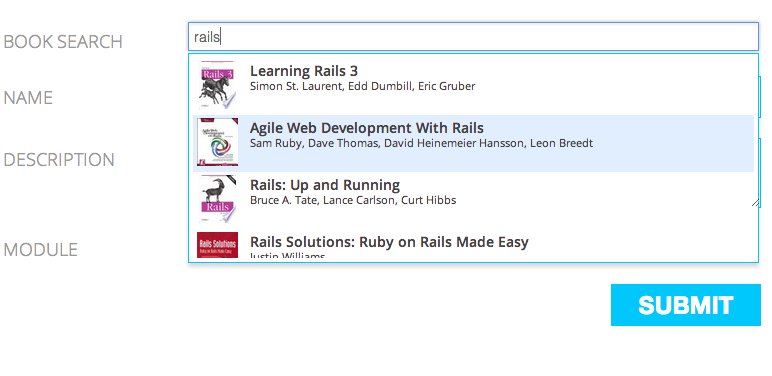
我的问题是,select2自动更改搜索输入的格式(在搜索框中的选定项周围添加css )。见这里:
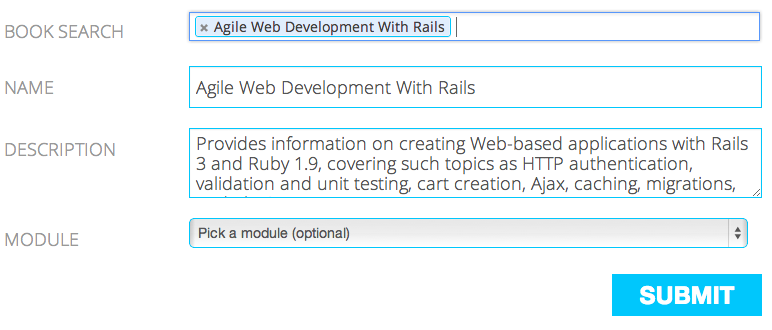
问题
我知道这并不是Select2的真正用途,但我希望搜索框值是"rails",就像我输入它时的样子(第一张屏幕快照)。如何保持常规的输入格式?
详细信息:
下面是我到目前为止使用的coffeescript代码(它具有图片的异步加载和所选内容的格式设置):
jQuery ->

  get_image = (unique_id, image_url) ->
    img = $("<img  />").load(->
      $(".#{unique_id} .typeahead_photo_wrapper").html(img)
    ).error(->
      $(".#{unique_id} .typeahead_photo_wrapper").html("No preview")
    ).addClass('typeahead_photo').attr({src: image_url}).fadeIn(500)


  format_item = (book) ->
    console.log book
    itm = ''
    itm += "<div class='typeahead_wrapper #{book.isbn}'>"
    itm += "<div class='typeahead_photo_wrapper'>"
    itm += "<div class='typeahead_photo'>...</div>"
    itm += "</div>"
    itm += "<div class='typeahead_labels'>"
    itm += "<div class='typeahead_primary'>#{book.title}</div>"
    itm += "<div class='typeahead_secondary'>#{book.author}</div>"
    itm += "</div>"
    itm += "</div>"

    get_image(book.isbn, book.image)
    itm


  update_with_item = (item) ->
    keywords = $("#learning_item_book_search").val()
    # console.log item

    $("#new-book #learning_item_unique_identifier").val(item.isbn)
    $("#new-book #learning_item_source").val(item.source)
    $("#new-book #learning_item_name").val(item.title)
    $("#new-book #learning_item_description").val(item.description)
    $("#new-book button").focus()
    item.title


  retrieve_books = (data) ->
    books = []
    $.each data, (i, item) ->
      books.push(
        id: item.id
        isbn: item.isbn
        title: item.title
        author: item.authors
        description: item.description
        image: item.volume_info.imageLinks.smallThumbnail
      )
    books


  $("#learning_item_book_search").select2({
    minimumInputLength: 2
    tags: true
    ajax:
      url: "/raw_items/fetch_books"
      dataType: 'json'
      quietMillis: 200
      data: (term, page) ->
        query: term
      results: (data, page) ->
        return {results: retrieve_books(data)}
    maximumSelectionSize:1
    formatResult: format_item
    formatSelection: update_with_item
    formatInputTooShort: (term, minLength) ->
      "Searching book on Google books"
    dropdownCssClass: 'typeahead'
})回答 2
Stack Overflow用户
发布于 2013-02-19 19:28:03
您可以将select2设置为多选择模式--这将使它看起来像您想要的常规文本字段。使用maximumSelectionSize:1选项将选择限制为单个项。使用原始html控件上的“change”事件填充表单。
Stack Overflow用户
发布于 2013-11-12 14:45:05
在format_item中添加一行
$("#learning_item_book_search").select2('val', '')适用于多重选择
$("#learning_item_book_search").select2('val', [])它将保留搜索项,而不是添加所选项。
页面原文内容由Stack Overflow提供。腾讯云小微IT领域专用引擎提供翻译支持
原文链接:
https://stackoverflow.com/questions/14964960
复制相关文章
相似问题
腾讯云开发者

Copyright © 2013 - 2026 Tencent Cloud. All Rights Reserved. 腾讯云 版权所有
深圳市腾讯计算机系统有限公司 ICP备案/许可证号:粤B2-20090059  粤公网安备44030502008569号
腾讯云计算(北京)有限责任公司 京ICP证150476号 | 京ICP备11018762号