
转换从CGPoint返回的CIFaceFeature结果
我试图找出如何转换从CGPoint返回的CIFaceFeature结果,以便在CALayer中使用它们进行绘图。以前,为了使事情变得更简单,我已经将我的图像规范化为0旋转,但这会给以景观模式保存的设备所拍摄的图像带来问题。
我已经在这方面工作了一段时间,但没有成功,我不确定我对任务的理解是否不正确,或者我的方法是否不正确,或者两者兼而有之。以下是我认为是正确的:
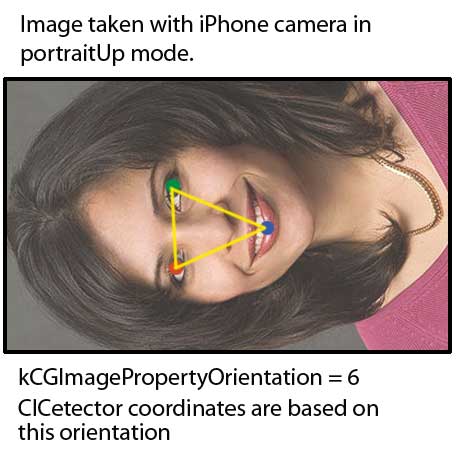
根据CIDetector featuresInImage:options:方法的文档
A dictionary that specifies the orientation of the image. The detection is
adjusted to account for the image orientation but the coordinates in the
returned feature objects are based on those of the image.
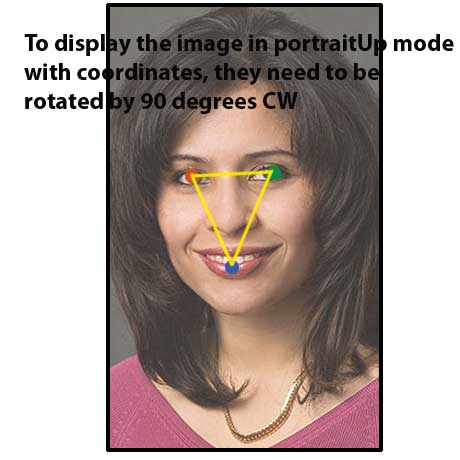
在下面的代码中,我试图旋转一个CGPoint,以便通过一个覆盖UIImageView的CAShape层来绘制它。
我在做什么(...or认为我在做.)是将左眼CGPoint移到视图的中心,旋转90度,然后将点移回原来的位置。这是不正确的,但我不知道我哪里出错了。是我的方法错了,还是我实施的方式错了?
#define DEGREES_TO_RADIANS(angle) ((angle) / 180.0 * M_PI)-- leftEyePosition是CGPoint
CGAffineTransform  transRot = CGAffineTransformMakeRotation(DEGREES_TO_RADIANS(90));

float x = self.center.x;
float y = self.center.y;
CGAffineTransform tCenter = CGAffineTransformMakeTranslation(-x, -y);
CGAffineTransform tOffset = CGAffineTransformMakeTranslation(x, y);

leftEyePosition = CGPointApplyAffineTransform(leftEyePosition, tCenter);
leftEyePosition = CGPointApplyAffineTransform(leftEyePosition, transRot);
leftEyePosition = CGPointApplyAffineTransform(leftEyePosition, tOffset);在这篇文章中:https://stackoverflow.com/a/14491293/840992,我需要基于imageOrientation进行旋转
方向 苹果/UIImage.ImageOrientingJpeg/File kCGImagePropertyOrientation UIImageOrientationUp =0=景观左=1 UIImageOrientationDown =1=景观右=3 UIImageOrientationLeft =2=肖像下降=8 UIImageOrientationRight =3=肖像向上=6
消息由skinnyTOD于下午4:09在2/1/13进行编辑
回答 2
Stack Overflow用户
发布于 2013-06-10 07:28:45
我需要找出完全相同的问题。苹果示例"SquareCam“直接对视频输出进行操作,但我需要静态UIImage的结果。因此,我用一些转换方法扩展了CIFaceFeature类,以获得相对于UIImage及其UIImageView (或UIView的CALayer )的正确的点位置和边界。完整的实现发布在这里:https://gist.github.com/laoyang/5747004。你可以直接使用。
这里是来自CIFaceFeature的点的最基本的转换,返回的CGPoint是根据图像的方向转换的:
- (CGPoint) pointForImage:(UIImage*) image fromPoint:(CGPoint) originalPoint {

    CGFloat imageWidth = image.size.width;
    CGFloat imageHeight = image.size.height;

    CGPoint convertedPoint;

    switch (image.imageOrientation) {
        case UIImageOrientationUp:
            convertedPoint.x = originalPoint.x;
            convertedPoint.y = imageHeight - originalPoint.y;
            break;
        case UIImageOrientationDown:
            convertedPoint.x = imageWidth - originalPoint.x;
            convertedPoint.y = originalPoint.y;
            break;
        case UIImageOrientationLeft:
            convertedPoint.x = imageWidth - originalPoint.y;
            convertedPoint.y = imageHeight - originalPoint.x;
            break;
        case UIImageOrientationRight:
            convertedPoint.x = originalPoint.y;
            convertedPoint.y = originalPoint.x;
            break;
        case UIImageOrientationUpMirrored:
            convertedPoint.x = imageWidth - originalPoint.x;
            convertedPoint.y = imageHeight - originalPoint.y;
            break;
        case UIImageOrientationDownMirrored:
            convertedPoint.x = originalPoint.x;
            convertedPoint.y = originalPoint.y;
            break;
        case UIImageOrientationLeftMirrored:
            convertedPoint.x = imageWidth - originalPoint.y;
            convertedPoint.y = originalPoint.x;
            break;
        case UIImageOrientationRightMirrored:
            convertedPoint.x = originalPoint.y;
            convertedPoint.y = imageHeight - originalPoint.x;
            break;
        default:
            break;
    }
    return convertedPoint;
}
以下是基于上述转换的分类方法:
// Get converted features with respect to the imageOrientation property
- (CGPoint) leftEyePositionForImage:(UIImage *)image;
- (CGPoint) rightEyePositionForImage:(UIImage *)image;
- (CGPoint) mouthPositionForImage:(UIImage *)image;
- (CGRect) boundsForImage:(UIImage *)image;

// Get normalized features (0-1) with respect to the imageOrientation property
- (CGPoint) normalizedLeftEyePositionForImage:(UIImage *)image;
- (CGPoint) normalizedRightEyePositionForImage:(UIImage *)image;
- (CGPoint) normalizedMouthPositionForImage:(UIImage *)image;
- (CGRect) normalizedBoundsForImage:(UIImage *)image;

// Get feature location inside of a given UIView size with respect to the imageOrientation property
- (CGPoint) leftEyePositionForImage:(UIImage *)image inView:(CGSize)viewSize;
- (CGPoint) rightEyePositionForImage:(UIImage *)image inView:(CGSize)viewSize;
- (CGPoint) mouthPositionForImage:(UIImage *)image inView:(CGSize)viewSize;
- (CGRect) boundsForImage:(UIImage *)image inView:(CGSize)viewSize;
(需要注意的另一件事是在从UIImage方向提取面部特征时指定正确的EXIF方向。很让人困惑..。以下是我所做的:
int exifOrientation;
switch (self.image.imageOrientation) {
    case UIImageOrientationUp:
        exifOrientation = 1;
        break;
    case UIImageOrientationDown:
        exifOrientation = 3;
        break;
    case UIImageOrientationLeft:
        exifOrientation = 8;
        break;
    case UIImageOrientationRight:
        exifOrientation = 6;
        break;
    case UIImageOrientationUpMirrored:
        exifOrientation = 2;
        break;
    case UIImageOrientationDownMirrored:
        exifOrientation = 4;
        break;
    case UIImageOrientationLeftMirrored:
        exifOrientation = 5;
        break;
    case UIImageOrientationRightMirrored:
        exifOrientation = 7;
        break;
    default:
        break;
}

NSDictionary *detectorOptions = @{ CIDetectorAccuracy : CIDetectorAccuracyHigh };
CIDetector *faceDetector = [CIDetector detectorOfType:CIDetectorTypeFace context:nil options:detectorOptions];

NSArray *features = [faceDetector featuresInImage:[CIImage imageWithCGImage:self.image.CGImage]
                                          options:@{CIDetectorImageOrientation:[NSNumber numberWithInt:exifOrientation]}];
)
Stack Overflow用户
发布于 2013-02-01 20:54:59
我想你需要把图像的水平中轴线上找到的面坐标
您能尝试一下这个转换吗:
CGAffineTransform transform = CGAffineTransformIdentity;
transform = CGAffineTransformTranslate(transform, 0.0f, image.size.height);
transform = CGAffineTransformScale(transform, 1.0f, -1.0f);
[path applyTransform:transform];
只有在查找faces之前将image.imageOrientation设置为0时,此转换才能工作。
https://stackoverflow.com/questions/14651976
复制相似问题
腾讯云开发者

Copyright © 2013 - 2026 Tencent Cloud. All Rights Reserved. 腾讯云 版权所有
深圳市腾讯计算机系统有限公司 ICP备案/许可证号:粤B2-20090059  粤公网安备44030502008569号
腾讯云计算(北京)有限责任公司 京ICP证150476号 | 京ICP备11018762号