
NSURLConnection sendAsynchronousRequest从不释放内存
我正在开发一个iOS应用程序,它将相当多的任务分派到我的串行队列中。任务是从我的web服务器下载图像,将其保存到磁盘,然后显示在UIImageView上。然而,[NSURLConnection sendAsynchrousRequest]将不断消耗越来越多的内存,直到iOS终止我的进程。
下载程序的方法如下所示:
// dispatch_queue_t is created once by: m_pRequestQueue = dispatch_queue_create( "mynamespace.app", DISPATCH_QUEUE_SERIAL);

- (void) downloadImageInBackgroundWithURL:(NSString*) szUrl {
__block typeof(self) bSelf = self;
__block typeof(m_pUrlRequestQueue) bpUrlRequestQueue = m_pRequestQueue;

dispatch_async( m_pRequestQueue, ^{
    NSAutoreleasePool *pAutoreleasePool = [[NSAutoreleasePool alloc] init];
    NSURLRequest *pRequest = [NSURLRequest requestWithURL:[NSURL URLWithString:szUrl]
                                              cachePolicy:NSURLRequestReloadIgnoringCacheData
                                          timeoutInterval:URL_REQUEST_TIMEOUT];

    [NSURLConnection sendAsynchronousRequest:pRequest queue:bpUrlRequestQueue completionHandler:^(NSURLResponse *pResponse, NSData *pData, NSError *pError) {
        NSAutoreleasePool *pPool = [[NSAutoreleasePool alloc] init];
        if ( pError != nil ) {
        } else {
            // convert image to png format
            UIImage *pImg = [UIImage imageWithData:pData];
            NSData *pDataPng = UIImagePNGRepresentation(pImg);
            bool bSaved = [[NSFileManager defaultManager] createFileAtPath:szCacheFile contents:pDataPng attributes:nil];
        }

            __block typeof(pDataPng) bpDataPng = pDataPng;
            __block typeof(pError) bpError = pError;
            dispatch_sync( dispatch_get_main_queue(), ^ {
                NSAutoreleasePool *autoreleasepool = [[NSAutoreleasePool alloc] init];
                UIImage *pImage = [[UIImage alloc] initWithData:bpDataPng];

                // display the image

                [pImage release];
//                    NSLog( @"image retain count: %d", [pImage retainCount] ); // 0, bad access

                [autoreleasepool drain];
            });
        }
        [pPool drain];
    }]; // end sendAsynchronousRequest

    [pAutoreleasePool drain];

}); // end dispatch_async
} // end downloadImageInBackgroundWithURL我很确定这是[NSURLConnection sendAsynchronousRequest]内部的一些东西,因为分析器显示这个函数消耗了所有的内存.
然而,我也不太确定dispatch_***和阻塞的东西,我以前总是用C和C++代码来处理线程,但是在阅读了苹果关于从线程迁移的文档之后,我决定尝试一下GCD,objective太麻烦了,我不知道当我这么做的时候,它会崩溃,如何释放NSData *pData和NSURLResponse *pResponse。
请指点..。真正需要帮助来学习和欣赏目标-c.
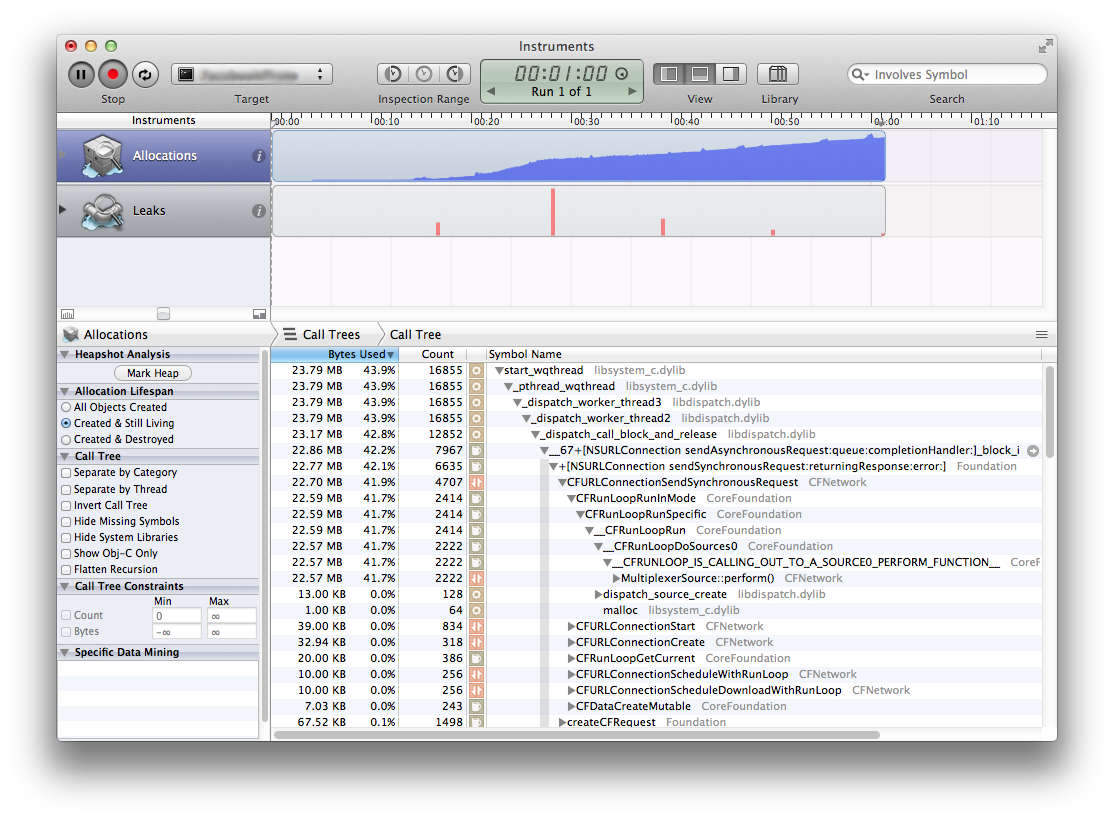
附加编辑:
多亏@robhayward,我把pImg和pDataPng作为__block变量,使用他的RHCacheImageView方式下载数据( NSData initWithContentOfURL )
同样感谢@JorisKluivers,第一个UIImage实际上可以被重用以作为UIImageView识别的jpg和png格式来显示,只是我后来的处理需要png格式,我稍后才在需要时从磁盘读取。
回答 2
Stack Overflow用户
发布于 2013-01-22 14:50:43
首先,我要将其归结为您正在创建的图像和数据对象:
UIImage *pImg = [UIImage imageWithData:pData];
NSData *pDataPng = UIImagePNGRepresentation(pImg);
因为它们可能是在不同的线程上创建/发布的,所以可能会在块外逗留太长时间:
__block UIImage *pImg = nil;
__block NSData *pDataPng = nil;
[NSURLConnection sendAsynchronousRequest..
(如果可以的话,也考虑使用ARC )
我有一些关于Github的代码,它可以在没有这个问题的情况下完成类似的工作,可以随意查看它:
Stack Overflow用户
发布于 2013-01-22 15:32:31
首先,尝试简化代码。我做过的事:
- 移除外部dispatch_async。这是不需要的,您的
sendAsynchronousRequest已经异步了。这也消除了队列中的另一个__block变量的需要。 - 您可以从接收到的
pImg创建一个名为pData的图像,然后将其转换回png类型的NSData,然后再次从它创建另一个图像pImage。而不是一遍又一遍地转换,只需重用第一个映像。您甚至可以将原始的pData写入磁盘(除非您真的希望磁盘上使用png格式)。
下面的代码不是我自己编译的,所以它可能包含一些错误。但这是一个更简单的版本,可能有助于解决漏洞。
- (void) downloadImageInBackgroundWithURL:(NSString*)szUrl
{
    __block typeof(self) bSelf = self;

    NSAutoreleasePool *pAutoreleasePool = [[NSAutoreleasePool alloc] init];
    NSURLRequest *pRequest = [NSURLRequest requestWithURL:[NSURL URLWithString:szUrl]
                                          cachePolicy:NSURLRequestReloadIgnoringCacheData
                                      timeoutInterval:URL_REQUEST_TIMEOUT];

    [NSURLConnection sendAsynchronousRequest:pRequest queue:m_pRequestQueue completionHandler:^(NSURLResponse *pResponse, NSData *pData, NSError *pError) {
        NSAutoreleasePool *pPool = [[NSAutoreleasePool alloc] init];
        if (pError) {
            // TODO: handle error
            return;
        }

        // convert image to png format
        __block UIImage *pImg = [UIImage imageWithData:pData];

        // possibly just write pData to disk
        NSData *pDataPng = UIImagePNGRepresentation(pImg);
        bool bSaved = [[NSFileManager defaultManager] createFileAtPath:szCacheFile contents:pDataPng attributes:nil];

        dispatch_sync( dispatch_get_main_queue(), ^ {
            // display the image in var pImg
        });
    }];
    [pAutoreleasePool drain];
}https://stackoverflow.com/questions/14460652
复制相似问题
腾讯云开发者

Copyright © 2013 - 2026 Tencent Cloud. All Rights Reserved. 腾讯云 版权所有
深圳市腾讯计算机系统有限公司 ICP备案/许可证号:粤B2-20090059  粤公网安备44030502008569号
腾讯云计算(北京)有限责任公司 京ICP证150476号 | 京ICP备11018762号