
力GraphViz力在子图之间对齐
我在以下点文件中使用GraphViz:
digraph "Fast-forward"
{
    rankdir=LR;
    subgraph master
    {
        "5c071a6b2c" -> "968bda3251";
    }
    subgraph branch
    {
        "35ee8ce6b6" [color="blue"] [style="filled"];
        "968bda3251" -> "9754d40473" [weight=0];
        "9754d40473" -> "9e59700d33" -> "35ee8ce6b6";
    }
    subgraph c1
    {
        rankdir=LR;
        rank="same";
        "remote/master/HEAD" [shape=box];
        "remote/master/HEAD" -> "35ee8ce6b6" [weight=0];
        oldmh [label="master/HEAD"] [shape=box] [color="red"] [style="filled"];
        newmh [label="master/HEAD"] [shape=box] [color="blue"] [style="filled"];
        oldmh -> "968bda3251" [weight=0];
        newmh -> "35ee8ce6b6" [weight=0];
    }
}
它给了我这样的东西:
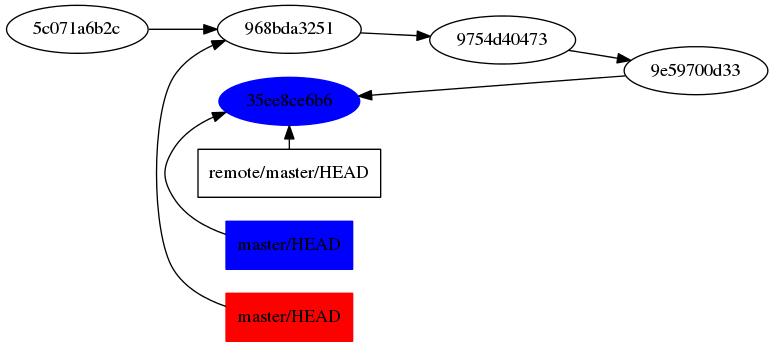
但我想要这样的东西:
white | \/ "9754d40473" -> "9e59700d33" -> "35ee8ce6b6"; / /\ 5c071a6b2c -> 968 3251/\ _
我怎么能这么做?
谢谢你的帮助,提前谢了。
回答 2
Stack Overflow用户
发布于 2013-01-15 22:39:10
我倾向于首先定义所有具有特殊需求的节点(比如处于同一级别或具有特殊形状/颜色),然后定义链接。这样,您就可以确保正确地分组rank=same节点,并按照正确的顺序进行定义。
没有weight=0,所有的侧链接都会在顶部结束。将weight=0添加到您想要的底部。
digraph "Fast-forward"
{
    rankdir=LR;
    subgraph c1 {
        rank="same";
        "968bda3251";
        oldmh [label="master/HEAD"] [shape=box] [color="red"] [style="filled"];
    }
    subgraph c2
    {
        rank="same";
        "remote/master/HEAD" [shape=box];
        "35ee8ce6b6" [color="blue"] [style="filled"];
        newmh [label="master/HEAD"] [shape=box] [color="blue"] [style="filled"];
    }
    "5c071a6b2c" -> "968bda3251" -> "9754d40473" -> "9e59700d33" -> "35ee8ce6b6";
    oldmh -> "968bda3251" [weight=0];
    "remote/master/HEAD" -> "35ee8ce6b6";
    newmh -> "35ee8ce6b6" [weight=0];
}
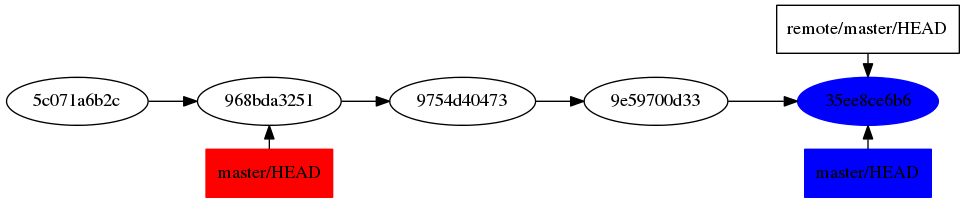
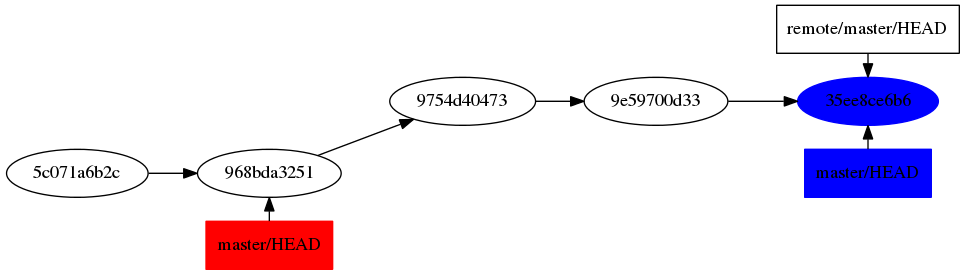
如果你真的想在96到97之间慢跑,你可以这样做:
digraph "Fast-forward"
{
    rankdir=LR;
    subgraph c1 {
        rank=same;
        "968bda3251";
        oldmh [label="master/HEAD"] [shape=box] [color="red"] [style="filled"];
    }
    subgraph c1p5 {
        rank=same;
        "9754d40473";
        inviso [style="invis"];
    }
    subgraph c2
    {
        rank="same";
        "remote/master/HEAD" [shape=box];
        "35ee8ce6b6" [color="blue"] [style="filled"];
        newmh [label="master/HEAD"] [shape=box] [color="blue"] [style="filled"];
    }
    "5c071a6b2c" -> "968bda3251";
    "968bda3251" -> "9754d40473" [weight=0];
    "9754d40473" -> "9e59700d33" -> "35ee8ce6b6";
    oldmh -> "968bda3251" [weight=0];
    "remote/master/HEAD" -> "35ee8ce6b6";
    newmh -> "35ee8ce6b6" [weight=0];
    "968bda3251" -> inviso [style="invis"];
    "9754d40473" -> inviso [style="invis"];
}
Stack Overflow用户
发布于 2013-01-10 10:55:10
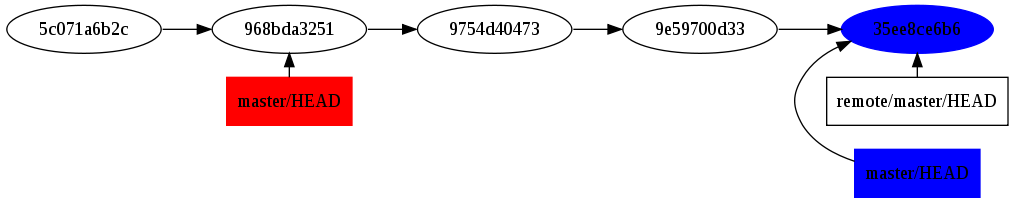
rank="same"会影响子图的所有节点,因此必须将标记子图分成两部分:
digraph "Fast-forward"
{
    rankdir=LR;
    subgraph master
    {
        "5c071a6b2c" -> "968bda3251";
    }
    subgraph branch
    {
        "968bda3251" -> "9754d40473" [weight=0];
        "9754d40473" -> "9e59700d33" -> "35ee8ce6b6";
        "35ee8ce6b6" [color="blue"] [style="filled"];
    }
    subgraph c1
    {
        rank="same";
        "remote/master/HEAD" [shape=box];
        "remote/master/HEAD" -> "35ee8ce6b6" [weight=0];
        newmh [label="master/HEAD"] [shape=box] [color="blue"] [style="filled"];
        newmh -> "35ee8ce6b6" [weight=0];
    }
    subgraph c2
    {
        rank="same";
        oldmh [label="master/HEAD"] [shape=box] [color="red"] [style="filled"];
        oldmh -> "968bda3251" [weight=0];
    }
}
这将给你:
https://stackoverflow.com/questions/14255634
复制相似问题
腾讯云开发者

Copyright © 2013 - 2026 Tencent Cloud. All Rights Reserved. 腾讯云 版权所有
深圳市腾讯计算机系统有限公司 ICP备案/许可证号:粤B2-20090059  粤公网安备44030502008569号
腾讯云计算(北京)有限责任公司 京ICP证150476号 | 京ICP备11018762号