
指定PrincipalContext容器后无法找到用户
指定PrincipalContext容器后无法找到用户
提问于 2013-01-07 23:11:35
我试图在Active Directory中使用用户名来查找用户。
这样做是可行的:
const string Domain = "SLO1.Foo.Bar.biz";
const string Username = "sanderso";

PrincipalContext principalContext = new PrincipalContext(ContextType.Domain, Domain);
UserPrincipal userPrincipal = UserPrincipal.FindByIdentity(principalContext,  Username);
这并不意味着:
const string Domain = "SLO1.Foo.Bar.biz";
const string Container = "CN=Users,DC=SLO1,DC=Foo,DC=Bar,DC=biz";
const string Username = "sanderso";

PrincipalContext principalContext = new PrincipalContext(ContextType.Domain, Domain, Container);
UserPrincipal userPrincipal = UserPrincipal.FindByIdentity(principalContext, Username);
我收到错误消息:
服务器上没有这样的对象。
下面是我的ActiveDirectory设置的屏幕截图:
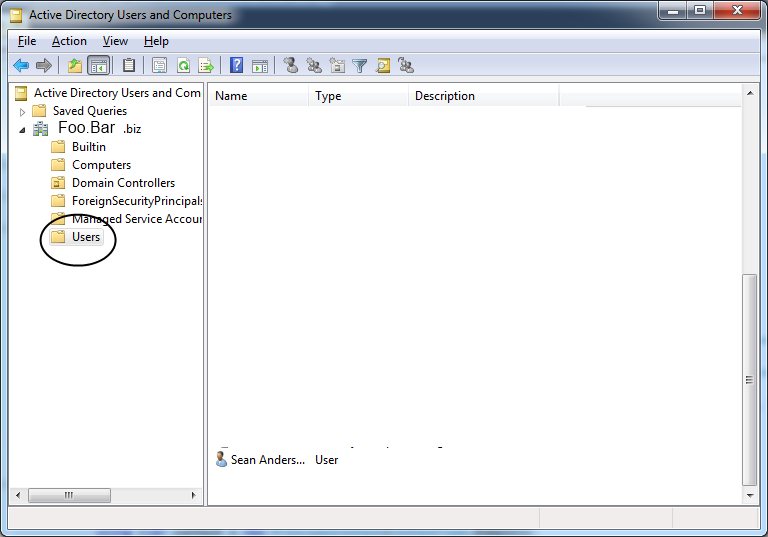
我还尝试使用以下容器:
const string Container = "OU=Users,DC=SLO1,DC=Foo,DC=Bar,DC=biz";这同样是不成功的。
如何在访问“用户”容器时指定容器?在引入具有更复杂需求的查找之前,我尝试将其作为一个初始的简单设置来完成。所以,我不想满足于简单的解决方案,因为我相信无论如何我都要解决这个问题。
回答 1
Stack Overflow用户
回答已采纳
发布于 2013-01-07 23:56:52
我想出来了:)
首先,我使用了以下软件来确保生成正确的容器字符串:
http://www.ldapbrowser.com/download.htm
这证实了我的字符串是相当正确的,除了缺少一个端口,但它只是需要一些麻烦。
正确的用法是:
const string Domain = "SLO1.Foo.Bar.biz:389";
const string Container = @"DC=Foo,DC=Bar,DC=biz";
const string Username = @"sanderso";
PrincipalContext principalContext = new PrincipalContext(ContextType.Domain, Domain, Container);
UserPrincipal userPrincipal = UserPrincipal.FindByIdentity(principalContext, username);页面原文内容由Stack Overflow提供。腾讯云小微IT领域专用引擎提供翻译支持
原文链接:
https://stackoverflow.com/questions/14205737
复制相关文章
相似问题
腾讯云开发者

Copyright © 2013 - 2026 Tencent Cloud. All Rights Reserved. 腾讯云 版权所有
深圳市腾讯计算机系统有限公司 ICP备案/许可证号:粤B2-20090059  粤公网安备44030502008569号
腾讯云计算(北京)有限责任公司 京ICP证150476号 | 京ICP备11018762号