
CurrentUICulture忽略区域和语言设置
Windows 7区域和语言对话框中的分类设置为CurrentCulture对象的属性提供值。但是,WPF控件似乎使用CurrentUICulture,从而导致完全不尊重用户的首选项。
例如,在我的工作站上,WPF控件似乎使用的是en-US的CurrentUICulture,从而导致它们以美国格式M/d/yyyy显示日期,而不是在区域和语言对话框中指定的澳大利亚格式。
在数据库中显式指定en-AU的区域性会导致相关控件使用默认的澳大利亚格式,但它继续忽略用户指定的格式。这很奇怪;进入应用程序时,我验证了DateTimeFormatInfo.CurrentInfo == DateTimeFormatInfo.CurrentInfo(相同对象)和DateTimeFormatInfo.CurrentInfo.ShortDatePattern ==“yyyy dd”(我设置了这个值,以便确定用户的首选项还是默认设置)。一切都如期而至,所以从表面上看,最大的问题是如何说服WPF控件和数据库使用CurrentCulture而不是CurrentUICulture。
我们应该如何使WPF应用程序尊重地区和语言设置?
基于Sphinxx的答案,我重写了绑定类的两个构造函数,以提供与标准标记更完全的兼容性。
using System.Globalization;
using System.Windows.Data;

namespace ScriptedRoutePlayback
{
  public class Bind : Binding
  {
    public Bind()
    {
      ConverterCulture = CultureInfo.CurrentCulture;
    }
    public Bind(string path) : base(path)
    {
      ConverterCulture = CultureInfo.CurrentCulture;
    }
  }
}
进一步的实验表明,您可以使用x:静态来引用标记中的System.Globalization.CultureInfo.CurrentCulture。这在运行时是完全成功的,但在设计时却是一场灾难,因为绑定编辑器一直在删除它。一个更好的解决方案是一个帮助类,用于遍历窗口的DOM并修复它找到的每个绑定的ConverterCulture。
using System;
using System.Windows;
using System.Windows.Data;
using System.ComponentModel;
using System.Collections.Generic;
using System.Diagnostics;
using System.Globalization;

namespace ScriptedRoutePlayback
{
  public static class DependencyHelper
  {
    static Attribute[] __attrsForDP = new Attribute[] { new PropertyFilterAttribute(PropertyFilterOptions.SetValues | PropertyFilterOptions.UnsetValues | PropertyFilterOptions.Valid) };

    public static IList<DependencyProperty> GetProperties(Object element, bool isAttached = false)
    {
      if (element == null) throw new ArgumentNullException("element");

      List<DependencyProperty> properties = new List<DependencyProperty>();

      foreach (PropertyDescriptor pd in TypeDescriptor.GetProperties(element, __attrsForDP))
      {
        DependencyPropertyDescriptor dpd = DependencyPropertyDescriptor.FromProperty(pd);
        if (dpd != null && dpd.IsAttached == isAttached)
        {
          properties.Add(dpd.DependencyProperty);
        }
      }

      return properties;
    }

    public static IEnumerable<Binding> EnumerateBindings(DependencyObject dependencyObject)
    {
      if (dependencyObject == null) throw new ArgumentNullException("dependencyObject");

      LocalValueEnumerator lve = dependencyObject.GetLocalValueEnumerator();

      while (lve.MoveNext())
      {
        LocalValueEntry entry = lve.Current;

        if (BindingOperations.IsDataBound(dependencyObject, entry.Property))
        {
          Binding binding = (entry.Value as BindingExpression).ParentBinding;
          yield return binding;
        }
      }
    }

    /// <summary>
    /// Use in the constructor of each Window, after initialisation.
    /// Pass "this" as the dependency object and omit other parameters to have
    /// all the bindings in the window updated to respect user customisations
    /// of regional settings. If you want a specific culture then you can pass
    /// values to recurse and cultureInfo. Setting recurse to false allows you
    /// to update the bindings on a single dependency object.
    /// </summary>
    /// <param name="dependencyObject">Root dependency object for binding change treewalk</param>
    /// <param name="recurse">A value of true causes processing of child dependency objects</param>
    /// <param name="cultureInfo">Defaults to user customisations of regional settings</param>
    public static void FixBindingCultures(DependencyObject dependencyObject, bool recurse = true, CultureInfo cultureInfo = null)
    {
      if (dependencyObject == null) throw new ArgumentNullException("dependencyObject");
      try
      {
        foreach (object child in LogicalTreeHelper.GetChildren(dependencyObject))
        {
          if (child is DependencyObject)
          {
            //may have bound properties
            DependencyObject childDependencyObject = child as DependencyObject;
            var dProps = DependencyHelper.GetProperties(childDependencyObject);
            foreach (DependencyProperty dependencyProperty in dProps)
              RegenerateBinding(childDependencyObject, dependencyProperty, cultureInfo);
            //may have children
            if (recurse)
              FixBindingCultures(childDependencyObject, recurse, cultureInfo);
          }
        }
      }
      catch (Exception ex)
      {
        Trace.TraceError(ex.Message);
      }
    }

    public static void RegenerateBinding(DependencyObject dependencyObject, DependencyProperty dependencyProperty, CultureInfo cultureInfo = null)
    {
      Binding oldBinding = BindingOperations.GetBinding(dependencyObject, dependencyProperty);
      if (oldBinding != null)
        try
        {
          //Bindings cannot be changed after they are used.
          //But they can be regenerated with changes.
          Binding newBinding = new Binding()
          {
            Converter = oldBinding.Converter,
            ConverterCulture = cultureInfo ?? CultureInfo.CurrentCulture,
            ConverterParameter = oldBinding.ConverterParameter,
            FallbackValue = oldBinding.FallbackValue,
            IsAsync = oldBinding.IsAsync,
            Mode = oldBinding.Mode,
            NotifyOnSourceUpdated = oldBinding.NotifyOnSourceUpdated,
            NotifyOnTargetUpdated = oldBinding.NotifyOnValidationError,
            Path = oldBinding.Path,
            StringFormat = oldBinding.StringFormat,
            TargetNullValue = oldBinding.TargetNullValue,
            UpdateSourceExceptionFilter = oldBinding.UpdateSourceExceptionFilter,
            UpdateSourceTrigger = oldBinding.UpdateSourceTrigger,
            ValidatesOnDataErrors = oldBinding.ValidatesOnDataErrors,
            ValidatesOnExceptions = oldBinding.ValidatesOnExceptions,
            XPath = oldBinding.XPath
          };
          //set only one of ElementName, RelativeSource, Source
          if (oldBinding.ElementName != null)
            newBinding.ElementName = oldBinding.ElementName;
          else if (oldBinding.RelativeSource != null)
            newBinding.Source = oldBinding.Source;
          else
            newBinding.RelativeSource = oldBinding.RelativeSource;
          BindingOperations.ClearBinding(dependencyObject, dependencyProperty);
          BindingOperations.SetBinding(dependencyObject, dependencyProperty, newBinding);
        }
        catch (Exception ex)
        {
          Trace.TraceError(ex.Message);
        }
    }

  }
}回答 2
Stack Overflow用户
发布于 2013-01-04 19:16:15
这是如此的帖子 (WPF/Silverlight)有一个指向这篇文章 (仅WPF)的链接,它解释了如何使用CurrentCulture作为应用程序的默认设置。这能解决你的问题吗?
编辑:
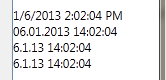
使绑定使用来自“区域和语言”的自定义设置而不是当前语言的默认设置需要更多的技巧。这个职位的结论是,每个绑定的ConverterCulture也必须显式地设置为CultureInfo.CurrentCulture。下面是一些DateTime测试:
<!-- Culture-aware(?) bindings -->
<StackPanel DataContext="{Binding Source={x:Static sys:DateTime.Now}}" >

    <!-- WPF's default en-US formatting (regardless of any culture/language settings) -->
    <TextBlock Text="{Binding Path=.}" />

    <!-- *Default* norwegian settings (dd.MM.YYY) -->
    <TextBlock Text="{Binding Path=., ConverterCulture=nb-NO}" />

    <!-- Norwegian settings from the "Region and Languague" dialog (d.M.YY) -->
    <TextBlock Text="{Binding Path=., ConverterCulture={x:Static sysglb:CultureInfo.CurrentCulture}}" />

    <!-- Hiding ConverterCulture initialization in our own custom Binding class as suggested here:
         https://stackoverflow.com/questions/5831455/use-real-cultureinfo-currentculture-in-wpf-binding-not-cultureinfo-from-ietfl#5937477 -->
    <TextBlock Text="{local:CultureAwareBinding Path=.}" />

</StackPanel>
自定义绑定类:
public class CultureAwareBinding : Binding
{
    public CultureAwareBinding()
    {
        this.ConverterCulture = System.Globalization.CultureInfo.CurrentCulture;
    }
}
在挪威的机器上,这一切都是这样的:
Stack Overflow用户
发布于 2016-02-25 11:13:35
在WPF中有一种非常肮脏的方法,但据我所知,这是最好的,因为它的工作没有任何其他额外的代码或具有特定的区域性感知绑定。您唯一需要做的就是在应用程序启动时调用SetFrameworkElementLanguageDirty方法(在下面的答案中),或者在应用程序的构造函数中调用更好的方法。
方法注释是不言自明的,但简而言之,该方法用LanguageProperty覆盖FrameworkElement的默认元数据,其中包括用户对windows的特定修改(如果有的话)。缩小/脏的部分是使用反射来设置XmlLanguage对象的私有字段。
    /// <summary>
    ///   Sets the default language for all FrameworkElements in the application to the user's system's culture (rather than
    ///   the default "en-US").
    ///   The WPF binding will use that default language when converting types to their string representations (DateTime,
    ///   decimal...).
    /// </summary>
    public static void SetFrameworkElementLanguageDirty()
    {
        // Note that the language you get from "XmlLanguage.GetLanguage(currentCulture.IetfLanguageTag)"
        // doesn't include specific user customizations, for example of date and time formats (Windows date and time settings).
        var xmlLanguage = XmlLanguage.GetLanguage(Thread.CurrentThread.CurrentCulture.IetfLanguageTag);
        SetPrivateField(xmlLanguage, "_equivalentCulture", Thread.CurrentThread.CurrentCulture);

        FrameworkElement.LanguageProperty.OverrideMetadata(typeof(FrameworkElement), new FrameworkPropertyMetadata(xmlLanguage));
    }
SetPrivateField方法可以如下所示。
    private static void SetPrivateField(object obj, string name, object value)
    {
        var privateField = obj.GetType().GetField(name, BindingFlags.Instance | BindingFlags.NonPublic);
        if (privateField == null) throw new ArgumentException($"{obj.GetType()} doesn't have a private field called '{name}'.");

        privateField.SetValue(obj, value);
}https://stackoverflow.com/questions/14149978
复制相似问题
腾讯云开发者

Copyright © 2013 - 2026 Tencent Cloud. All Rights Reserved. 腾讯云 版权所有
深圳市腾讯计算机系统有限公司 ICP备案/许可证号:粤B2-20090059  粤公网安备44030502008569号
腾讯云计算(北京)有限责任公司 京ICP证150476号 | 京ICP备11018762号