
如何在xpce/prolog中创建一个按钮来执行某些功能
如何在xpce/prolog中创建一个按钮来执行某些功能
提问于 2012-12-21 09:30:17
?- new(B, button(hello,
                 message(@pce, write_ln, hello))).
在xpce/prolog中,创建一个按钮来打印句子的方法是,当我单击一个按钮时,我想要做一些功能,请帮助!
回答 1
Stack Overflow用户
发布于 2012-12-21 10:07:35
在Help > XPCE manual > Browsers > Examples > Obtainers +右单击+ Select中,您可以看到一个实用的示例。
create_person_dialog :-
    new(D, dialog('Enter new person')),
    send(D, append, new(label)),    % for reports
    send(D, append, new(Name, text_item(name))),
    send(D, append, new(Age, text_item(age))),
    send(D, append, new(Sex, menu(sex, marked))),

    send(Sex, append, female),
    send(Sex, append, male),
    send(Age, type, int),

    send(D, append,
         button(create, message(@prolog, create_person,
                                Name?selection,
                                Age?selection,
                                Sex?selection))),

    send(D, default_button, create),
    send(D, open).

create_person(Name, Age, Sex) :-
    format('Creating ~w person ~w of ~d years old~n',
[Sex, Name, Age]).在打开高亮显示create_person_dialog后,右击和Consult将得到(我填充了一些值)
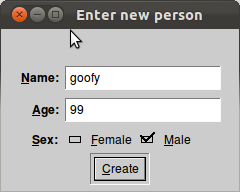
并在控制台中单击Create输出。
Creating male person goofy of 99 years old通常,您需要将按钮attach到某些GUI以获得它们的功能。
HTH
编辑这里是我在Windows上获得的布局
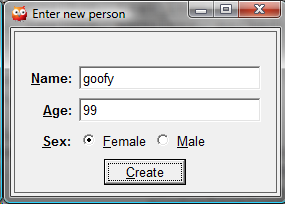
获得这2幅图像的方式有所不同:在Windows中,在打开帮助主题后,上下文菜单Consult处于活动状态。
页面原文内容由Stack Overflow提供。腾讯云小微IT领域专用引擎提供翻译支持
原文链接:
https://stackoverflow.com/questions/13987487
复制相关文章
相似问题
腾讯云开发者

Copyright © 2013 - 2026 Tencent Cloud. All Rights Reserved. 腾讯云 版权所有
深圳市腾讯计算机系统有限公司 ICP备案/许可证号:粤B2-20090059  粤公网安备44030502008569号
腾讯云计算(北京)有限责任公司 京ICP证150476号 | 京ICP备11018762号