
UIButton未能在注释的calloutView上单击
UIButton未能在注释的calloutView上单击
提问于 2012-12-18 05:32:03
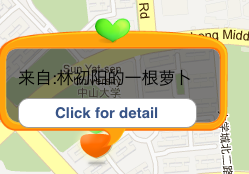
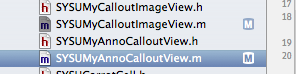
我遇到的问题是:我点击按钮,但是CalloutView似乎收到了我的点击而不是UIButton。
首先要解释一下:1. "SYSUMyAnnoCalloutView“是MKPinAnnotationView 2. "SYSUMyCalloutImageView”是UIImageView,我在"SYSUMyAnnoCalloutView“一书中给它加上了addSubview 3. UIButton和UILabel在"SYSUMyCalloutImageView”中是addSubviewed
对应代码: 1.在"SYSUMyAnnoCalloutView.m“中
- (void)setSelected:(BOOL)selected animated:(BOOL)animated
{
if (selected){
    [self.calloutImageView setFrame:CGRectMake(-75, -100, 230, 130)];

    [self animateCalloutAppearance];
    //[self.calloutImageView becomeFirstResponder];
    //[self.calloutImageView.detailButton addTarget:self.calloutImageView action:@selector(clickForDetail) forControlEvents:UIControlEventTouchUpInside];
    [self addSubview:self.calloutImageView];
    [self setCanShowCallout:NO];
}
else
{
    //Remove your custom view...
    [self.calloutImageView removeFromSuperview];
}
}- 在"SYSUMyCalloutImageView.m“中
- (id)initWithImage:(UIImage *)图像{ self = super :image;if ( self ){ //Label CGRect boundsForLabel;界sForLabel.initi.x= 20;finsForLabel.Sour.y= 50;boundsForLabel.size.width = self.bounds.size.width - 100;boundsForLabel.size.height = 20;self.messageLabel = [UILabel alloc initWithFrame:boundsForLabel];self.messageLabel.backgroundColor = UIColor clearColor;self addSubview:self.messageLabel;//细节buttonRect buttonRect;扣onRect.Sour.x= 20;boundsForLabel.size.width= 80;buttonRect.size.width =adesForLabel.size-50;buttonRect.size.height = 30;self.detailButton = UIButton按钮-setFrame:UIButtonTypeRoundedRect;self.detailButton setFrame:buttonRect;self.detailButton setTitle:@“clickForDetail”forState:UIControlStateNormal;self.detailButton.userInteractionEnabled = YES;//sel.细节UIButton addTarget:self.superview动作:@selector(ClickForDetail)UIControlEventTouchUpInside;self addSubview:self.detailButton; }返回自我;}
有人能解决我的问题吗?将非常感谢:)
回答 1
Stack Overflow用户
回答已采纳
发布于 2012-12-18 05:45:08
默认情况下,UIImageView不接受用户交互。
您应该尝试在SYSUMyCalloutImageView.m的initWithImage中添加这一行代码
[self setUserInteractionEnabled:YES];页面原文内容由Stack Overflow提供。腾讯云小微IT领域专用引擎提供翻译支持
原文链接:
https://stackoverflow.com/questions/13926864
复制相关文章
相似问题
腾讯云开发者

Copyright © 2013 - 2026 Tencent Cloud. All Rights Reserved. 腾讯云 版权所有
深圳市腾讯计算机系统有限公司 ICP备案/许可证号:粤B2-20090059  粤公网安备44030502008569号
腾讯云计算(北京)有限责任公司 京ICP证150476号 | 京ICP备11018762号