
使用节点内置调试器检查变量?
使用节点内置调试器检查变量?
提问于 2012-12-18 04:13:47
我正在尝试使用节点调试器。我正在运行node debug server来运行我的服务器。那我就有:
...
var Workspace = mongoose.model('Workspace');
debugger;
此时,正如预期的那样,当我运行这段代码时,调试器会弹出。不过,我希望它能够设置所有当前变量,就像Chrome自己的调试器中所发生的那样。
但是:
break in hotplate/node_modules/bd/lib/bd.js:133
132
133   debugger;
134
135   // Delete the ID and the version since there's no point,
debug> Workspace
ReferenceError: Workspace is not defined
所以..。如何实际检查当前的变量?
附加问题:是否有任何方法可以使用Chrome的开发工具(CTRL)来连接到节点并以这种方式工作?(我知道节点检查器,但它非常过时,而且.)
回答 2
Stack Overflow用户
回答已采纳
发布于 2018-12-07 02:57:11
奖金问题的答案在2018年发生了变化。
运行node inspect foo.js。
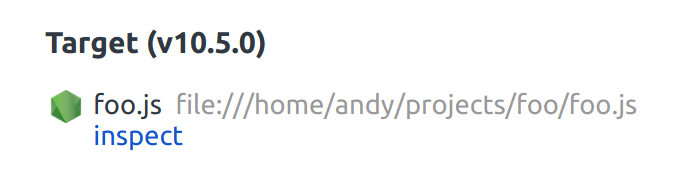
访问chrome://inspect,在设备列表中,您应该会看到一个条目,上面写着Target (<process.version>),并附带了一个检查链接。
看起来是这样的:
Stack Overflow用户
发布于 2012-12-18 05:22:46
使用repl命令(参见docs中的第三个示例)
break in hotplate/node_modules/bd/lib/bd.js:133
132
133   debugger;
134
135   // Delete the ID and the version since there's no point,
debug> repl
Press Ctrl + C to leave debug repl
> Workspace页面原文内容由Stack Overflow提供。腾讯云小微IT领域专用引擎提供翻译支持
原文链接:
https://stackoverflow.com/questions/13926143
复制相关文章
相似问题
腾讯云开发者

Copyright © 2013 - 2026 Tencent Cloud. All Rights Reserved. 腾讯云 版权所有
深圳市腾讯计算机系统有限公司 ICP备案/许可证号:粤B2-20090059  粤公网安备44030502008569号
腾讯云计算(北京)有限责任公司 京ICP证150476号 | 京ICP备11018762号