
使用DrawString对齐文本
我想使用DrawString垂直对齐不同大小字体的文本。基本上,我试图在一份报告上打印一个销售价格,用比美元更小的字体打印美分。这是在一个报告引擎中,我需要写入一个图像,而不是一个Windows,所以我认为我必须使用DrawString而不是TextRenderer。
我发现了许多解释如何在BaseLine上绘制文本的文章。虽然我发现不同大小的相同字体可以用一个像素来显示,但这些看起来还不错。我想我可以拿出这些,并想出如何使用字体的提升设计信息对齐,但我没有成功:-
有人有一些有用的示例代码吗?
更新1:更改总数以反映我希望顶部对齐而不是垂直对齐。我希望打印在Arial 20中的美元值的顶部与Arial 14中的0.分值的顶部水平对齐。我尝试过的所有字体都有问题。
在下面的图片中,我使用的是Arial。

你可以看到在较大的字体之间,红线和1顶部之间有一个缺口,但当它到达较小的字体时,它就消失了。

有了阿里尔,它就开始在线上。

我认为这个是Verdana,它的开头是一个更大的字体之间的差距。
对于这三种情况,我使用以下代码:
float offset = myFont.SizeInPoints /
myFont.FontFamily.GetEmHeight(myFont.Style) *
(myFont.FontFamily.GetLineSpacing(myFont.Style) - myFont.FontFamily.GetCellAscent(myFont.Style));
float pixels = e.Graphics.DpiY / 72f * offset;
float baseline = pixels;// (int)(pixels + 0.5f);

PointF renderPt = new PointF(left, y - baseline);
e.Graphics.DrawString("$1", myFont, new SolidBrush(Color.Black), renderPt);我还使用这个样本作为一些测试的基础。我想,如果绘制上升线的方式是准确的,那么我可以简单地调整初始写入点。唉,当你选择更大的字体大小或不同的字体时,上升的线条被不准确地画出来了,所以我无法继续走这条路。
我没有使用TextRenderer,因为我没有使用windows OnPaint事件,也无法想出如何获得适当的图形,因此无法解决如何使它工作。时间有点紧迫,但我认为这可能是我的下一个选择。
回答 2
Stack Overflow用户
发布于 2012-12-18 03:24:59
字体是一个继承了大量物质世界的领域,有着历史的基础。不幸的是,这并不总是与计算机的工作方式兼容。
例如,物理世界中的字体大小不一定等于物理世界中相同的字体大小(没有打印错误)。以同样大小的这些符号为例:


虽然这些是相同的大小(64点),但它们的大小并不相等。这与字体的历史方面有关,在物理世界中,图形被放置在方形金属板上。这是这些盘子的大小所指的大小,而不是上面的字形--它们可以填满整个盘子;或者不能。基于计算机的字体也是如此。您可以看到字形的边框是相同的(=字体大小),但是字体本身是不同的。
这通常不是一个印刷或印刷的问题,因为一个人可以迅速作出调整,以弥补这一点。
通过引入.net/GDI+,在特殊情况下这是另一回事。基线是“始终正确的”,即:如果使用基线,则保证对齐,但使用字形的“底部”(不包括其下降)。当你需要从顶部对齐时,你会遇到问题。
一种解决此问题的方法(在GDI+中)是实际扫描字形位图的顶部开始,然后用一个偏移量来表示这个结果。使用BitmapLock进行扫描并直接访问缓冲区。
当然,您也可以使用Bitmap.GetPixel进行扫描,但是对于大量的文本,这将是一个非常缓慢的过程。
更新:
我忘了提到所谓的轴承-在这种情况下,顶部轴承,它描述的差距从顶部上升到顶部的字形。不幸的是,您无法通过GDI/GDI+ (无需编写字体解析器)来提取。但是,WPF允许您从字形中提取此信息。
虽然在这个插图中没有显示,但它显示了字形的不同部分。与顶部等效的侧轴承:
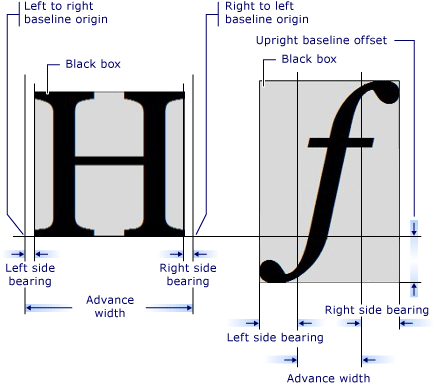
有关更多信息,请参见此链接:
http://msdn.microsoft.com/en-us/library/system.windows.media.glyphtypeface.aspx
也许这段代码能帮上忙。我用VB写了这篇文章,并翻译成C# (所以我希望在翻译过程中没有丢失任何东西)。这将采取一个字形,并返回它的位图与一个确切的边界框的字形本身。这样,只需将生成的位图放置在所需的垂直位置:
它需要一个WPF字体作为参数(用WPF而不是GDI+打开的字体)--如果需要帮助,请告诉我:
using System.Windows.Media;
using System.Windows.Media.Imaging;

static class WPFGlyphToGDIPBitmap
{
    public static System.Drawing.Bitmap GetBitmapOfChar(GlyphTypeface gt, _
                                                        char c, _
                                                        double ptSize, _
                                                        float dpi)
    {

        ushort ci = 0;
        if (!gt.CharacterToGlyphMap.TryGetValue(Strings.AscW(c), ci)) {
            if (!gt.CharacterToGlyphMap.TryGetValue(Strings.Asc(c), ci))
                    return null;
        }

        Geometry geo = gt.GetGlyphOutline(ci, ptSize, ptSize);
        GeometryDrawing gDrawing = new GeometryDrawing(System.Windows.Media.Brushes.Black, null, geo);
        DrawingImage geoImage = new DrawingImage(gDrawing);
        geoImage.Freeze();

        DrawingVisual viz = new DrawingVisual();
        DrawingContext dc = viz.RenderOpen;

        dc.DrawImage(geoImage, new Rect(0, 0, geoImage.Width, geoImage.Height));
        dc.Close();

        RenderTargetBitmap bmp = new RenderTargetBitmap(geoImage.Width, _
                                                        geoImage.Height, _
                                                        dpi, dpi, _
                                                        PixelFormats.Pbgra32);
        bmp.Render(viz);

        PngBitmapEncoder enc = new PngBitmapEncoder();
        enc.Frames.Add(BitmapFrame.Create(bmp));

        MemoryStream ms = new MemoryStream();
        enc.Save(ms);
        ms.Seek(0, SeekOrigin.Begin);

        enc = null;
        dc = null;
        viz = null;

        DisposeBitmap(bmp);

        System.Drawing.Bitmap gdiBMP = new System.Drawing.Bitmap(ms);
        ms.Dispose();

        //gdiBMP.Save("c:\test.png", System.Drawing.Imaging.ImageFormat.Png)

        return gdiBMP;

    }

}
public static void DisposeBitmap(RenderTargetBitmap bmp)
{
    if (bmp != null) {
        bmp.Clear();
    }
    bmp = null;
    GC.Collect();
    GC.WaitForPendingFinalizers();
}Stack Overflow用户
发布于 2015-04-27 14:10:53
//-----------------------------------------------------------------------------------------------------------------
// MeasureLeading Function
// Measures the amount of white space above a line of text, in pixels. This is accomplished by drawing the text
// onto an offscreen bitmap and then looking at each row of pixels until a non-white pixel is found.
// The y coordinate of that pixel is the result. This represents the offset by which a line of text needs to be
// raised vertically in order to make it top-justified.
//-----------------------------------------------------------------------------------------------------------------

public static int MeasureLeading(string Text, Font Font) {

  Size sz = MeasureText(Text, Font);
  Bitmap offscreen = new Bitmap(sz.Width, sz.Height);
  Graphics ofg = Graphics.FromImage(offscreen);
  ofg.FillRectangle(new SolidBrush(Color.White), new Rectangle(0, 0, sz.Width, sz.Height));
  ofg.DrawString(Text, Font, new SolidBrush(Color.Black), 0, 0, StringFormat.GenericTypographic);

  for (int iy=0; iy<sz.Height; iy++) {
    for (int ix=0; ix<sz.Width; ix++) {
      Color c = offscreen.GetPixel(ix, iy);
      if ((c.R!=255) || (c.G!=255) || (c.B!=255)) return iy;
    }
  }

  return 0;
}

//-----------------------------------------------------------------------------------------------------------------
// MeasureText Method
// TextRenderer.MeasureText always adds about 1/2 em width of white space on the right,
// even when NoPadding is specified. But it returns zero for an empty string.
// To get the true string width, we measure the width of a string containing a single period
// and subtract that from the width of our original string plus a period.
//-----------------------------------------------------------------------------------------------------------------

public static System.Drawing.Size MeasureText(string Text, System.Drawing.Font Font) {
  System.Windows.Forms.TextFormatFlags flags
    = System.Windows.Forms.TextFormatFlags.Left
    | System.Windows.Forms.TextFormatFlags.Top
    | System.Windows.Forms.TextFormatFlags.NoPadding
    | System.Windows.Forms.TextFormatFlags.NoPrefix;
  System.Drawing.Size szProposed = new System.Drawing.Size(int.MaxValue, int.MaxValue);
  System.Drawing.Size sz1 = System.Windows.Forms.TextRenderer.MeasureText(".", Font, szProposed, flags);
  System.Drawing.Size sz2 = System.Windows.Forms.TextRenderer.MeasureText(Text + ".", Font, szProposed, flags);
  return new System.Drawing.Size(sz2.Width - sz1.Width, sz2.Height);
}https://stackoverflow.com/questions/13922553
复制相似问题
腾讯云开发者

Copyright © 2013 - 2026 Tencent Cloud. All Rights Reserved. 腾讯云 版权所有
深圳市腾讯计算机系统有限公司 ICP备案/许可证号:粤B2-20090059  粤公网安备44030502008569号
腾讯云计算(北京)有限责任公司 京ICP证150476号 | 京ICP备11018762号