
在处理核心图像过滤器ios中>1.4MB大小的图像时收到的内存警告?
在处理核心图像过滤器ios中>1.4MB大小的图像时收到的内存警告?
提问于 2012-12-12 16:33:44
在我的应用程序中,我使用的是核心图像过滤器,下面是我使用的代码
我的代码:
- (UIImage*)applyRGBWithRed:(float)red withGreen:(float)green withBlue:(float)blue
{
        ciimage=[CIImage imageWithCGImage:self.CGImage];
       // Make the filter
    CIFilter *colorMatrixFilter = [CIFilter filterWithName:@"CIColorMatrix"]; // 2
    [colorMatrixFilter setDefaults]; // 3
    [colorMatrixFilter setValue:ciimage forKey:kCIInputImageKey]; // 4
    [colorMatrixFilter setValue:[CIVector vectorWithX:red Y:0 Z:0 W:0] forKey:@"inputRVector"]; // 5
    [colorMatrixFilter setValue:[CIVector vectorWithX:0 Y:green Z:0 W:0] forKey:@"inputGVector"]; // 6
    [colorMatrixFilter setValue:[CIVector vectorWithX:0 Y:0 Z:blue W:0] forKey:@"inputBVector"]; // 7
    [colorMatrixFilter setValue:[CIVector vectorWithX:0 Y:0 Z:0 W:1] forKey:@"inputAVector"]; // 8z


    // Get the output image recipe
    CIImage *outputImage = [colorMatrixFilter outputImage];  // 9

    // Create the context and instruct CoreImage to draw the output image recipe into a CGImage
    context = [CIContext contextWithOptions:nil];
    CGImageRef cgimg = [context createCGImage:outputImage fromRect:[outputImage extent]]; // 10
    self.saveImage=[UIImage imageWithCGImage:cgimg];
    CGImageRelease(cgimg);
    return self.saveImage;
  }
当我处理大于1.4MB大小的大图像时,它会发出内存警告并使应用程序崩溃。
,为什么它会导致崩溃?我如何处理这个场景?
任何建议或想法都值得高度赞赏。在这一周多的时间里.
提前谢谢..。
在pro中运行时,它给出了下面的输出put
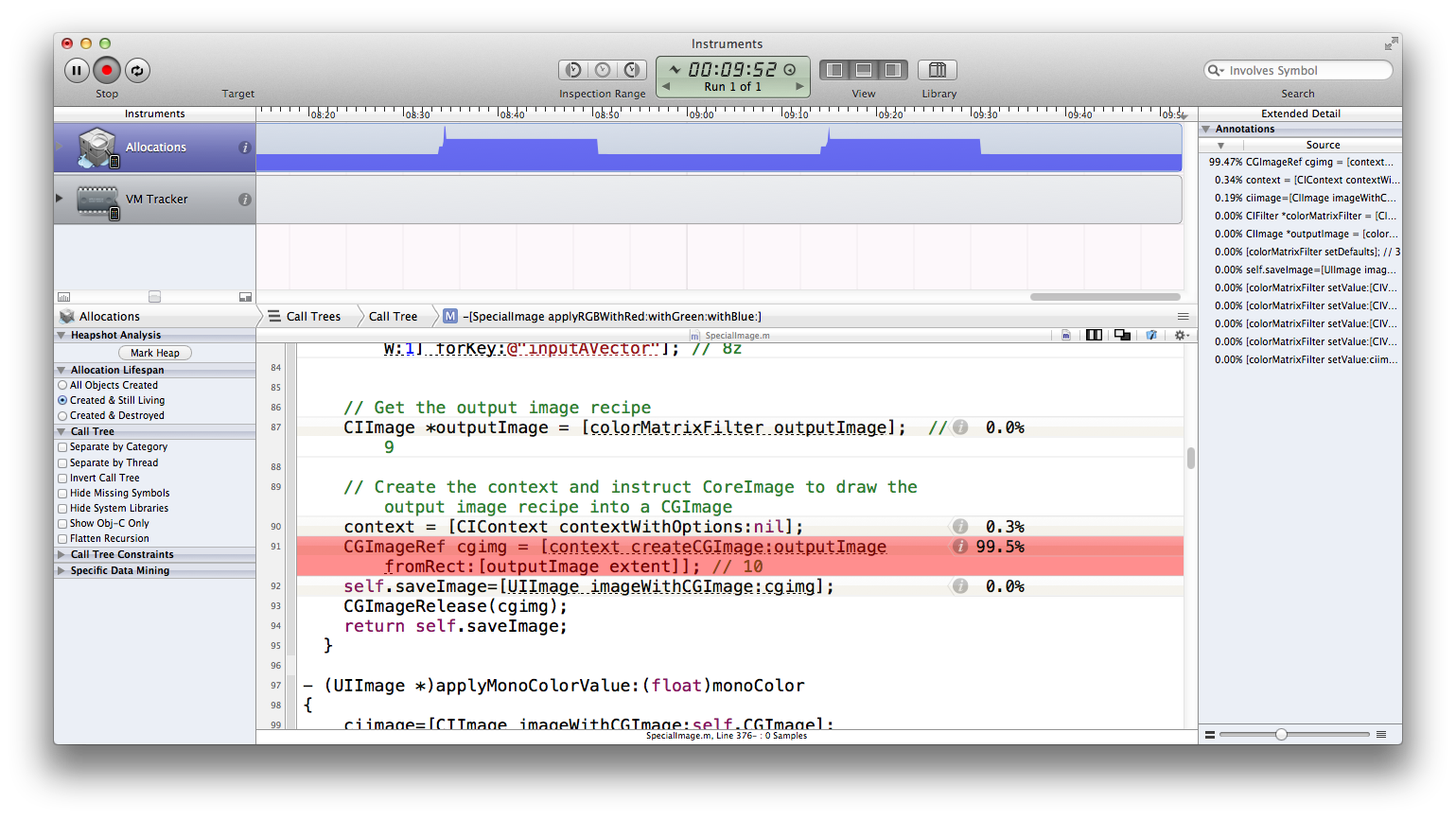
回答 1
Stack Overflow用户
回答已采纳
发布于 2012-12-13 04:58:54
也许你可以把你的大图像“分割”成更小的部分,在每个图像上应用文件器,并将它们组合成一个大图像?
UIImage *image = [UIImage imageWithContentsOfFile:imagePath]; // The Big image
NSMutableArray *croppedImages = [NSMutableArray array];
CGSize imageSize = image.size;
CGSize cropSize = CGSizeMake(500, 500); // The size of each "small image"
// Step 1: Produce the small images and save to disk
for (CGFloat x = 0; x < imageSize.width; x += cropSize.width)
{
    for (CGFloat y = 0; y < imageSize.height; y += cropSize.height)
    {
        UIGraphicsBeginImageContext(cropSize);
        [image drawAtPoint:CGPointMake(-x, -y)];
        UIImage *cropped = UIGraphicsGetImageFromCurrentImageContext();
        UIGraphicsEndImageContext();

        NSString *path = [NSTemporaryDirectory() stringByAppendingPathComponent:[NSString stringWithFormat:@"cropped_%f_%f.png",x,y]];
        NSData *imageData = UIImagePNGRepresentation(cropped);
        [imageData writeToFile:path atomically:YES];
        imageData = nil;

        [croppedImages addObject:path];
    }
}
// Release the big image (assume we are using ARC)
image = nil;
// Step 2: Apply the filter to the small images and re-save them
for (NSString *path in croppedImages)
{
    UIImage *img = [UIImage imageWithContentsOfFile:path];

    // Apply your filter to img here

    NSData *imageData = UIImagePNGRepresentation(img);
    [imageData writeToFile:path atomically:YES];
    imageData = nil;
}
// Step 3: Combine the small images back to a big one
UIGraphicsBeginImageContext(imageSize);
for (CGFloat x = 0; x < imageSize.width; x += cropSize.width)
{
    for (CGFloat y = 0; y < imageSize.height; y += cropSize.height)
    {
        NSString *path = [NSTemporaryDirectory() stringByAppendingPathComponent:[NSString stringWithFormat:@"cropped_%f_%f.png",x,y]];
        UIImage *img = [UIImage imageWithContentsOfFile:path];

        [img drawAtPoint:CGPointMake(x, y)];
    }
}
UIImage *finalImage = UIGraphicsGetImageFromCurrentImageContext();
UIGraphicsEndImageContext();
// Step 4: Optionally remove the temporary files
for (NSString *path in croppedImages)
{
    [[NSFileManager defaultManager] removeItemAtPath:path error:NULL];
}
很明显,这会很慢。
页面原文内容由Stack Overflow提供。腾讯云小微IT领域专用引擎提供翻译支持
原文链接:
https://stackoverflow.com/questions/13844291
复制相关文章
相似问题
腾讯云开发者

Copyright © 2013 - 2026 Tencent Cloud. All Rights Reserved. 腾讯云 版权所有
深圳市腾讯计算机系统有限公司 ICP备案/许可证号:粤B2-20090059  粤公网安备44030502008569号
腾讯云计算(北京)有限责任公司 京ICP证150476号 | 京ICP备11018762号