
使用NSTask和NSPipe会导致100%的CPU使用率。
使用NSTask和NSPipe会导致100%的CPU使用率。
提问于 2012-12-06 15:44:33
我试图使用NSTask运行一个简单的bash脚本,并将输出定向到文本视图。一旦任务被执行,我的应用程序的CPU使用率是100%,尽管它是一个简单的echo (就目前而言)。
我创建了一个全新的项目来隔离这个问题:
@interface AppDelegate ()
@property (nonatomic) NSTask *task;
@property (nonatomic) NSPipe *pipe;
@end

@implementation AppDelegate
- (void)applicationDidFinishLaunching:(NSNotification *)aNotification
{
    self.pipe = [NSPipe pipe];
    self.pipe.fileHandleForReading.readabilityHandler = ^(NSFileHandle *h) {
        NSLog(@"Read: %@", [h readDataToEndOfFile]);
    };

    self.task = [[NSTask alloc] init];
    self.task.launchPath = @"/bin/bash";
    self.task.arguments = @[@"-c", @"echo test"];
    self.task.standardOutput = self.pipe;
    [self.task launch];
}
@end它被正确地执行,输出(作为NSData)被NSLog记录。
PipeTest[3933:2623] Read: <74657374 0a>然而,CPU使用率保持在100%,直到我终止我的应用程序。
编辑:
一个时间分析器测试返回下面的列表,但我不知道如何解释这个列表。
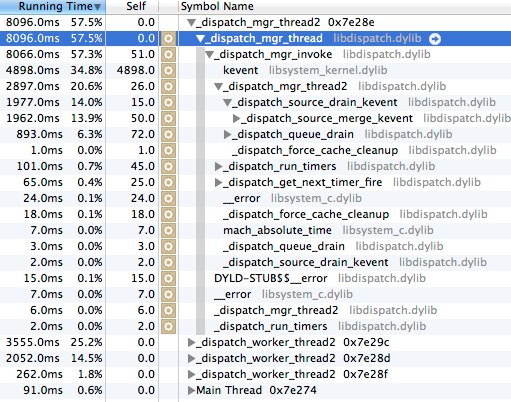
回答 2
Stack Overflow用户
回答已采纳
发布于 2012-12-06 17:09:47
文件柄打开了吗?
@interface AppDelegate ()
@property (nonatomic) NSTask *task;
@property (nonatomic) NSPipe *pipe;
@end

@implementation AppDelegate
- (void)applicationDidFinishLaunching:(NSNotification *)aNotification
{
    self.pipe = [NSPipe pipe];
    self.pipe.fileHandleForReading.readabilityHandler = ^(NSFileHandle *h) {
        NSLog(@"Read: %@", [h readDataToEndOfFile]);
        [h closeFile];
    };

    self.task = [[NSTask alloc] init];
    self.task.launchPath = @"/bin/bash";
    self.task.arguments = @[@"-c", @"echo test"];
    self.task.standardOutput = self.pipe;
    [self.task launch];
}关闭NSFileHandle h上的文件似乎会使您的CPU使用恢复正常。
Stack Overflow用户
发布于 2015-11-04 02:11:55
如果应用程序编写的代码超过NSFileHandle的实现缓冲区(我在El Capitan上观察到的4K),建议的代码将无法工作。H readDataToEndOfFile倾向于一次读取4K,因此此示例可能会过早关闭缓冲区。对于您的处理程序来说,一种更健壮和同样没有文档的方法是这样的:
NSData *data = [h readDataToEndOfFile];
if (data.length) {
  NSLog(@"Read: %@", data);
} else {
  [h closeFile];
}页面原文内容由Stack Overflow提供。腾讯云小微IT领域专用引擎提供翻译支持
原文链接:
https://stackoverflow.com/questions/13747232
复制相关文章
相似问题
腾讯云开发者

Copyright © 2013 - 2026 Tencent Cloud. All Rights Reserved. 腾讯云 版权所有
深圳市腾讯计算机系统有限公司 ICP备案/许可证号:粤B2-20090059  粤公网安备44030502008569号
腾讯云计算(北京)有限责任公司 京ICP证150476号 | 京ICP备11018762号