
MapFragment in ScrollView
我在一个MapFragment中有一个新的ScrollView。实际上它是一个SupportMapFragment,但是无论如何。这是可行的,但有两个问题:
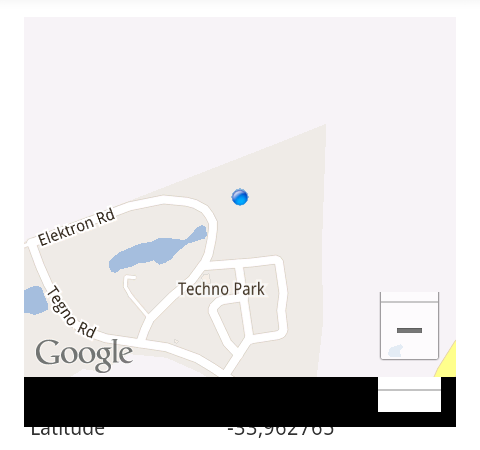
- 当它滚动时,会留下一个黑色的面具。黑色覆盖的区域正好是地图所在的地方,除了一个洞,其中的+/缩放按钮。见下面的截图。这是在Android4.0上。
- 当用户与地图交互时,视图不使用
requestDisallowInterceptTouchEvent()来阻止ScrollView拦截触摸,所以如果您试图在地图中垂直移动,它只会滚动包含的ScrollView。理论上,我可以派生视图类MapView并添加该功能,但是如何让MapFragment使用定制的MapView而不是标准的MapView呢?
回答 8
Stack Overflow用户
发布于 2012-12-18 19:03:11
在mapview片段上应用透明图像似乎解决了这个问题。这不是最漂亮的,但看起来很管用。下面是一个XML片段,它显示了以下内容:
<RelativeLayout
        android:id="@+id/relativeLayout1"
        android:layout_width="match_parent"
        android:layout_height="300dp" >

        <fragment
            android:id="@+id/map"
            android:name="com.google.android.gms.maps.MapFragment"
            android:layout_width="fill_parent"
            android:layout_height="fill_parent"/>

        <ImageView
            android:id="@+id/imageView123"
            android:layout_width="match_parent"
            android:layout_height="match_parent"
            android:src="@drawable/temp_transparent" />
</RelativeLayout>Stack Overflow用户
发布于 2013-06-26 09:11:21
对我来说,添加一个透明的ImageView并不能完全消除黑面具。在滚动时,地图的顶部和底部仍然显示黑色面具。
因此,我在这个答案中发现了一个小小的改变。我补充说,
android:layout_marginTop="-100dp"
android:layout_marginBottom="-100dp"
因为它是垂直滚动视图。所以我现在的布局是这样的:
<RelativeLayout
    android:id="@+id/map_layout"
    android:layout_width="match_parent"
    android:layout_height="300dp">

    <fragment
        android:id="@+id/mapview"
        android:layout_width="match_parent"
        android:layout_height="match_parent"
        android:layout_marginTop="-100dp"
        android:layout_marginBottom="-100dp"
        android:name="com.google.android.gms.maps.MapFragment"/>

    <ImageView
        android:id="@+id/transparent_image"
        android:layout_width="match_parent"
        android:layout_height="match_parent"
        android:src="@color/transparent" />

</RelativeLayout> 为了解决问题的第二部分,我将requestDisallowInterceptTouchEvent(true)设置为我的主ScrollView。当用户触摸到透明图像并移动时,我禁用了对MotionEvent.ACTION_DOWN和MotionEvent.ACTION_MOVE的透明图像的触摸,这样映射片段就可以接收touch事件。
ScrollView mainScrollView = (ScrollView) findViewById(R.id.main_scrollview);
ImageView transparentImageView = (ImageView) findViewById(R.id.transparent_image);

transparentImageView.setOnTouchListener(new View.OnTouchListener() {

    @Override
    public boolean onTouch(View v, MotionEvent event) {
        int action = event.getAction();
        switch (action) {
           case MotionEvent.ACTION_DOWN:
                // Disallow ScrollView to intercept touch events.
                mainScrollView.requestDisallowInterceptTouchEvent(true);
                // Disable touch on transparent view
                return false;

           case MotionEvent.ACTION_UP:
                // Allow ScrollView to intercept touch events.
                mainScrollView.requestDisallowInterceptTouchEvent(false);
                return true;

           case MotionEvent.ACTION_MOVE:
                mainScrollView.requestDisallowInterceptTouchEvent(true);
                return false;

           default:
                return true;
        }
    }
});
这对我有用。希望它能帮到你..。
Stack Overflow用户
发布于 2012-12-19 15:39:59
这可能源于这个问题中的问题所在。解决方案是使用一个透明的框架,这是一个重量比透明的图像轻一点。
https://stackoverflow.com/questions/13746351
复制相似问题
腾讯云开发者

Copyright © 2013 - 2026 Tencent Cloud. All Rights Reserved. 腾讯云 版权所有
深圳市腾讯计算机系统有限公司 ICP备案/许可证号:粤B2-20090059  粤公网安备44030502008569号
腾讯云计算(北京)有限责任公司 京ICP证150476号 | 京ICP备11018762号