
显示TImage部分Dim
我正在尝试制作一个如下所示的裁剪工具:
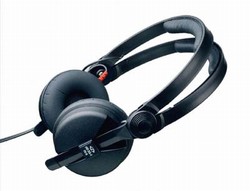
原始图像:
作物工具-这是我想要的:
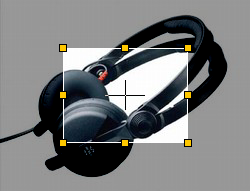
注意,裁剪区显示的是原来的颜色,周围的颜色是暗淡的。
我所做的就是在我的TImage上放置一个属性:
object Shape1: TShape
  Brush.Color = clSilver
  Pen.Mode = pmMask
  Pen.Style = psDot
end
我计划使用TShape来进行调整/应对控制。在Delphi中是这样的:
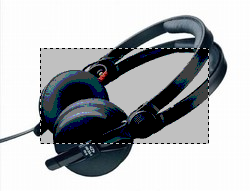
正如你所看到的,它看起来不太好(调色板看起来有点抖动),但是主要的问题是,我需要模糊的区域在作物区域周围,而不是在中间。我尝试用另一个TShpae覆盖整个TShpae,尝试不同的Pen.Mode组合,但是没有好的结果,我认为我的方法/方法很糟糕。
你对如何达到预期的行为有什么想法吗?
回答 1
Stack Overflow用户
发布于 2012-12-03 19:17:47
这里少了一点,但应该不会有问题.
unit Unit3;
// 20121108 by Thomas Wassermann
interface

uses
  Windows, Messages, SysUtils, Variants, Classes, Graphics, Controls, Forms,
  Dialogs, ExtCtrls, jpeg;

type
  TForm3 = class(TForm)
    Image1: TImage;
    PaintBox1: TPaintBox;
    procedure FormCreate(Sender: TObject);
    procedure PaintBox1Paint(Sender: TObject);
    procedure PaintBox1MouseDown(Sender: TObject; Button: TMouseButton; Shift: TShiftState; X, Y: Integer);
    procedure PaintBox1MouseMove(Sender: TObject; Shift: TShiftState; X, Y: Integer);
  private
    { Private-Deklarationen }
    FDownPoint, FCurrentPoint: TPoint;
  public
    { Public-Deklarationen }
  end;

var
  Form3: TForm3;

implementation

uses Math;
{$R *.dfm}

procedure TForm3.FormCreate(Sender: TObject);
begin
  PaintBox1.BringToFront;
end;

type
  pRGBQuadArray = ^TRGBQuadArray;
  TRGBQuadArray = ARRAY [0 .. $EFFFFFF] OF TRGBQuad;

Procedure SetAlpha(bmp: TBitMap; Alpha: Byte; R: TRect);
var
  pscanLine32: pRGBQuadArray;
  i, j: Integer;
begin
  bmp.PixelFormat := pf32Bit;
  bmp.HandleType := bmDIB;
  bmp.ignorepalette := true;
  bmp.alphaformat := afDefined;
  for i := 0 to bmp.Height - 1 do
  begin
    pscanLine32 := bmp.Scanline[i];
    for j := 0 to bmp.Width - 1 do
    begin
      if (j >= R.Left) and (j <= R.Right) and (i >= R.Top) and (i <= R.Bottom) then
      begin
        pscanLine32[j].rgbReserved := 0;
        pscanLine32[j].rgbBlue := 0;
        pscanLine32[j].rgbRed := 0;
        pscanLine32[j].rgbGreen := 0;
      end
      else
      begin
        pscanLine32[j].rgbReserved := Alpha;
        pscanLine32[j].rgbBlue := Alpha;
        pscanLine32[j].rgbRed := Alpha;
        pscanLine32[j].rgbGreen := Alpha;
      end;
    end;
  end;
end;

procedure TForm3.PaintBox1MouseDown(Sender: TObject; Button: TMouseButton; Shift: TShiftState; X, Y: Integer);
begin
  FDownPoint.X := X;
  FDownPoint.Y := Y;
  FCurrentPoint := FDownPoint;
  PaintBox1.Invalidate;
end;

procedure TForm3.PaintBox1MouseMove(Sender: TObject; Shift: TShiftState; X, Y: Integer);
begin
  if ssLeft in Shift then
  begin
    FCurrentPoint.X := X;
    FCurrentPoint.Y := Y;
    PaintBox1.Invalidate;
  end;
end;

procedure TForm3.PaintBox1Paint(Sender: TObject);
var
  bmp: TBitMap;
  SelRect: TRect;
begin
  bmp := TBitMap.Create;
  try
    bmp.Width := PaintBox1.Width;
    bmp.Height := PaintBox1.Height;
    if (FCurrentPoint.X = FDownPoint.X) and (FCurrentPoint.Y = FDownPoint.Y) then
      SelRect := PaintBox1.BoundsRect
    else
    begin
      SelRect.Left := Min(FCurrentPoint.X, FDownPoint.X);
      SelRect.Top := Min(FCurrentPoint.Y, FDownPoint.Y);
      SelRect.Right := Max(FCurrentPoint.X, FDownPoint.X);
      SelRect.Bottom := Max(FCurrentPoint.Y, FDownPoint.Y);
    end;
    SetAlpha(bmp, 140, SelRect);
    PaintBox1.Canvas.Draw(0, 0, bmp);
  finally
    bmp.Free;
  end;
end;

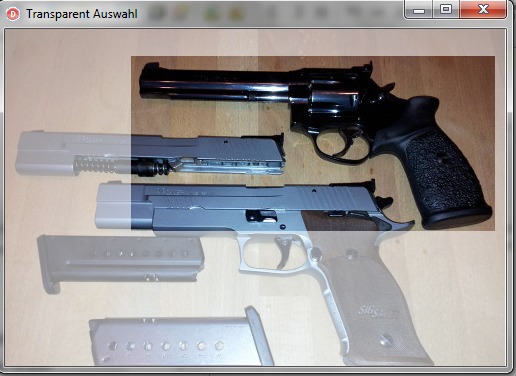
end.对此解决方案的尝试是使用覆盖画框,与图像相同的客户端,用于所有绘图和选择。通过使用鼠标/向下/移动生成的坐标,将创建一个半透明位图,该位图在选定的rect中是完全透明的。一代后,它被画在油漆盒上。进一步的绘画可以在那里进行,例如框架,锚,十字头发。任何用户的动作都必须按下鼠标,这取决于所选的部分,例如锚,可以对rect进行调整。通常,对于这样的请求,我更喜欢GDI+,但如图所示,不需要额外的单元。来源:http://www.bummisoft.de/download/transparenteauswahl.zip
https://stackoverflow.com/questions/13689732
复制相似问题
腾讯云开发者

Copyright © 2013 - 2026 Tencent Cloud. All Rights Reserved. 腾讯云 版权所有
深圳市腾讯计算机系统有限公司 ICP备案/许可证号:粤B2-20090059  粤公网安备44030502008569号
腾讯云计算(北京)有限责任公司 京ICP证150476号 | 京ICP备11018762号