
searchDisplayController被释放,崩溃
searchDisplayController被释放,崩溃
提问于 2012-11-30 16:08:18
在这一点上,这是一个很好的工作,显然,有些东西已经改变了。当我离开加载searchDisplayController的searchDisplayController时,我的应用程序将向已释放的实例发送一条消息。堆栈是我相信它是searchDisplayController的原因:
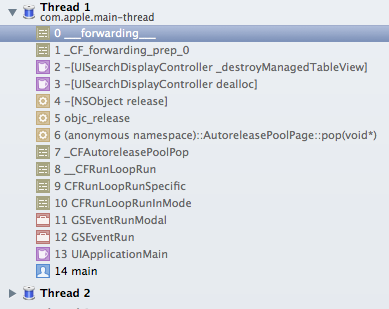
查看我的代码,我不知道它是在哪里被释放的。如果有任何想法我会很感激。谢谢。
编辑:如果我注释掉了我的viewDidDisappear方法,崩溃就会停止。。
-(void)viewDidDisappear:(BOOL)animated {
        // save the state of the search UI so that it can be restored if the view is re-created
    self.searchWasActive = [self.searchDisplayController isActive];
    self.savedSearchTerm = [self.searchDisplayController.searchBar text];
    self.savedScopeButtonIndex = [self.searchDisplayController.searchBar selectedScopeButtonIndex];
}
以下是相关的双边投资条约:
@interface ShowAttributesViewController : UIViewController <UITableViewDataSource, UITableViewDelegate, UISearchDisplayDelegate, UISearchBarDelegate>
{
    IBOutlet UITableView *attributesTableView;
    NSString        *savedSearchTerm;
    NSInteger   savedScopeButtonIndex;
    BOOL            searchWasActive;
}
@property (nonatomic, retain) UITableView *attributesTableView;
@property (nonatomic, retain) NSMutableArray *filteredattributesArray;
@property (nonatomic, copy) NSString *savedSearchTerm;
@property (nonatomic) NSInteger savedScopeButtonIndex;
@property (nonatomic) BOOL searchWasActive;


- (void)viewDidLoad
{
    [super viewDidLoad];

    self.filteredattributesArray = [NSMutableArray arrayWithCapacity:[[[SharedAppData sharedStore] attributesArray] count]];

    if (self.savedSearchTerm)
    {
        [self.searchDisplayController setActive:self.searchWasActive];
        [self.searchDisplayController.searchBar setSelectedScopeButtonIndex:self.savedScopeButtonIndex];
        [self.searchDisplayController.searchBar setText:savedSearchTerm];

        self.savedSearchTerm = nil;
    }
}

-(void)viewDidDisappear:(BOOL)animated {
    self.searchWasActive = [self.searchDisplayController isActive];
    self.savedSearchTerm = [self.searchDisplayController.searchBar text];
    self.savedScopeButtonIndex = [self.searchDisplayController.searchBar selectedScopeButtonIndex];
}

-(void)viewDidUnload {

    self.filteredattributesArray = nil;
}

- (BOOL)searchDisplayController:(UISearchDisplayController *)controller shouldReloadTableForSearchString:(NSString *)searchString {
    [self filterContentForSearchText:searchString];
    return YES;
}

- (void)searchDisplayController:(UISearchDisplayController *)controller willUnloadSearchResultsTableView:(UITableView *)tableView {

    [attributesTableView reloadData];
}回答 1
Stack Overflow用户
回答已采纳
发布于 2012-11-30 19:43:12
和其他人一样,经过大量的挖掘,我发现这篇文章解决了这个问题。
页面原文内容由Stack Overflow提供。腾讯云小微IT领域专用引擎提供翻译支持
原文链接:
https://stackoverflow.com/questions/13648788
复制相关文章
相似问题
腾讯云开发者

Copyright © 2013 - 2026 Tencent Cloud. All Rights Reserved. 腾讯云 版权所有
深圳市腾讯计算机系统有限公司 ICP备案/许可证号:粤B2-20090059  粤公网安备44030502008569号
腾讯云计算(北京)有限责任公司 京ICP证150476号 | 京ICP备11018762号