
由gwt-maven-plugin生成的导入项目
我遵循gwt-maven-plugin的指示,生成然后导入下面的项目,
1)生成项目
$ mvn archetype:generate \
   -DarchetypeGroupId=org.codehaus.mojo \
   -DarchetypeArtifactId=gwt-maven-plugin \
   -DarchetypeVersion=2.5.0

...

Define value for property 'groupId': : org.codehaus.mojo
Define value for property 'artifactId': : gwt-maven-plugin-sample
Define value for property 'version':  1.0-SNAPSHOT: :
Define value for property 'package':  org.codehaus.mojo: :
Define value for property 'module': : Sample

...
2)检查生成的POM
<?xml version="1.0" encoding="UTF-8"?>
<project
  xmlns="http://maven.apache.org/POM/4.0.0"
  xmlns:xsi="http://www.w3.org/2001/XMLSchema-instance"
  xsi:schemaLocation="http://maven.apache.org/POM/4.0.0 http://maven.apache.org/maven-v4_0_0.xsd">

  <!-- POM file generated with GWT webAppCreator -->
  <modelVersion>4.0.0</modelVersion>
  <groupId>org.codehaus.mojo</groupId>
  <artifactId>gwt-maven-plugin-sample</artifactId>
  <packaging>war</packaging>
  <version>1.0-SNAPSHOT</version>
  <name>GWT Maven Archetype</name>

  <properties>
    <!-- Convenience property to set the GWT version -->
    <gwtVersion>2.5.0</gwtVersion>
    <!-- GWT needs at least java 1.5 -->
    <webappDirectory>${project.build.directory}/${project.build.finalName}</webappDirectory>
    <project.build.sourceEncoding>UTF-8</project.build.sourceEncoding>
  </properties>

  <dependencies>
    <dependency>
      <groupId>com.google.gwt</groupId>
      <artifactId>gwt-servlet</artifactId>
      <version>${gwtVersion}</version>
      <scope>runtime</scope>
    </dependency>
    <dependency>
      <groupId>com.google.gwt</groupId>
      <artifactId>gwt-user</artifactId>
      <version>${gwtVersion}</version>
      <scope>provided</scope>
    </dependency>
    <dependency>
      <groupId>junit</groupId>
      <artifactId>junit</artifactId>
      <version>4.7</version>
      <scope>test</scope>
    </dependency>
    <dependency>
      <groupId>javax.validation</groupId>
      <artifactId>validation-api</artifactId>
      <version>1.0.0.GA</version>
      <scope>test</scope>
    </dependency>
    <dependency>
      <groupId>javax.validation</groupId>
      <artifactId>validation-api</artifactId>
      <version>1.0.0.GA</version>
      <classifier>sources</classifier>
      <scope>test</scope>
    </dependency>
  </dependencies>

  <build>
    <!-- Generate compiled stuff in the folder used for developing mode -->
    <outputDirectory>${webappDirectory}/WEB-INF/classes</outputDirectory>

    <plugins>

      <!-- GWT Maven Plugin -->
      <plugin>
        <groupId>org.codehaus.mojo</groupId>
        <artifactId>gwt-maven-plugin</artifactId>
        <version>2.5.0</version>
        <executions>
          <execution>
            <goals>
              <goal>compile</goal>
              <goal>test</goal>
              <goal>i18n</goal>
              <goal>generateAsync</goal>
            </goals>
          </execution>
        </executions>
        <!-- Plugin configuration. There are many available options, see
          gwt-maven-plugin documentation at codehaus.org -->
        <configuration>
          <runTarget>Sample.html</runTarget>
          <hostedWebapp>${webappDirectory}</hostedWebapp>
          <i18nMessagesBundle>org.codehaus.mojo.client.Messages</i18nMessagesBundle>
        </configuration>
      </plugin>

      <!-- Copy static web files before executing gwt:run -->
      <plugin>
        <groupId>org.apache.maven.plugins</groupId>
        <artifactId>maven-war-plugin</artifactId>
        <version>2.1.1</version>
        <executions>
          <execution>
            <phase>compile</phase>
            <goals>
              <goal>exploded</goal>
            </goals>
          </execution>
        </executions>
        <configuration>
          <webappDirectory>${webappDirectory}</webappDirectory>
        </configuration>
      </plugin>
      <plugin>
        <groupId>org.apache.maven.plugins</groupId>
        <artifactId>maven-compiler-plugin</artifactId>
        <version>2.3.2</version>
        <configuration>
          <source>1.5</source>
          <target>1.5</target>
        </configuration>
      </plugin>
    </plugins>
  </build>

</project>
3)检查生成的项目
gwt-maven-plugin-sample/
├── .classpath
├── pom.xml
├── .project
├── SampleTest-dev.launch
├── SampleTest-prod.launch
├── .settings
│   ├── com.google.appengine.eclipse.core.prefs
│   ├── com.google.gdt.eclipse.core.prefs
│   ├── com.google.gwt.eclipse.core.prefs
│   ├── .jsdtscope
│   ├── org.eclipse.jdt.core.prefs
│   ├── org.eclipse.wst.common.component
│   ├── org.eclipse.wst.common.project.facet.core.xml
│   ├── org.eclipse.wst.jsdt.ui.superType.container
│   └── org.maven.ide.eclipse.prefs
├── src
│   ├── main
│   │   ├── java
│   │   │   └── org
│   │   │       └── codehaus
│   │   │           └── mojo
│   │   │               ├── client
│   │   │               │   ├── GreetingService.java
│   │   │               │   └── Sample.java
│   │   │               ├── server
│   │   │               │   └── GreetingServiceImpl.java
│   │   │               └── shared
│   │   │                   └── FieldVerifier.java
│   │   ├── resources
│   │   │   └── org
│   │   │       └── codehaus
│   │   │           └── mojo
│   │   │               ├── client
│   │   │               │   ├── Messages_fr.properties
│   │   │               │   └── Messages.properties
│   │   │               └── Sample.gwt.xml
│   │   └── webapp
│   │       ├── Sample.css
│   │       ├── Sample.html
│   │       └── WEB-INF
│   │           └── web.xml
│   └── test
│       ├── java
│       │   └── org
│       │       └── codehaus
│       │           └── mojo
│       │               └── client
│       │                   └── GwtTestSample.java
│       └── resources
│           └── org
│               └── codehaus
│                   └── mojo
│                       └── SampleJUnit.gwt.xml
└── target
    └── generated-sources
        └── gwt
            └── org
                └── codehaus
                    └── mojo

33 directories, 26 files
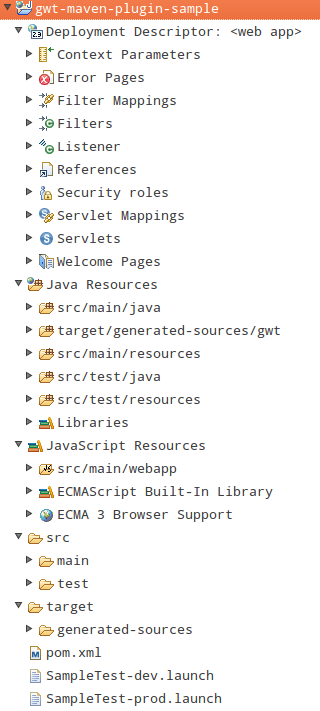
4)在Eclipse上,选择“将现有项目导入工作区”
( 5)根据gwt-maven-plugin的指示,进口项目应形成以下类似的项目结构:
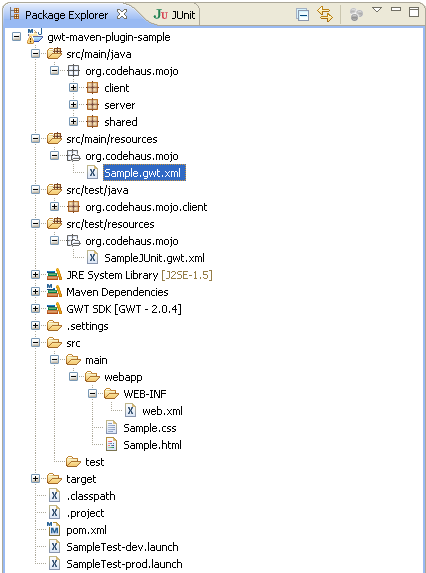
最后,通过比较4)和5),我们看到的问题似乎根本没有通过导入添加maven依赖项,换句话说,生成的项目没有作为maven项目进行验证。那么,上面的步骤和下面的配置有什么问题呢?
gwt-maven-plugin 2.5.0
m2e 1.2.0.20120903-1050
eclipse 3.7.2
maven 3.0.4
@编辑
成功运行"mvn :run“,但未能通过GWT Eclipse Plugin启动GWT Eclipse Plugin,

@编辑2
参考@Sachin Shekhar R的链接,我查看了官方的GWT Wiki:与maven合作,遵循了指令并测试了DynaTable RequestFactory样本。太好了,真管用!
不幸的是,Wiki呼应了gwt-maven-plugin在使用archetype时确实存在问题。
回答 1
Stack Overflow用户
发布于 2012-11-30 15:05:45
gwt-maven-plugin 2.5.0在GWT 2.5.0中工作得最好。该语句成功运行了"mvn :run“,但是未能启动DevMode,这有点让人困惑。
我也注意到在你的情况下-
1)生成的pom文件指示为2.5.0,eclipse屏幕快照为2.0.4。这可能是因为您的GPE指向GWT 2.0.4并覆盖pom文件指令。
2)如果您使用的是maven gwt:run,那么GWT Eclipse插件就无关紧要了。开发模式通过以下方式启动either
- ( a)
mvn gwt:run - ( b)在右键单击项目并选择
Debug As->Web Application时,使用GWT插件
3) Maven依赖关系显示在您共享的屏幕快照中。你能扩展它并验证哪个罐子被捡起来了吗?
Edit --您可以尝试使用http://code.google.com/p/google-web-toolkit/wiki/WorkingWithMaven提供一些其他故障排除提示。
我猜是配置@ Project properties, Google > Web Application, the "This project has a WAR directory"
https://stackoverflow.com/questions/13643262
复制相似问题
腾讯云开发者

Copyright © 2013 - 2026 Tencent Cloud. All Rights Reserved. 腾讯云 版权所有
深圳市腾讯计算机系统有限公司 ICP备案/许可证号:粤B2-20090059  粤公网安备44030502008569号
腾讯云计算(北京)有限责任公司 京ICP证150476号 | 京ICP备11018762号