
Jquery弹出框
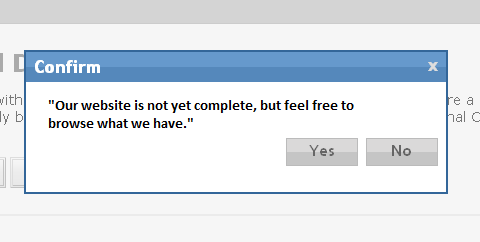
我对JavaScript和Jquery很陌生。我在网上搜索了Jquery弹出的例子。我希望留言说:“我们的网站还没有完成,但请随时浏览我们拥有的。”我将包括我找到的代码示例,但它看起来非常奇怪。我不知道函数的名称是什么,以及如何使用window.onload = function();代码来执行它。我也希望有一个按钮‘关闭’关闭文本框。这是它应该是什么样子:http://demo.tutorialzine.com/2010/12/better-confirm-box-jquery-css3/
以下是第一部分:
    (function($){

    $.confirm = function(params){

        if($('#confirmOverlay').length){
            // A confirm is already shown on the page:
            return false;
        }

        var buttonHTML = '';
        $.each(params.buttons,function(name,obj){

            // Generating the markup for the buttons:

            buttonHTML += '<a href="#" class="button '+obj['class']+'">'+name+'<span></span></a>';

            if(!obj.action){
                obj.action = function(){};
            }
        });

        var markup = [
            '<div id="confirmOverlay">',
            '<div id="confirmBox">',
            '<h1>',params.title,'</h1>',
            '<p>',params.message,'</p>',
            '<div id="confirmButtons">',
            buttonHTML,
            '</div></div></div>'
        ].join('');

        $(markup).hide().appendTo('body').fadeIn();

        var buttons = $('#confirmBox .button'),
            i = 0;

        $.each(params.buttons,function(name,obj){
            buttons.eq(i++).click(function(){

                // Calling the action attribute when a
                // click occurs, and hiding the confirm.

                obj.action();
                $.confirm.hide();
                return false;
            });
        });
    }

    $.confirm.hide = function(){
        $('#confirmOverlay').fadeOut(function(){
            $(this).remove();
        });
    }

})(jQuery);
下面是第二部分:
$(document).ready(function(){

    $('.item .delete').click(function(){

        var elem = $(this).closest('.item');

        $.confirm({
            'title'     : 'Delete Confirmation',
            'message'   : 'You are about to delete this item. <br />It cannot be restored at a later time! Continue?',
            'buttons'   : {
                'Yes'   : {
                    'class' : 'blue',
                    'action': function(){
                        elem.slideUp();
                    }
                },
                'No'    : {
                    'class' : 'gray',
                    'action': function(){}  // Nothing to do in this case. You can as well omit the action property.
                }
            }
        });

    });

});

            $(markup).hide().appendTo('body').fadeIn();

            var buttons = $('#confirmBox .button'),
                i = 0;

            $.each(params.buttons,function(name,obj){
                buttons.eq(i++).click(function(){

                    // Calling the action attribute when a
                    // click occurs, and hiding the confirm.

                    obj.action();
                    $.confirm.hide();
                    return false;
                });
            });
        }

        $.confirm.hide = function(){
            $('#confirmOverlay').fadeOut(function(){
                $(this).remove();
            });
        }

    })(jQuery);
编辑:我收到了在加载时显示的消息。我将第二部分中的代码更改为
$('.item .delete‘).ready(函数(){
回答 2
Stack Overflow用户
发布于 2012-11-20 04:35:25
把这个放在纸上。
确保你的问题的first part也包括在内。
它将在页面中心创建一个对话框,其中包含一条消息和一个关闭按钮。
另外,您可以更改标题,我只是添加了一个占位符。
$(document).ready(function(){
  $.confirm({
    'title'     : 'Heading Goes Here',
    'message'   : 'Our website is not yet complete, '
                  + 'but feel free to browse what we have.',
    'buttons'   : {
        'Close'   : {
          'class' : 'blue',
          'action': function(){}  // Nothing to do in this case.
        }
    {
  });

});Stack Overflow用户
发布于 2012-11-20 04:32:10
对话框窗口,请查看此图像:
请查看此示例:http://www.ericmmartin.com/projects/simplemodal/
有各种各样的流行音乐模特:http://www.ericmmartin.com/projects/
和编码样本:http://www.ericmmartin.com/projects/simplemodal/#examples
https://stackoverflow.com/questions/13466523
复制相似问题
腾讯云开发者

Copyright © 2013 - 2026 Tencent Cloud. All Rights Reserved. 腾讯云 版权所有
深圳市腾讯计算机系统有限公司 ICP备案/许可证号:粤B2-20090059  粤公网安备44030502008569号
腾讯云计算(北京)有限责任公司 京ICP证150476号 | 京ICP备11018762号