
RenderTargetBitmap呈现大小错误的图像
我的任务是向用户展示他的XPS文档的每一页的缩略图。我需要所有的图像都是小的,所以我用dpi设置为72.0来呈现它们(我在googled上搜索了dpi 72.0的A4工作表的大小是635x896)。基本上,我做以下几点:
        List<BitmapImage> thumbnails = new List<BitmapImage>();
        documentPaginator.ComputePageCount();
        int pageCount = documentPaginator.PageCount;
        for (int i = 0; i < pageCount; i++)
        {
            DocumentPage documentPage = documentPaginator.GetPage(i);
            bool isLandscape = documentPage.Size.Width > documentPage.Size.Height;
            Visual pageVisual = documentPage.Visual;
            //I want all the documents to be less or equals to A4
            //private const double A4_SHEET_WIDTH = 635;
            //private const double A4_SHEET_HEIGHT = 896;
            //A4 sheet size in px, considering 72 dpi
            RenderTargetBitmap targetBitmap = new RenderTargetBitmap(
            (int)(System.Math.Min(documentPage.Size.Width, A4_SHEET_WIDTH)),
            (int)(System.Math.Min(documentPage.Size.Height, A4_SHEET_HEIGHT)),
            72.0, 72.0,
            PixelFormats.Pbgra32);
            targetBitmap.Render(pageVisual);
            BitmapFrame frame = BitmapFrame.Create(targetBitmap);
            PngBitmapEncoder encoder = new PngBitmapEncoder();
            encoder.Frames.Add(frame);
            BitmapImage image = new BitmapImage();
            using (System.IO.MemoryStream ms = new System.IO.MemoryStream())
            {
                encoder.Save(ms);
                image.BeginInit();
                image.CacheOption = BitmapCacheOption.OnLoad;
                image.StreamSource = ms;
                if (isLandscape)
                {
                    image.Rotation = Rotation.Rotate270;
                }
                image.EndInit();
            }
            thumbnails.Add(image);
}但是,当我呈现文档页(A4)时,它的大小实际上是846x1194,而不是我预期的大小。我试图降低dpi (48.0),图像的大小变得更大(我猜,我只是不太清楚dpi是什么以及它如何影响文档)。我试着做dpi=96.0,但尺寸变小了。我将上述代码生成的类BitmapImage的实例集合中的一个映像设置为Image控件的源代码(我正在创建WPF应用程序),如果dpi设置为96.0,我的程序如下所示:
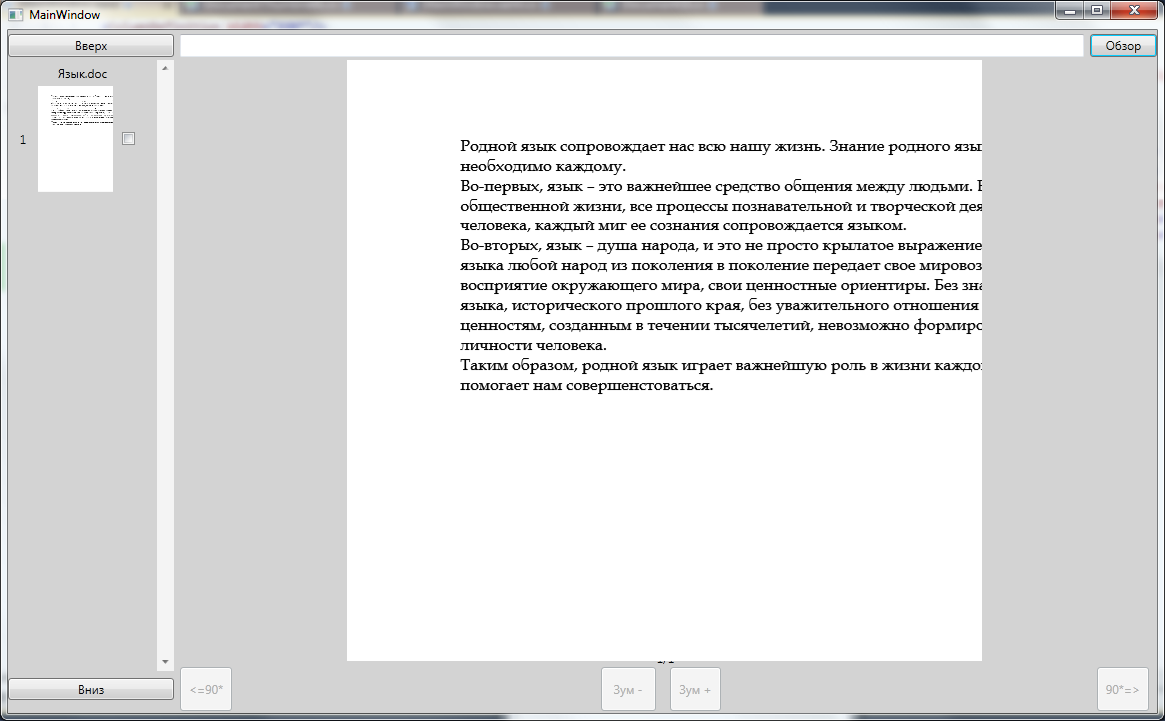
如您所见,页面的一部分根本没有显示,它不适合在Image控件中显示,即使控件的大小设置为635x896,这也是为什么根据上面的代码,图像必须正确显示,并且所有文本必须适合。
简单地说,我所期望的结果是什么:我试图创建文档页面的缩略图,但我希望它们相对于某个数字更小(对不起,我不太确定如何用英语来表示这样的内容,基本上,如果文档的页面宽度是1200 px,我希望它是1200/n,其中n是我前面提到的“某个数字”),但是如果缩小的图像的大小仍然大于635x896,我希望大小是635x896。
提前谢谢。同时,我也为我糟糕的英语感到抱歉。
回答 1
Stack Overflow用户
发布于 2012-10-30 20:11:15
首先,DPI意味着每英寸点,或每英寸像素。如果将一个A4页面( 21乘29.7厘米)呈现为72 DPI的位图,您将得到以下大小的位图:
- 宽度= 21厘米/ (2.54厘米/英寸)* 72像素/英寸= 595像素
- 高度= 29.7厘米/ (2.54厘米/英寸)* 72像素/英寸= 842像素
除此之外,您不应该太关心DPI,只有一个例外: WPF呈现是在96 DPI完成的。这意味着您文档的A4大小的页面将呈现为794 x 1123位图。作为提醒:
- 宽度= 21厘米/ (2.54厘米/英寸)* 96像素/英寸= 794像素
- 高度= 29.7厘米/ (2.54厘米/英寸)* 96像素/英寸= 1123像素
因此,当RenderTargetBitmap包含一个完全是A4的页面时,它的大小应该是794x1123。如果页面大小小于A4,则位图应该更小。另一方面,如果页面比A4大,则应该缩小到794x1123。这就是诀窍。与直接将页面呈现为可视的RenderTargetBitmap不同,您可以将可视内容放入带有ScaleTransform的ContainerVisual中,如下所示。
for (int i = 0; i < paginator.PageCount; i++)
{
    DocumentPage page = paginator.GetPage(i);
    double width = page.Size.Width;
    double height = page.Size.Height;
    double maxWidth = Math.Round(21.0 / 2.54 * 96.0); // A4 width in pixels at 96 dpi
    double maxHeight = Math.Round(29.7 / 2.54 * 96.0); // A4 height in pixels at 96 dpi
    double scale = 1.0;
    scale = Math.Min(scale, maxWidth / width);
    scale = Math.Min(scale, maxHeight / height);

    ContainerVisual containerVisual = new ContainerVisual();
    containerVisual.Transform = new ScaleTransform(scale, scale);
    containerVisual.Children.Add(page.Visual);

    RenderTargetBitmap bitmap = new RenderTargetBitmap(
        (int)(width * scale), (int)(height * scale), 96, 96, PixelFormats.Default);

    bitmap.Render(containerVisual);

    ...
}https://stackoverflow.com/questions/13144615
复制相似问题
腾讯云开发者

Copyright © 2013 - 2026 Tencent Cloud. All Rights Reserved. 腾讯云 版权所有
深圳市腾讯计算机系统有限公司 ICP备案/许可证号:粤B2-20090059  粤公网安备44030502008569号
腾讯云计算(北京)有限责任公司 京ICP证150476号 | 京ICP备11018762号