
副报告未显示的详细波段
我的主要报告包含5个字段,其中4个是java.lang.String类型,最后一个是java.util.List.类型。我使用它的后者作为子报表的数据源。我设置了子报告的数据源。
分报告属性:
连接类型:使用数据源表达式
数据源表达式: net.sf.jasperreports.engine.data.JRBeanCollectionDataSource($F{Field5})新
数据传递工作正常(我猜是这样),因为当我在Java应用程序中填充报表时。我可以查看传递给字段1到4的数据,但在字段5中,首先我无法验证,因为子报表不显示数据,只显示列标题中定义的静态文本。
然后,当我将子报表的字段放在页面页脚中时,我发现数据被成功地传递了,问题是细节带本身没有显示。
为什么它没露出来?
在子报表属性中,我有:
当没有数据时:所有部分,没有详细信息
谁能对这件事有所了解吗?
回答 5
Stack Overflow用户
发布于 2012-10-25 09:18:33
我也有同样的问题超过一天。在我正在开发的应用程序中,有多个工作的JasperReports。我在添加一个新的问题时遇到了这个问题。不管我做了什么,细节乐队里什么也没有显示。我尝试了各种方法,从三重检查填充报表的Controller到升级到最新的jasperreports jar和最新的iReports版本。似乎什么都没起作用。
问题是,默认情况下,报表设置为:When No Data: All Sections, No Detail,这基本上意味着,如果没有向报表发送数据,它将显示所有部分,但细节部分除外。
尽管除了用于测试报表的静态文本之外,我还直接从Java传递参数,但直到我向报表的Query属性添加了一个EXEC [myFunction] $P{parameterId}之后,它才起作用。该函数是一个简单明了的函数,它以从parameterId传递的一个parameterId作为参数,并返回一些内容。(此外,确保将dataset query属性的语言设置为SQL)。
总之,由于某种原因,报表似乎没有将Java参数作为数据(因此它会显示除细节之外的所有部分),所以当我显式调用返回一些参数并将其放入详细信息页的SQL函数时,它就能工作了。
我希望这能帮到你,我花了10个小时才弄明白这一点。
Stack Overflow用户
发布于 2012-10-23 11:01:42
你可以试试这个样本。
POJO (豆子):
public class BeanWithList {

    private List<String> m_cities;
    private Integer m_id;

    public BeanWithList(List<String> cities, Integer id) {
        m_cities = cities;
        m_id = id;
    }

    public List<String> getCities() {
        return m_cities;
    }

    public Integer getId() {
        return m_id;
    }
}
填写报告的代码:
public static void testBuildPdf() {
    try {

        Map<String, Object> params = new HashMap<String, Object>();

        params.put("BeanSubreport", JasperCompileManager.compileReport(subreportSource));

        JasperReport jasperReport = JasperCompileManager.compileReport(masterSource);
        JasperPrint jasperPrint = JasperFillManager.fillReport(jasperReport, params, getDataSource());

        JasperExportManager.exportReportToPdfFile(jasperPrint, outputFileName);
    } catch (Exception e) {
        e.printStackTrace();
    }
}

private static JRDataSource getDataSource() {
    Collection<BeanWithList> coll = new ArrayList<BeanWithList>();

    BeanWithList bean = new BeanWithList(Arrays.asList("London", "Paris"), 1);

    coll.add(bean);

    bean = new BeanWithList(Arrays.asList("London", "Madrid", "Moscow"), 2);
    coll.add(bean);

    bean = new BeanWithList(Arrays.asList("Rome"), 3);
    coll.add(bean);

    return new JRBeanCollectionDataSource(coll);
}
子报告jrxml
<?xml version="1.0" encoding="UTF-8"?>
<jasperReport .. leftMargin="0" rightMargin="0" topMargin="0" bottomMargin="0">
    <field name="city" class="java.lang.String">
        <fieldDescription><![CDATA[_THIS]]></fieldDescription>
    </field>
    <detail>
        <band height="20" splitType="Stretch">
            <textField>
                <reportElement positionType="Float" x="0" y="0" width="100" height="20"/>
                <box leftPadding="10">
                    <topPen lineWidth="1.0"/>
                    <leftPen lineWidth="1.0"/>
                    <bottomPen lineWidth="1.0"/>
                    <rightPen lineWidth="1.0"/>
                </box>
                <textElement/>
                <textFieldExpression><![CDATA[$F{city}]]></textFieldExpression>
            </textField>
        </band>
    </detail>
</jasperReport>
主jrxml
<?xml version="1.0" encoding="UTF-8"?>
<jasperReport ...>
    <parameter name="BeanSubreport" class="net.sf.jasperreports.engine.JasperReport"/>
    <field name="id" class="java.lang.Integer"/>
    <field name="cities" class="java.util.Collection"/>
    <title>
        <band height="103" splitType="Stretch">
            <staticText>
                <reportElement x="138" y="28" width="258" height="20"/>
                <textElement textAlignment="Center" verticalAlignment="Middle">
                    <font isBold="true" isItalic="true"/>
                </textElement>
                <text><![CDATA[Bean with List sample]]></text>
            </staticText>
        </band>
    </title>
    <columnHeader>
        <band height="20">
            <staticText>
                <reportElement x="0" y="0" width="100" height="20"/>
                <box>
                    <topPen lineWidth="1.0"/>
                    <leftPen lineWidth="1.0"/>
                    <bottomPen lineWidth="1.0"/>
                    <rightPen lineWidth="1.0"/>
                </box>
                <textElement textAlignment="Center" verticalAlignment="Middle">
                    <font isBold="true" isItalic="true" isUnderline="false"/>
                </textElement>
                <text><![CDATA[Id]]></text>
            </staticText>
            <staticText>
                <reportElement x="100" y="0" width="100" height="20"/>
                <box>
                    <topPen lineWidth="1.0"/>
                    <leftPen lineWidth="1.0"/>
                    <bottomPen lineWidth="1.0"/>
                    <rightPen lineWidth="1.0"/>
                </box>
                <textElement textAlignment="Center" verticalAlignment="Middle">
                    <font isBold="true" isItalic="true" isUnderline="false"/>
                </textElement>
                <text><![CDATA[City name]]></text>
            </staticText>
        </band>
    </columnHeader>
    <detail>
        <band height="20" splitType="Stretch">
            <textField>
                <reportElement stretchType="RelativeToTallestObject" x="0" y="0" width="100" height="20"/>
                <box leftPadding="10">
                    <topPen lineWidth="1.0"/>
                    <leftPen lineWidth="1.0"/>
                    <bottomPen lineWidth="1.0"/>
                    <rightPen lineWidth="1.0"/>
                </box>
                <textElement/>
                <textFieldExpression><![CDATA[$F{id}]]></textFieldExpression>
            </textField>
            <subreport>
                <reportElement positionType="Float" stretchType="RelativeToTallestObject" x="100" y="0" width="100" height="20" isPrintWhenDetailOverflows="true"/>
                <dataSourceExpression><![CDATA[new net.sf.jasperreports.engine.data.JRBeanCollectionDataSource($F{cities})]]></dataSourceExpression>
                <subreportExpression><![CDATA[$P{BeanSubreport}]]></subreportExpression>
            </subreport>
        </band>
    </detail>
</jasperReport>
其结果将是:
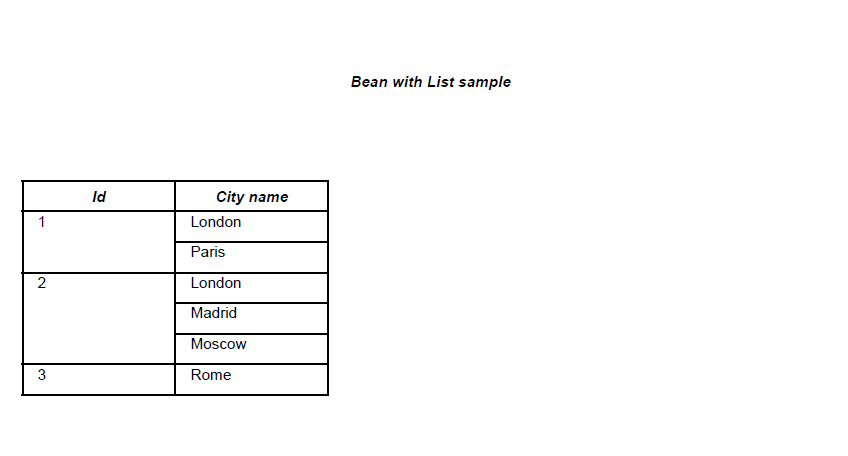
此示例的主要技巧是使用_THIS“变量”。
有关更多信息,您可以阅读JavaBean数据源文章。
Stack Overflow用户
发布于 2012-10-29 03:36:54
我通过在运行时设置子报表参数来解决这个问题。
对于遇到同样问题的人,我只是将JasperReport对象(数据类型为net.sf.jasperreports.engine.JasperReport)存储在java变量中,然后将变量传递给报表中的参数。此参数设置为子报表表达式的值。子报表参数的表达式类应该是net.sf.jasperreports.engine.JasperReport。
https://stackoverflow.com/questions/13024431
复制相似问题
腾讯云开发者

Copyright © 2013 - 2026 Tencent Cloud. All Rights Reserved. 腾讯云 版权所有
深圳市腾讯计算机系统有限公司 ICP备案/许可证号:粤B2-20090059  粤公网安备44030502008569号
腾讯云计算(北京)有限责任公司 京ICP证150476号 | 京ICP备11018762号