
Java/JAudiotagger: Mp3错误的ID3标签大小
我正在使用mp3库构建一个JAudiotagger标记应用程序。我的应用程序可以很好地读取mp3元数据,并且可以很好地编写元数据,除了艺术品。因此,我的问题如下:
当我在mp3文件中添加一些艺术品并保存它时,文件会变得越来越大,这是有意义的。但是当我删除一个或所有的艺术品时,文件大小不会变小。
实际问题在于我的ID3v2文件的mp3标记。当我移除一件艺术品时,它实际上是从标签中移除的,但是标签大小本身根本不会缩小。
我在删除艺术品时使用的方法如下:
    // Get the artworkList from the parentFrame.
    List<Artwork> list = parentFrame.getArtworkList();

    // Get the tag from the parentFrame's mp3File.
    AbstractID3v2Tag tag = parentFrame.getTag();

   // Get the index of the artwork the user is currently looking at (and
   // wants to delete too).
   int visibleArtworkIndex = parentFrame.getVisibleArtworkIndex();

   // Remove it from the list.
   list.remove(visibleArtworkIndex);

   // Update the parentFrame's copy of the artworkList.
   parentFrame.setArtworkList(list);

   // Update the tag (delete its whole artwork field).
   tag.deleteArtworkField();

   // If the list has more artworks left, add them to the tag.
   if (!list.isEmpty()) {
       Iterator<Artwork> iterator = list.iterator();
       while (iterator.hasNext()) {
           try {
               tag.addField(iterator.next());
           } catch (FieldDataInvalidException e1) {
               e1.printStackTrace();
           }
       }
   }
,它实际上从列表中删除了一个艺术品,然后通过删除其所有的艺术品并从更新的列表中复制它们来更新标记本身。
我的解决办法是:
- 从更新的旧标记(调用
tag.deleteArtworkField()之后)创建一个新标记,然后将艺术品添加到新标记中,但新标记的大小与旧标记相同。 - 在保存mp3文件之前,使用
tag.adjustPadding(File fileToBeTrimmed, int sizeToStoreTagBeforeAudioInBytes, long audioStartByte)来调整MP3文件开头的填充长度。 这里的问题是,我只知道错误的标签大小,而不是正确的,所以我不能正确地修剪mp3,我最终会丢失音频数据。
为了更好地说明这个问题,我包括了一些图片:
前面的mp3文件:
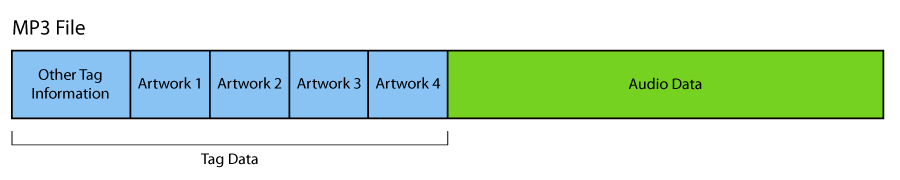
删除一件艺术品后的mp3文件。注意,标记保持了以前的大小,尽管它有较少的艺术品:
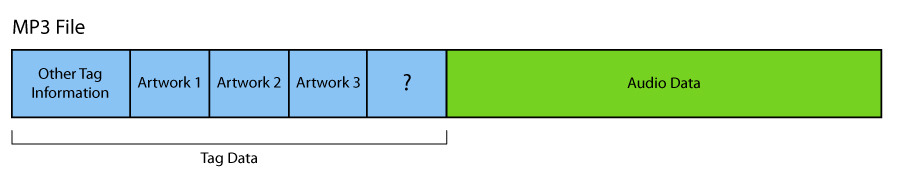
以及该文件应如何:

我希望任何人都有任何想法。提前谢谢。
回答 3
Stack Overflow用户
发布于 2020-03-26 16:56:57
这件事从今天起就解决了。
默认情况下,jaudiotagger在使元数据变小时不会回收空间,但现在如果您设置
TagOptionSingleton.getInstance().setId3v2PaddingWillShorten(true);在保存更改之前,它将回收不必要的填充,以使文件大小尽可能最小。
Stack Overflow用户
发布于 2012-10-11 15:26:29
这实际上是有意的行为,这是一种优化。
当您将数据添加到ID3v2标记而没有足够的空间时,需要重写整个文件以获得足够的空间。当您删除数据时,ID3v2只是被更新以包含数据,未使用的空间只是简单地标记为空闲(当您再次添加更多数据时,它将被回收)。
在你的库中寻找一个“在标签中释放未使用的空间”调用。您需要明确地告诉它,应该释放空闲空间。
编辑:查看Javadoc,我认为您需要在处理文件之前设置此选项:
TagOptionSingleton.getInstance().setId3v2PaddingWillShorten(true);Stack Overflow用户
发布于 2018-02-05 09:59:01
方法
TagOptionSingleton.getInstance().setId3v2PaddingWillShorten(true);
TagOptionSingleton.getInstance().setOriginalSavedAfterAdjustingID3v2Padding(true);似乎没有得到充分执行(截至2018年1月)。例如,检查http://www.jthink.net/jaudiotagger/maven/apidocs/org/jaudiotagger/tag/mp4/Mp4TagCreator.html以确保类Mp4TagCreator在将元数据转换为原始数据时没有实现填充:
填充- TODO填充参数当前被忽略
对于mp3-文件,我有一个解决办法,使用库mp3agic https://github.com/mpatric/mp3agic。与2015年最后一次更新的jaudiotagger不同,它仍然是更新的。在android上,您需要使用0.9.0版本,因为0.9.1使用java.nio.file-classes,这是Android.https://github.com/mpatric/mp3agic/issues/141不支持的。
解决方法是简单地创建一个新标记并复制标记数据,然后将其写入一个新文件。如果已满,请用新文件替换旧文件。如果不复制封面图像,新文件将比原始文件小。我认为这也应该是可能的,但没有做到这一点。下面是如何使用mp3agic:
                        try {
                        Mp3File song = new Mp3File(location,false);

                        if (song.hasId3v2Tag()){
                            ID3v2 oritag=song.getId3v2Tag();
                            byte[] image=oritag.getAlbumImage();
                            if(image!=null){
                                if (image.length > 10) {
                                    song = new Mp3File(location, true);
                                    oritag=song.getId3v2Tag();
                                    ID3v24Tag newtag = new ID3v24Tag();

                                    // copy metadata

                                    newtag.setArtist(oritag.getArtist());
                                    newtag.setArtistUrl(oritag.getArtistUrl());
                                    newtag.setOriginalArtist(oritag.getOriginalArtist());
                                    newtag.setArtistUrl(oritag.getArtistUrl());

                                    newtag.setAlbum(oritag.getAlbum());
                                    newtag.setAlbumArtist(oritag.getAlbumArtist());

                                    newtag.setAudiofileUrl(oritag.getAudiofileUrl());
                                    newtag.setAudioSourceUrl(oritag.getAudioSourceUrl());
                                    newtag.setUrl(oritag.getUrl());

                                    newtag.setGenre(oritag.getGenre());
                                    newtag.setGrouping(oritag.getGrouping());

                                    newtag.setTitle(oritag.getTitle());
                                    newtag.setTrack(oritag.getTrack());

                                    newtag.setPublisher(oritag.getPublisher());
                                    newtag.setPublisherUrl(oritag.getPublisherUrl());
                                    newtag.setCopyright(oritag.getCopyright());
                                    newtag.setCopyrightUrl(oritag.getCopyrightUrl());
                                    newtag.setComposer(oritag.getComposer());
                                    newtag.setCommercialUrl(oritag.getCommercialUrl());
                                    newtag.setComment(oritag.getComment());
                                    newtag.setYear(oritag.getYear());
                                    newtag.setKey(oritag.getKey());
                                    newtag.setRadiostationUrl(oritag.getRadiostationUrl());
                                    newtag.setPaymentUrl(oritag.getPaymentUrl());

                                    song.setId3v2Tag(newtag);


                                    try {
                                        song.save(location + "intermed");

                                        File from = new File(location + "intermed");
// if successfull then replace old file with new file
                                        if(from.exists()) {
                                            File file = new File(location);
                                            long sizeold = file.length();
                                            file.delete();
                                            File to = new File(location);
                                            long sizenew = from.length();
                                            from.renameTo(to);
                                            freedspace += sizeold - sizenew;
                                            }

                                    } catch (IOException | NotSupportedException e) {
                                        e.printStackTrace();

                                    }
                                }
                            }
                        }

                    } catch (IOException | UnsupportedTagException | InvalidDataException e) {
                        e.printStackTrace();
}备注:我在我的AudioCleanup,https://play.google.com/store/apps/details?id=com.gluege.audiocleanup&hl=en中实现了这一点,它在mp3-文件上工作。我没有设法删除其他文件类型的专辑封面。如果有人有解决方案,请分享。
我不喜欢ID3标准,尤其是垫子。在智能手机上浪费宝贵的空间。我见过每首歌都包含相同的1MB封面图像的专辑。
https://stackoverflow.com/questions/12841454
复制相似问题
腾讯云开发者

Copyright © 2013 - 2026 Tencent Cloud. All Rights Reserved. 腾讯云 版权所有
深圳市腾讯计算机系统有限公司 ICP备案/许可证号:粤B2-20090059  粤公网安备44030502008569号
腾讯云计算(北京)有限责任公司 京ICP证150476号 | 京ICP备11018762号