
如何使WCF客户端符合特定的WS-安全标志UsernameToken和SecurityTokenReference
我需要创建一个wcf客户端来调用我无法控制的服务。
我得到了一个wsdl和一个工作的soapui项目。
该服务同时使用用户名/密码和x509证书。
更新
我现在明白了问题的所在,但仍然不确定我需要采取哪些步骤来创建所需的信息,因此,任何帮助都将是非常感谢的。
我需要同时签署UsernameToken和SecurityTokenReference。
我必须创建自定义绑定的代码已经从这个帖子中删除,因为它不再被使用。我不再向绑定添加一个SecurityBindingElement,而是添加一个将安全元素写入标头的新行为。
因此,通过子类SignedXml类创建安全节点,添加签名引用,然后调用ComputeSignature在security中创建签名节点。
您需要将xml传递给SignedXml构造函数以进行签名,这样才能正常工作。在UsernameToken中传递是没有问题的,这似乎是正确的签名。
问题是,只有在调用SecurityTokenReference ()时才创建ComputeSignature(),因此我无法向该元素添加签名引用,因为它在需要时不存在(在ComputeSignature()之前调用的SignedXml重写的GetIdElement方法中)。
用于创建要插入到安全头中的签名块的代码如下所示
   string certificatePath = System.Windows.Forms.Application.StartupPath + "\\" + "Certs\\sign-and-    enc.p12";

    XmlDocument xd = new XmlDocument();
    xd.LoadXml(xml);

    // Set Certificate
    System.Security.Cryptography.X509Certificates.X509Certificate2 cert = new X509Certificate2(certificatePath, "password");
    MySignedXml signedXml = new MySignedXml(xd);
    signedXml.SigningKey = cert.PrivateKey;

    // Create a new KeyInfo object.
    KeyInfo keyInfo = new KeyInfo();
    keyInfo.Id = "";

    MemoryStream keyInfoStream = new MemoryStream();
    XmlWriter keyInfoWriter = XmlWriter.Create(keyInfoStream);

    WSSecurityTokenSerializer.DefaultInstance.WriteKeyIdentifierClause(keyInfoWriter, new LocalIdKeyIdentifierClause("token_reference", typeof(X509SecurityToken)));

    keyInfoWriter.Flush();
    keyInfoStream.Position = 0;
    XmlDocument keyInfoDocument = new XmlDocument();
    keyInfoDocument.Load(keyInfoStream);

    XmlAttribute attrib = keyInfoDocument.CreateAttribute("ValueType");
    attrib.InnerText = "http://docs.oasis-open.org/wss/2004/01/oasis-200401-wss-x509-token-profile-1.0#X509v3";
    keyInfoDocument.ChildNodes[1].ChildNodes[0].Attributes.Append(attrib);

    KeyInfoNode keyInfoNode = new KeyInfoNode();
    keyInfoNode.LoadXml(keyInfoDocument.DocumentElement);
    keyInfo.AddClause(keyInfoNode);

    // Add the KeyInfo object to the SignedXml object.
    signedXml.KeyInfo = keyInfo;

    // Need to use External Canonicalization method.
    signedXml.SignedInfo.CanonicalizationMethod = "http://www.w3.org/2001/10/xml-exc-c14n#";

    // Create a reference to be signed.
    Reference reference = new Reference();
    reference.Uri = "#UsernameToken-1";

    XmlDsigEnvelopedSignatureTransform env = new XmlDsigEnvelopedSignatureTransform();
    env.Algorithm = "http://www.w3.org/2001/10/xml-exc-c14n#";
    reference.AddTransform(env);
    reference.DigestMethod = "http://www.w3.org/2000/09/xmldsig#sha1";
    signedXml.AddReference(reference);


    Reference reference2 = new Reference();
    reference2.Uri = "#token_reference";
    XmlDsigEnvelopedSignatureTransform env2 = new XmlDsigEnvelopedSignatureTransform();
    env2.Algorithm = "http://www.w3.org/2001/10/xml-exc-c14n#";
    reference2.AddTransform(env2);
    reference2.DigestMethod = "http://www.w3.org/2000/09/xmldsig#sha1";
    signedXml.AddReference(reference2);

    // Add the Signature Id
    signedXml.Signature.Id = "MYSIG_ID";

    // Compute the signature.
    signedXml.ComputeSignature();

    XmlElement xmlDigitalSignature = signedXml.GetXml();
其中xml变量是UsernameToken xml字符串,而MySignedXml类是一个子类SignedXml,其中GetIdElement方法被重写(试图查找和正确地重新释放不存在的SecurityTokenReference)。
我花了好几天的时间研究和测试这个问题,不幸的是,提供这种服务的公司没有任何帮助--但我需要使用他们的服务。
全工作soap消息(soapUI项目)
<soapenv:Envelope xmlns:soapenv="http://schemas.xmlsoap.org/soap/envelope/" xmlns:urn="urn:XXXXX">
   <soapenv:Header xmlns:ebxml="http://docs.oasis-open.org/ebxml-msg/ebms/v3.0/ns/core/200704/">
   <wsse:Security soapenv:mustUnderstand="1" xmlns:wsse="http://docs.oasis-open.org/wss/2004/01/oasis-200401-wss-wssecurity-secext-1.0.xsd">
    <wsse:BinarySecurityToken EncodingType="http://docs.oasis-open.org/wss/2004/01/oasis-200401-wss-soap-message-security-1.0#Base64Binary" ValueType="http://docs.oasis-open.org/wss/2004/01/oasis-200401-wss-x509-token-profile-1.0#X509v3" wsu:Id="CertId-D05E596B5ABC341FEB13505090224061" xmlns:wsu="http://docs.oasis-open.org/wss/2004/01/oasis-200401-wss-wssecurity-utility-1.0.xsd">MIIEnDCCBAWgAwIBAgIBAjANBgkqhkiG9w0BAQUFADCBxDELMAkGA1UEBhMCTloxDTALBgNVBAgTBFdHVE4xEzARBgNVBAcTCldlbGxpbmd0b24xGDAWBgNVBAoTD0lSRFN0dWR5bGlua0IyQjEUMBIGA1UECxMLRGV2ZWxvcG1lbnQxHjAcBgNVBAMTFWRldmNhLmIyYi5pcmQuZ292dC5uejEXMBUGA1UEKRMORGV2ZWxvcG1lbnQgQ0ExKDAmBgkqhkiG9w0BCQEWGWNocmlzLnNjaHVsdHpAaXJkLmdvdnQubnowHhcNMTEwOTE1MDIwNjIwWhcNMjEwOTEyMDIwNjIwWjCByTELMAkGA1UEBhMCTloxDTALBgNVBAgTBFdHVE4xEzARBgNVBAcTCldlbGxpbmd0b24xGDAWBgNVBAoTD0lSRFN0dWR5bGlua0IyQjEUMBIGA1UECxMLRGV2ZWxvcG1lbnQxJTAjBgNVBAMTHHNpZ24tYW5kLWVuYy5kZXYuaXJkLmdvdnQubnoxFTATBgNVBCkTDHNpZ24tYW5kLWVuYzEoMCYGCSqGSIb3DQEJARYZY2hyaXMuc2NodWx0ekBpcmQuZ292dC5uejCBnzANBgkqhkiG9w0BAQEFAAOBjQAwgYkCgYEAykyZHVnXjsG220zB3kNOsGBeGP2rdNbLlIqW1D8yZO1fcj3/RhRiqsopbUrb8AU1ClpfhbH2K68kg7V91VAY0qrwNxP+pPPo1vYKMU6pT38qJGQzffr+iV2BCJshZvSk9E7QSWO5mFNstdg19xc+5ST1Lgb3fefuRG2KZVxPx0sCAwEAAaOCAZUwggGRMAkGA1UdEwQCMAAwEQYJYIZIAYb4QgEBBAQDAgZAMDQGCWCGSAGG+EIBDQQnFiVFYXN5LVJTQSBHZW5lcmF0ZWQgU2VydmVyIENlcnRpZmljYXRlMB0GA1UdDgQWBBSczRKXKPe3Sin7eFrVXfI7MXckzzCB+QYDVR0jBIHxMIHugBSLWxPSZd9otEj16vhLyovMCI9OMaGByqSBxzCBxDELMAkGA1UEBhMCTloxDTALBgNVBAgTBFdHVE4xEzARBgNVBAcTCldlbGxpbmd0b24xGDAWBgNVBAoTD0lSRFN0dWR5bGlua0IyQjEUMBIGA1UECxMLRGV2ZWxvcG1lbnQxHjAcBgNVBAMTFWRldmNhLmIyYi5pcmQuZ292dC5uejEXMBUGA1UEKRMORGV2ZWxvcG1lbnQgQ0ExKDAmBgkqhkiG9w0BCQEWGWNocmlzLnNjaHVsdHpAaXJkLmdvdnQubnqCCQDL/qDdlx2j6DATBgNVHSUEDDAKBggrBgEFBQcDATALBgNVHQ8EBAMCBaAwDQYJKoZIhvcNAQEFBQADgYEAS4ZPIVVpgTOGN4XcIC3SiYlxF8wYg7qnUhH5wJsAD3VCKfj68j9FSJtdBWLlWvvRxEoDP2lZ0IbFl6Rjnl+2ibzFnyac2G1AVm5mwPrNKHBQJ9J5eDJi0iUVY7Wphz86tKnqj34GvlHPNXmrF7oGEcDhPwK0T8zRdE/pvKIUiJc=</wsse:BinarySecurityToken>
    <ds:Signature Id="Signature-2" xmlns:ds="http://www.w3.org/2000/09/xmldsig#">
        <ds:SignedInfo>
            <ds:CanonicalizationMethod Algorithm="http://www.w3.org/2001/10/xml-exc-c14n#"/>
            <ds:SignatureMethod Algorithm="http://www.w3.org/2000/09/xmldsig#rsa-sha1"/>
            <ds:Reference URI="#CertId-D05E596B5ABC341FEB13505090224061">
                <ds:Transforms>
                    <ds:Transform Algorithm="http://www.w3.org/2001/10/xml-exc-c14n#"/>
                </ds:Transforms>
                <ds:DigestMethod Algorithm="http://www.w3.org/2000/09/xmldsig#sha1"/>
                <ds:DigestValue>3iVAUEAt8vAb7Ku+jf2gwSkSm0Q=</ds:DigestValue>
            </ds:Reference>
            <ds:Reference URI="#UsernameToken-1">
                <ds:Transforms>
                    <ds:Transform Algorithm="http://www.w3.org/2001/10/xml-exc-c14n#"/>
                </ds:Transforms>
                <ds:DigestMethod Algorithm="http://www.w3.org/2000/09/xmldsig#sha1"/>
                <ds:DigestValue>r4HLEAWJldJwmEmcAqV6Y8rnTPE=</ds:DigestValue>
            </ds:Reference>
        </ds:SignedInfo>
        <ds:SignatureValue>
        YGh2I3VcukqjT0O7hKItiykWN5tlID18ZXRCwQjXriHmnVsO4wGcHjWfmhuNDecq+xRN+SjG8E7M
        2Rx/5/BbFKbVlNOkQOSbSxIs1YT9GaThK16pMrX5KRkkJme1W3R0pGIIQh6gGRSUf79RZUIYxyVl
        LqdIe561TXXDdtbt/6Q=
        </ds:SignatureValue>
        <ds:KeyInfo Id="KeyId-D05E596B5ABC341FEB13505090224372">
            <wsse:SecurityTokenReference wsu:Id="STRId-D05E596B5ABC341FEB13505090224373" xmlns:wsu="http://docs.oasis-open.org/wss/2004/01/oasis-200401-wss-wssecurity-utility-1.0.xsd">
                <wsse:Reference URI="#CertId-D05E596B5ABC341FEB13505090224061" ValueType="http://docs.oasis-open.org/wss/2004/01/oasis-200401-wss-x509-token-profile-1.0#X509v3"/></wsse:SecurityTokenReference>
        </ds:KeyInfo>
    </ds:Signature>
    <wsse:UsernameToken wsu:Id="UsernameToken-1" xmlns:wsu="http://docs.oasis-open.org/wss/2004/01/oasis-200401-wss-wssecurity-utility-1.0.xsd">
        <wsse:Username>XXXXXX</wsse:Username>
        <wsse:Password Type="http://docs.oasis-open.org/wss/2004/01/oasis-200401-wss-username-token-profile-1.0#PasswordText">XXXXXXX</wsse:Password>
        </wsse:UsernameToken>
    </wsse:Security>
  <ebxml:Messaging xmlns:xsi="http://www.w3.org/2001/XMLSchema-instance">
     <ebxml:UserMessage>
        <ebxml:MessageInfo>
           <ebxml:Timestamp>2002-02-02T14:18:02.0Z</ebxml:Timestamp>
           <ebxml:MessageId>bf9433d9-c6e9-4c12-9c98-724008a09c21</ebxml:MessageId>
        </ebxml:MessageInfo>
        <ebxml:PartyInfo>
           <ebxml:From>
              <ebxml:PartyId type="identifier">Trading Partner X</ebxml:PartyId>
              <ebxml:Role>Provider</ebxml:Role>
           </ebxml:From>
           <ebxml:To>
              <ebxml:PartyId type="identifier">XXXXXXX</ebxml:PartyId>
              <ebxml:Role>Requestor</ebxml:Role>
           </ebxml:To>
        </ebxml:PartyInfo>
        <ebxml:CollaborationInfo>
           <ebxml:AgreementRef>urn:XXXXXXXXX</ebxml:AgreementRef>
           <ebxml:Service type="Web Service">urn:XXXXXXXX</ebxml:Service>
           <ebxml:Action>customerInformation</ebxml:Action>
           <ebxml:ConversationId>e302426a-b2d9-4ff1-a14b-fbbc2f40a017</ebxml:ConversationId>
        </ebxml:CollaborationInfo>
     </ebxml:UserMessage>
  </ebxml:Messaging>
   </soapenv:Header>
   <soapenv:Body>
  <urn:ConnectionTest>
     <Message>Bonjour</Message>
  </urn:ConnectionTest>
   </soapenv:Body>
</soapenv:Envelope>
我们得到了一些文件。下面复制了安全部分
必须按照以下顺序对每个请求应用以下安全性:必须包含一个wsse:UsernameToken,并包含:
- 代理的Portal用户名,用于wsse:Username元素的值
- x509元素中wsse:PasswordText (明文)值的代理门户密码--签名块:数字签名是使用x509证书创建的。每个软件提供商必须持有和保护由其颁发的有效证书和私钥,待确定。对于每个服务请求,该软件必须:
- 包含与用于作为wsse:BinarySecurityToken签名的私钥相匹配的证书,并将其用作签名的wsse:SecurityTokenReference
- 签署wsse:BinarySecurityToken
- 签名wsse:UsernameToken
- 使用规范化方法算法:http://www.w3.org/2001/10/xml-exc-c14n#
- 使用签名方法算法:http://www.w3.org/2000/09/xmldsig#rsa-sha1
- 使用摘要法算法:http://www.w3.org/2000/09/xmldsig#sha1
更新
最初给出了SoapUI配置的图像
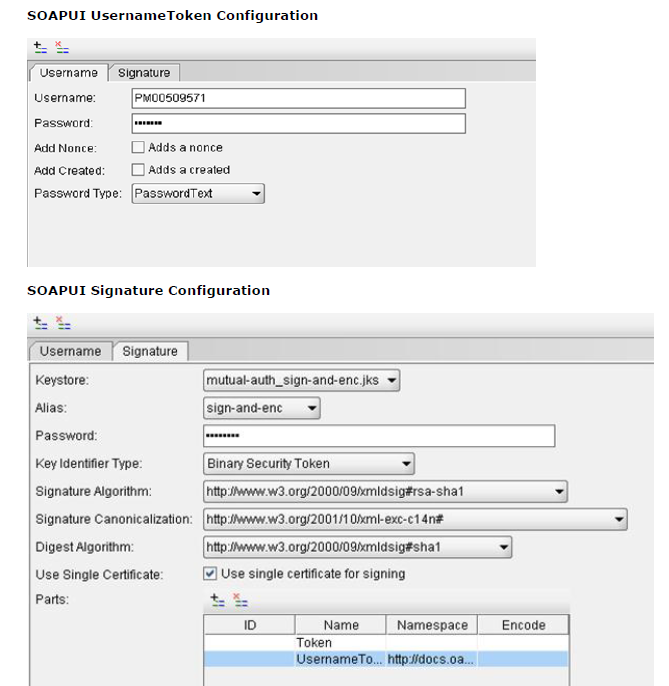
回答 2
Stack Overflow用户
发布于 2012-11-07 00:15:06
今天终于解决了问题。就术语而言,我需要签署的不是SecurityTokenReference,而是二进制安全令牌。
为了做到这一点,我需要隐藏发起者和收件人的证书,并添加一个签名的支持令牌。
我回到使用配置来创建和签名消息,而不是尝试手动添加签名。
另一个会阻止它工作的问题是,我的自定义“消息”标题上有一个不正确的名称空间,所以请注意名称空间,我认为它们不会像它们那样重要。
创建绑定的代码如下
    private System.ServiceModel.Channels.Binding GetCustomBinding()
    {
        System.ServiceModel.Channels.AsymmetricSecurityBindingElement asbe = new AsymmetricSecurityBindingElement();
        asbe.MessageSecurityVersion = MessageSecurityVersion.WSSecurity11WSTrust13WSSecureConversation13WSSecurityPolicy12;

        asbe.InitiatorTokenParameters = new System.ServiceModel.Security.Tokens.X509SecurityTokenParameters { InclusionMode = SecurityTokenInclusionMode.Never };
        asbe.RecipientTokenParameters = new System.ServiceModel.Security.Tokens.X509SecurityTokenParameters { InclusionMode = SecurityTokenInclusionMode.Never };
        asbe.MessageProtectionOrder = System.ServiceModel.Security.MessageProtectionOrder.SignBeforeEncrypt;

        asbe.SecurityHeaderLayout = SecurityHeaderLayout.Strict;
        asbe.EnableUnsecuredResponse = true;
        asbe.IncludeTimestamp = false;
        asbe.SetKeyDerivation(false);
        asbe.DefaultAlgorithmSuite = System.ServiceModel.Security.SecurityAlgorithmSuite.Basic128Rsa15;
        asbe.EndpointSupportingTokenParameters.Signed.Add(new UserNameSecurityTokenParameters());
        asbe.EndpointSupportingTokenParameters.Signed.Add(new X509SecurityTokenParameters());

        CustomBinding myBinding = new CustomBinding();
        myBinding.Elements.Add(asbe);
        myBinding.Elements.Add(new TextMessageEncodingBindingElement(MessageVersion.Soap11, Encoding.UTF8));

        HttpsTransportBindingElement httpsBindingElement = new HttpsTransportBindingElement();
        httpsBindingElement.RequireClientCertificate = true;
        myBinding.Elements.Add(httpsBindingElement);

        return myBinding;
    }
在使用绑定时,我设置了ClientCredentials UserName、ServiceCertificate和ClientCertificate,所有这些都按预期工作。
使用代码如下所示
using (CredentialingService.SOAPPortTypeClient client = GetCredentialingClient())
{
    client.Open();
    etc....
}

private static CredentialingService.SOAPPortTypeClient GetCredentialingClient()
{
    CredentialingService.SOAPPortTypeClient client = new CredentialingService.SOAPPortTypeClient(GetCustomBinding(), new EndpointAddress(new Uri(Settings.AppSettings.B2BUrl), new DnsEndpointIdentity(Settings.AppSettings.B2BDNSEndpoint), new AddressHeaderCollection()));
    client.Endpoint.Contract.ProtectionLevel = System.Net.Security.ProtectionLevel.None;
    SetClientCredentialsSecurity(client.ClientCredentials);

    return client;
}
在我的帖子中指定了GetCustomBinding
SetClientCredentialsSecurity是设置证书的地方,如下所示
private static void SetClientCredentialsSecurity(ClientCredentials clientCredentials)
{
    clientCredentials.UserName.UserName = Settings.AppSettings.B2BUserName;
    clientCredentials.UserName.Password = Settings.AppSettings.B2BPassword;

    string directoryName = Path.GetDirectoryName(System.Reflection.Assembly.GetExecutingAssembly().Location);
    clientCredentials.ServiceCertificate.DefaultCertificate = new X509Certificate2(Path.Combine(directoryName, Settings.AppSettings.B2BServerCertificateName));
    clientCredentials.ClientCertificate.Certificate = new X509Certificate2(Path.Combine(directoryName, Settings.AppSettings.B2BClientCertificateName), Settings.AppSettings.B2BClientCertificatePassword);
}
希望这能让事情变得更清楚
Stack Overflow用户
发布于 2012-10-23 10:12:16
也许是因为你的证书是无效的。试试这个:
System.Net.ServicePointManager.ServerCertificateValidationCallback = new System.Net.Security.RemoteCertificateValidationCallback(delegate { return true; });
//...
using (var client = new SrvClient())
{
    client.ClientCredentials.UserName.UserName = "usr";
    client.ClientCredentials.UserName.Password = "psw";
    //...
}https://stackoverflow.com/questions/12832213
复制相似问题
腾讯云开发者

Copyright © 2013 - 2026 Tencent Cloud. All Rights Reserved. 腾讯云 版权所有
深圳市腾讯计算机系统有限公司 ICP备案/许可证号:粤B2-20090059  粤公网安备44030502008569号
腾讯云计算(北京)有限责任公司 京ICP证150476号 | 京ICP备11018762号