
如何修复TComboBox Ctl3D属性Bug?
如何修复TComboBox Ctl3D属性Bug?
提问于 2012-10-08 20:03:35
这是一张来自TForm的图片,上面有一个TEdit,向下有一个TComboBox。
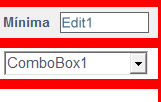
如您所见,TEdit没有默认主题的经典3D边框。这是因为我将该组件的Ctl3D property设置为False。然后您会看到TComboBox有正常的3D边框,但在本例中,我也将该组件的Ctl3D property设置为False,但它继续显示3D边框。
在开发级别上,它似乎是一个Delphi错误。我怎么才能在密码里解决这个问题?
在测试了RRUZ的答案,BevelKind=bkFlat之后,如下所示:
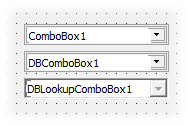
我不知道为什么会这么不一样..。也很奇怪。*-/
回答 2
Stack Overflow用户
回答已采纳
发布于 2012-10-08 20:26:48
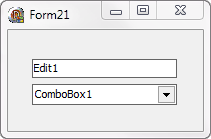
您可以删除3D边框,将TComboBox的TComboBox属性设置为bkFlat。
Stack Overflow用户
发布于 2016-03-02 09:19:51
这是支持BidiMode和调整大小的最佳方法;并且可以用客户端颜色填充边框:
TTestComboBox=class(TComboBox)
protected
  procedure WMPaint(var Msg: TMessage); message WM_Paint;
End;

Procedure TTestComboBox.WMPaint(var Msg: TMessage);
var MCanvas: TControlCanvas;
    R: TRect;
Begin
  inherited;
  MCanvas:=TControlCanvas.Create;
  Try
    MCanvas.Control:=Self;
    With MCanvas do begin
      R:=ClientRect;
      Brush.Style:= bsClear;
      Pen.Color:= Color;
      Pen.Width:= 3;
      if BiDiMode in [bdRightToLeft, bdRightToLeftNoAlign] then begin
        if Style = csSimple then                   //remove border and space
          Rectangle(1, 1, R.Width - 1, R.Height-1) else Rectangle(-1, 1, R.Width, R.Height-1);
        if Style in [csDropDown, csOwnerDrawFixed, csOwnerDrawVariable] then begin
          Pen.Width:= 5;                           //remove space btw editor and button
          MoveTo(18, 0);
          LineTo(18, R.Height-1);
        end;
      end else begin
        if Style = csSimple then
          Rectangle(1, 1, r.Width - 1, R.Height-1) else Rectangle(1, 1, r.Width + 1, R.Height-1);
        if Style in [csDropDown, csOwnerDrawFixed, csOwnerDrawVariable] then begin
          Pen.Width:= 5;
          MoveTo(R.Width - 18, 0);
          LineTo(R.Width - 18, R.Height-1);
        end;
      end;
    end;
  finally
    MCanvas.Free;
  End;
End;页面原文内容由Stack Overflow提供。腾讯云小微IT领域专用引擎提供翻译支持
原文链接:
https://stackoverflow.com/questions/12788670
复制相关文章
相似问题
腾讯云开发者

Copyright © 2013 - 2026 Tencent Cloud. All Rights Reserved. 腾讯云 版权所有
深圳市腾讯计算机系统有限公司 ICP备案/许可证号:粤B2-20090059  粤公网安备44030502008569号
腾讯云计算(北京)有限责任公司 京ICP证150476号 | 京ICP备11018762号