
图像裁剪AVCaptureSession图像
因此,我一整天都在做这件事,没有任何运气,不用说,我已经查到了很多例子和可下载的类别,它们都能完美地裁剪图像。但是,当我试图从一个通过AVCaptureSession定义的图像中做这件事的时候,它就不起作用了。我咨询了这两个消息来源
http://codefuel.wordpress.com/2011/04/22/image-cropping-from-a-uiscrollview/
http://vocaro.com/trevor/blog/2009/10/12/resize-a-uiimage-the-right-way/
该项目从第一个链接似乎直接工作,如广告,但一旦我破解它做同样的魔术在av捕获image...nope.
有人对此有洞察力吗?这也是我的代码供参考。
- (IBAction)TakePhotoPressed:(id)sender
{
     AVCaptureConnection *videoConnection = nil;
     for (AVCaptureConnection *connection in stillImageOutput.connections)
     {
     for (AVCaptureInputPort *port in [connection inputPorts])
     {
     if ([[port mediaType] isEqual:AVMediaTypeVideo] )
     {
     videoConnection = connection;
     break;
     }
     }
     if (videoConnection) { break; }
     }

     //NSLog(@"about to request a capture from: %@", stillImageOutput);
     [stillImageOutput captureStillImageAsynchronouslyFromConnection:videoConnection completionHandler: ^(CMSampleBufferRef imageSampleBuffer, NSError *error)
     {
         CFDictionaryRef exifAttachments = CMGetAttachment( imageSampleBuffer, kCGImagePropertyExifDictionary, NULL);
         if (exifAttachments)
         {
             // Do something with the attachments.
             //NSLog(@"attachements: %@", exifAttachments);
         }
         else

         NSLog(@"no attachments");

         NSData *imageData = [AVCaptureStillImageOutput jpegStillImageNSDataRepresentation:imageSampleBuffer];
         UIImage *image = [[UIImage alloc] initWithData:imageData];

         NSLog(@"%f",image.size.width);
         NSLog(@"%f",image.size.height);


         float scale = 1.0f/_scrollView.zoomScale;

         CGRect visibleRect;
         visibleRect.origin.x = _scrollView.contentOffset.x * scale;
         visibleRect.origin.y = _scrollView.contentOffset.x * scale;
         visibleRect.size.width = _scrollView.bounds.size.width * scale;
         visibleRect.size.height = _scrollView.bounds.size.height * scale;

         UIImage* cropped = [self cropImage:image withRect:visibleRect];

         [croppedImage setImage:cropped];

         [image release];
     }
      ];

    [croppedImage setHidden:NO];


}
上面使用的cropImage函数。
-(UIImage*)cropImage :(UIImage*)originalImage withRect :(CGRect) rect
{


    CGRect transformedRect=rect;
    if(originalImage.imageOrientation==UIImageOrientationRight)
    {
        transformedRect.origin.x = rect.origin.y;
        transformedRect.origin.y = originalImage.size.width-(rect.origin.x+rect.size.width);
        transformedRect.size.width = rect.size.height;
        transformedRect.size.height = rect.size.width;
    }

    CGImageRef cr = CGImageCreateWithImageInRect(originalImage.CGImage, transformedRect);
    UIImage* cropped = [UIImage imageWithCGImage:cr scale:originalImage.scale orientation:originalImage.imageOrientation];
    [croppedImage setFrame:CGRectMake(croppedImage.frame.origin.x,
                                      croppedImage.frame.origin.y,
                                      cropped.size.width,
                                      cropped.size.height)];

    CGImageRelease(cr);
    return cropped;
}
我也想要详细和武装谁可能帮助我在困境中尽可能多的信息,以张贴我的简介,我的scrollView和avcapture会话。然而,这可能有点过了,所以,如果你想看到它,只需问。
现在,关于代码实际执行的结果呢?
在我拍照之前是什么样子?
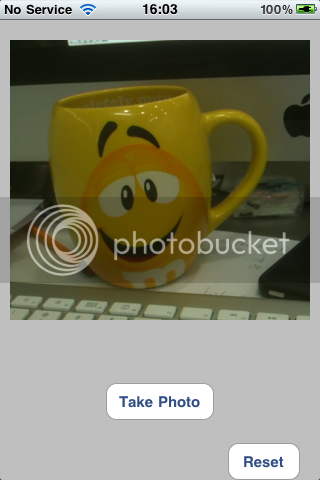
之后..。
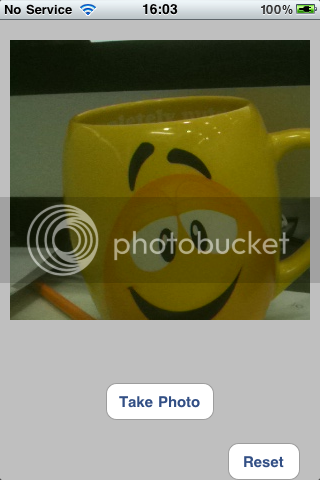
编辑:
嗯,我现在有几个观点,没有评论,所以要么没有人知道,要么它是如此简单,他们认为我会解决它,again...In,任何情况下,我还没有取得任何进展。因此,对于任何感兴趣的人来说,这里都是一个小示例应用程序,它的代码都已经设置好了,您可以看到我在做什么。
回答 1
Stack Overflow用户
发布于 2012-10-15 02:36:21
看来,这个小难题不仅使我困惑了将近一个星期,而且几乎没有几个人看过我的问题也没有任何建议。我必须说,对于这个特别的问题,我无法使它这样工作,我思考,修补和沉思了一段时间,但没有结果。直到我做了这个
[self HideElements];

UIGraphicsBeginImageContext(chosenPhotoView.frame.size);
[chosenPhotoView.layer renderInContext:UIGraphicsGetCurrentContext()];
UIImage *viewImage = UIGraphicsGetImageFromCurrentImageContext();
UIGraphicsEndImageContext();

[self ShowElements];
就是这样,更少的代码,它几乎立即起作用了。因此,我没有尝试通过滚动视图裁剪图像,而是在当时获取屏幕的屏幕截图,然后使用滚动视图框架变量裁剪图像。而隐藏/显示元素函数隐藏我想要的图片上的任何重叠元素。
https://stackoverflow.com/questions/12758028
复制相似问题
腾讯云开发者

Copyright © 2013 - 2026 Tencent Cloud. All Rights Reserved. 腾讯云 版权所有
深圳市腾讯计算机系统有限公司 ICP备案/许可证号:粤B2-20090059  粤公网安备44030502008569号
腾讯云计算(北京)有限责任公司 京ICP证150476号 | 京ICP备11018762号