
计算A-B线上从A到B的给定距离点
我非常疯狂地试图计算出A-B,在一个给定的距离上的点,这样我就可以在两个给定的点之间“画出”线。一开始听起来很简单,但我似乎搞错了。更糟糕的是,我不知道自己哪里出了问题。几何(和一般的数学)不是我的强项。
我读过类似的问题,也有答案。事实上,我直接从Mads的答案中删除了我目前对CalculatePoint函数的实现:给定起始点和终点,以及距离,计算一条直线上的一个点。 (再加上后来的一条评论中的更正--如果我对他的理解是正确的话),因为我试图解决这个问题的坚定尝试,除了头等舱的特快机票节约地之外,并没有给我带来任何帮助。
下面是我的更新的代码(请参阅文章底部的编辑说明):
using System;
using System.Drawing;
using System.Windows.Forms;
namespace DrawLines
{
public class MainForm : Form
{
// =====================================================================
// Here's the part I'm having trouble with. I don't really understand
// how this is suposed to work, so I can't seem to get it right!
// ---------------------------------------------------------------------
// A "local indirector" - Just so I don't have go down and edit the
// actual call everytime this bluddy thing changes names.
private Point CalculatePoint(Point a, Point b, int distance) {
return CalculatePoint_ByAgentFire(a, b, distance);
}
#region CalculatePoint_ByAgentFire
//AgentFire: Better approach (you can rename the struct if you need):
struct Vector2
{
public readonly double X;
public readonly double Y;
public Vector2(double x, double y) {
this.X = x;
this.Y = y;
}
public static Vector2 operator -(Vector2 a, Vector2 b) {
return new Vector2(b.X - a.X, b.Y - a.Y);
}
public static Vector2 operator *(Vector2 a, double d) {
return new Vector2(a.X * d, a.Y * d);
}
public override string ToString() {
return string.Format("[{0}, {1}]", X, Y);
}
}
// For getting the midpoint you just need to do the (a - b) * d action:
//static void Main(string[] args)
//{
// Vector2 a = new Vector2(1, 1);
// Vector2 b = new Vector2(3, 1);
// float distance = 0.5f; // From 0.0 to 1.0.
// Vector2 c = (a - b) * distance;
// Console.WriteLine(c);
//}
private Point CalculatePoint_ByAgentFire(Point a, Point b, int distance) {
var vA = new Vector2(a.X, a.Y);
var vB = new Vector2(b.X, b.Y);
double lengthOfHypotenuse = LengthOfHypotenuseAsDouble(a,b);
double portionOfDistanceFromAtoB = distance / lengthOfHypotenuse;
var vC = (vA - vB) * portionOfDistanceFromAtoB;
Console.WriteLine("vC="+vC);
return new Point((int)(vC.X+0.5), (int)(vC.Y+0.5));
}
// Returns the length of the hypotenuse rounded to an integer, using
// Pythagoras' Theorem for right angle triangles: The length of the
// hypotenuse equals the sum of the square of the other two sides.
// Ergo: h = Sqrt(a*a + b*b)
private double LengthOfHypotenuseAsDouble(Point a, Point b) {
double aSq = Math.Pow(Math.Abs(a.X - b.X), 2); // horizontal length squared
double bSq = Math.Pow(Math.Abs(b.Y - b.Y), 2); // vertical length squared
return Math.Sqrt(aSq + bSq); // length of the hypotenuse
}
#endregion
//dbaseman: I thought something looked strange about the formula ... the question
//you linked was how to get the point at a distance after B, whereas you want the
//distance after A. This should give you the right answer, the start point plus
//distance in the vector direction.
//
// Didn't work as per: http://s1264.photobucket.com/albums/jj496/corlettk/?action=view¤t=DrawLinesAB-broken_zps069161e9.jpg
//
private Point CalculatePoint_ByDbaseman(Point a, Point b, int distance) {
// a. calculate the vector from a to b:
double vectorX = b.X - a.X;
double vectorY = b.Y - a.Y;
// b. calculate the length:
double magnitude = Math.Sqrt(vectorX * vectorX + vectorY * vectorY);
// c. normalize the vector to unit length:
vectorX /= magnitude;
vectorY /= magnitude;
// d. calculate and Draw the new vector, which is x1y1 + vxvy * (mag + distance).
return new Point(
(int)((double)a.X + vectorX * distance) // x = col
, (int)((double)a.Y + vectorY * distance) // y = row
);
}
// MBo: Try to remove 'magnitude' term in the parentheses both for X and for Y expressions.
//
// Didn't work as per: http://s1264.photobucket.com/albums/jj496/corlettk/?action=view¤t=DrawLinesAB-broken_zps069161e9.jpg
//
//private Point CalculatePoint_ByMBo(Point a, Point b, int distance) {
// // a. calculate the vector from a to b:
// double vectorX = b.X - a.X;
// double vectorY = b.Y - a.Y;
// // b. calculate the length:
// double magnitude = Math.Sqrt(vectorX * vectorX + vectorY * vectorY);
// // c. normalize the vector to unit length:
// vectorX /= magnitude;
// vectorY /= magnitude;
// // d. calculate and Draw the new vector, which is x1y1 + vxvy * (mag + distance).
// return new Point(
// (int)( ((double)a.X + vectorX * distance) + 0.5 )
// , (int)( ((double)a.X + vectorX * distance) + 0.5 )
// );
//}
// Didn't work
//private Point CalculatePoint_ByUser1556110(Point a, Point b, int distance) {
// Double magnitude = Math.Sqrt(Math.Pow(b.Y - a.Y, 2) + Math.Pow(b.X - a.X, 2));
// return new Point(
// (int)(a.X + distance * (b.X - a.X) / magnitude + 0.5)
// , (int)(a.Y + distance * (b.Y - a.Y) / magnitude + 0.5)
// );
//}
// didn't work
//private static Point CalculatePoint_ByCadairIdris(Point a, Point b, int distance) {
// // a. calculate the vector from a to b:
// double vectorX = b.X - a.X;
// double vectorY = b.Y - a.Y;
// // b. calculate the proportion of hypotenuse
// double factor = distance / Math.Sqrt(vectorX*vectorX + vectorY*vectorY);
// // c. factor the lengths
// vectorX *= factor;
// vectorY *= factor;
// // d. calculate and Draw the new vector,
// return new Point((int)(a.X + vectorX), (int)(a.Y + vectorY));
//}
// Returns a point along the line A-B at the given distance from A
// based on Mads Elvheim's answer to:
// https://stackoverflow.com/questions/1800138/given-a-start-and-end-point-and-a-distance-calculate-a-point-along-a-line
private Point MyCalculatePoint(Point a, Point b, int distance) {
// a. calculate the vector from o to g:
double vectorX = b.X - a.X;
double vectorY = b.Y - a.Y;
// b. calculate the length:
double magnitude = Math.Sqrt(vectorX * vectorX + vectorY * vectorY);
// c. normalize the vector to unit length:
vectorX /= magnitude;
vectorY /= magnitude;
// d. calculate and Draw the new vector, which is x1y1 + vxvy * (mag + distance).
return new Point(
(int)(((double)a.X + vectorX * (magnitude + distance)) + 0.5) // x = col
, (int)(((double)a.Y + vectorY * (magnitude + distance)) + 0.5) // y = row
);
}
// =====================================================================
private const int CELL_SIZE = 4; // width and height of each "cell" in the bitmap.
private readonly Bitmap _bitmap; // to draw on (displayed in picBox1).
private readonly Graphics _graphics; // to draw with.
// actual points on _theLineString are painted red.
private static readonly SolidBrush _thePointBrush = new SolidBrush(Color.Red);
// ... and are labeled in Red, Courier New, 12 point, Bold
private static readonly SolidBrush _theLabelBrush = new SolidBrush(Color.Red);
private static readonly Font _theLabelFont = new Font("Courier New", 12, FontStyle.Bold);
// the interveening calculated cells on the lines between actaul points are painted Black.
private static readonly SolidBrush _theLineBrush = new SolidBrush(Color.Black);
// the points in my line-string.
private static readonly Point[] _theLineString = new Point[] {
// x, y
new Point(170, 85), // A
new Point( 85, 70), // B
//new Point(209, 66), // C
//new Point( 98, 120), // D
//new Point(158, 19), // E
//new Point( 2, 61), // F
//new Point( 42, 177), // G
//new Point(191, 146), // H
//new Point( 25, 128), // I
//new Point( 95, 24) // J
};
public MainForm() {
InitializeComponent();
// initialise "the graphics system".
_bitmap = new Bitmap(picBox1.Width, picBox1.Height);
_graphics = Graphics.FromImage(_bitmap);
picBox1.Image = _bitmap;
}
#region actual drawing on the Grpahics
private void DrawCell(int x, int y, Brush brush) {
_graphics.FillRectangle(
brush
, x * CELL_SIZE, y * CELL_SIZE // x, y
, CELL_SIZE, CELL_SIZE // width, heigth
);
}
private void DrawLabel(int x, int y, char c) {
string s = c.ToString();
_graphics.DrawString(
s, _theLabelFont, _theLabelBrush
, x * CELL_SIZE + 5 // x
, y * CELL_SIZE - 8 // y
);
}
// ... there should be no mention of _graphics or CELL_SIZE below here ...
#endregion
#region draw points on form load
private void MainForm_Load(object sender, EventArgs e) {
DrawPoints();
}
// draws and labels each point in _theLineString
private void DrawPoints() {
char c = 'A'; // label text, as a char so we can increment it for each point.
foreach ( Point p in _theLineString ) {
DrawCell(p.X, p.Y, _thePointBrush);
DrawLabel(p.X, p.Y, c++);
}
}
#endregion
#region DrawLines on button click
private void btnDrawLines_Click(object sender, EventArgs e) {
DrawLinesBetweenPointsInTheString();
}
// Draws "the lines" between the points in _theLineString.
private void DrawLinesBetweenPointsInTheString() {
int n = _theLineString.Length - 1; // one less line-segment than points
for ( int i = 0; i < n; ++i )
Draw(_theLineString[i], _theLineString[i + 1]);
picBox1.Invalidate(); // tell the graphics system that the picture box needs to be repainted.
}
// Draws all the cells along the line from Point "a" to Point "b".
private void Draw(Point a, Point b) {
int maxDistance = LengthOfHypotenuse(a, b);
for ( int distance = 1; distance < maxDistance; ++distance ) {
var point = CalculatePoint(a, b, distance);
DrawCell(point.X, point.X, _theLineBrush);
}
}
// Returns the length of the hypotenuse rounded to an integer, using
// Pythagoras' Theorem for right angle triangles: The length of the
// hypotenuse equals the sum of the square of the other two sides.
// Ergo: h = Sqrt(a*a + b*b)
private int LengthOfHypotenuse(Point a, Point b) {
double aSq = Math.Pow(Math.Abs(a.X - b.X), 2); // horizontal length squared
double bSq = Math.Pow(Math.Abs(b.Y - b.Y), 2); // vertical length squared
return (int)(Math.Sqrt(aSq + bSq) + 0.5); // length of the hypotenuse
}
#endregion
#region Windows Form Designer generated code
/// <summary>
/// Required method for Designer support - do not modify
/// the contents of this method with the code editor.
/// </summary>
private void InitializeComponent() {
this.picBox1 = new System.Windows.Forms.PictureBox();
this.btnDrawLines = new System.Windows.Forms.Button();
((System.ComponentModel.ISupportInitialize)(this.picBox1)).BeginInit();
this.SuspendLayout();
//
// picBox1
//
this.picBox1.Dock = System.Windows.Forms.DockStyle.Fill;
this.picBox1.Location = new System.Drawing.Point(0, 0);
this.picBox1.Name = "picBox1";
this.picBox1.Size = new System.Drawing.Size(1000, 719);
this.picBox1.TabIndex = 0;
this.picBox1.TabStop = false;
//
// btnDrawLines
//
this.btnDrawLines.Location = new System.Drawing.Point(23, 24);
this.btnDrawLines.Name = "btnDrawLines";
this.btnDrawLines.Size = new System.Drawing.Size(77, 23);
this.btnDrawLines.TabIndex = 1;
this.btnDrawLines.Text = "Draw Lines";
this.btnDrawLines.UseVisualStyleBackColor = true;
this.btnDrawLines.Click += new System.EventHandler(this.btnDrawLines_Click);
//
// MainForm
//
this.AutoScaleDimensions = new System.Drawing.SizeF(6F, 13F);
this.AutoScaleMode = System.Windows.Forms.AutoScaleMode.Font;
this.ClientSize = new System.Drawing.Size(1000, 719);
this.Controls.Add(this.btnDrawLines);
this.Controls.Add(this.picBox1);
this.Location = new System.Drawing.Point(10, 10);
this.MinimumSize = new System.Drawing.Size(1016, 755);
this.Name = "MainForm";
this.SizeGripStyle = System.Windows.Forms.SizeGripStyle.Hide;
this.StartPosition = System.Windows.Forms.FormStartPosition.Manual;
this.Text = "Draw Lines on a Matrix.";
this.Load += new System.EventHandler(this.MainForm_Load);
((System.ComponentModel.ISupportInitialize)(this.picBox1)).EndInit();
this.ResumeLayout(false);
}
private System.Windows.Forms.PictureBox picBox1;
private System.Windows.Forms.Button btnDrawLines;
#endregion
}
}对不起,如果有点长,但这是从我的实际项目中挖掘出来的SSCCE,它是最短路径算法的一个实现,用于运行MazeOfBolton.也就是迷宫赛跑者。
我实际上想做的是预先计算迷宫(矩阵)中两个给定点(原点和目标)周围的“栅栏”(即缓冲的MBR),这样“栅栏”内的所有点都在从“两点之间的直线”的给定距离内,以便快速消除数百-数千条可能的偏离目标的路径。
请注意,这个编程挑战几年前就结束了,所以这里没有“竞争剽窃”的问题。不,这不是作业,事实上我是一个专业的程序员.我只是离开了我的舒适区,即使是相对简单的几何。叹一口气。
所以..。请有人给我指点,帮助我正确地得到CalculatePoint函数到,:计算A-B线上从A到B的给定距离的一个点?
谢谢你的慷慨..。即使在阅读这么远的地方。
干杯。基思。
编辑:我刚刚更新了发布的源代码,因为:
(1)我刚刚意识到它不是自成一体的。我忘记了单独的MainForm.Designer.cs文件,我已经将其附加到发布代码的底部。
(2)最新版本包括我迄今尝试过的内容,其中有一个指向每个故障的图片的photobucket链接.它们都是一样的。惠伊?见鬼?
我想我的问题可能出在其他地方,比如以前被其他人忽略的一些古怪的windows表单设置,因为我忘记了发布设计人员生成的代码……除了(在我的实际项目中)所有的东西都画在我期望的地方,那么为什么计算的点会有什么不同呢?我不知道!?我很沮丧,而且越来越暴躁,所以我想我会把这个留到另一天;-)
这说明我们经常低估让一台计算机做ANYthing所需的努力。即使划一条简单的线..。它甚至不是一条曲线,更不用说一个大圆圈,一个横向的墨卡托或任何奇特的东西.只是一句简单的棒棒糖!?;-)
非常感谢每一个发帖的人!
再次干杯。基思。
回答 6
Stack Overflow用户
发布于 2012-09-23 07:13:47
计算矢量AB
首先定义从点A(1,-1)到点B(2,4)减去B的向量。向量是Vab(1,5)。
计算AB的长度
利用毕达哥拉斯定理计算矢量AB的长度。
|Vab| = SQRT(1²+5²)长度为(四舍五入) 5.1
计算单位向量
将向量除以其长度得到单位向量(长度为1的向量)。
V1(1/5.1,5/5.1) = V1(0.2, 0.98)计算长度为4的向量
现在用您想要的长度乘以V1,例如4,以获得Vt。
Vt(0.2*4,0.98*4) = Vt(0.8,3.92)计算目标点
将向量Vt添加到A点以得到点T(目标)。
T = A + Vt = T(1.8,2.92)编辑:响应您的编辑
方法LengthOfHypotenuse应该是这样的
- 修正了计算bSq的一个错误
- 并删除冗余的Math.Abs调用,因为pow为2总是正的。
- 去掉0.5的加法,不知道你为什么要那样做
- 您至少应该使用浮点数作为返回值(双小数点也可以)。 //您应该使用Vector2类而不是Point,并使用它们的长度属性私有双LengthOfHypotenuse(点a,点b) { double aSq =Math.Pow(A.X-b.X,2);//水平长度平方双bSq =Math.Pow(A.Y-B.Y,2);//垂直长度平方返回Math.Sqrt(aSq + bSq);//低音长度}
绘制方法( a点,b点)应如下所示:
- 修正的DrawCell()调用 私有空图(点a,点b) {双maxDistance = LengthOfHypotenuse(a,b);for (int距离= 0;距离< maxDistance;++distance) { var点=CalculatePoint(新的Vector2(a),新的Vector2(b),距离);DrawCell(Pointt.x,point t.Y,_theLineBrush);}}
您的CalculatePoint(点a,点b,int距离)方法:
- 将一些计算移到Vector2类中 专用点CalculatePoint(Vector2 a,Vector2 b,int距离){ Vector2 vectorAB =a;返回a+ vectorAB.UnitVector *距离;}
我为您扩展了向量类,以添加缺少的运算符(AgentFire学分)
    //AgentFire: Better approach (you can rename the struct if you need):
    struct Vector2 {
        public readonly double X;
        public readonly double Y;
        public Vector2(Point p) : this(p.X,p.Y) {
        }

        public Vector2(double x, double y) {
            this.X = x;
            this.Y = y;
        }
        public static Vector2 operator -(Vector2 a, Vector2 b) {
            return new Vector2(b.X - a.X, b.Y - a.Y);
        }
        public static Vector2 operator +(Vector2 a, Vector2 b) {
            return new Vector2(b.X + a.X, b.Y + a.Y);
        }
        public static Vector2 operator *(Vector2 a, double d) {
            return new Vector2(a.X * d, a.Y * d);
        }
        public static Vector2 operator /(Vector2 a, double d) {
            return new Vector2(a.X / d, a.Y / d);
        }

        public static implicit operator Point(Vector2 a) {
            return new Point((int)a.X, (int)a.Y);
        }

        public Vector2 UnitVector {
            get { return this / Length; }
        }

        public double Length {
            get {
                double aSq = Math.Pow(X, 2);
                double bSq = Math.Pow(Y, 2);
                return Math.Sqrt(aSq + bSq);
            }
        }

        public override string ToString() {
            return string.Format("[{0}, {1}]", X, Y);
        }
}Stack Overflow用户
发布于 2012-09-23 07:20:15
更好的方法(如果需要,可以重命名结构):
struct Vector2
{
    public readonly float X;
    public readonly float Y;

    public Vector2(float x, float y)
    {
        this.X = x;
        this.Y = y;
    }

    public static Vector2 operator -(Vector2 a, Vector2 b)
    {
        return new Vector2(b.X - a.X, b.Y - a.Y);
    }
    public static Vector2 operator +(Vector2 a, Vector2 b)
    {
        return new Vector2(a.X + b.X, a.Y + b.Y);
    }
    public static Vector2 operator *(Vector2 a, float d)
    {
        return new Vector2(a.X * d, a.Y * d);
    }

    public override string ToString()
    {
        return string.Format("[{0}, {1}]", X, Y);
    }
}要获得中点,只需执行(a - b) * d + a操作:
class Program
{
    static void Main(string[] args)
    {
        Vector2 a = new Vector2(1, 1);
        Vector2 b = new Vector2(3, 1);
        float distance = 0.5f; // From 0.0 to 1.0.
        Vector2 c = (a - b) * distance + a;
        Console.WriteLine(c);
    }
}
这将给你一个重点:
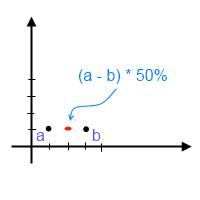
output:\> [2, 1]
在此之后,您所需要的就是从for(the distance; up toone‘从0.0到1.0并绘制像素。
Stack Overflow用户
发布于 2012-09-23 07:24:03
    private static Point CalculatePoint(Point a, Point b, int distance)
    {

        // a. calculate the vector from o to g:
        double vectorX = b.X - a.X;
        double vectorY = b.Y - a.Y;

        // b. calculate the proportion of hypotenuse
        double factor = distance / Math.Sqrt(vectorX * vectorX + vectorY * vectorY);

        // c. factor the lengths
        vectorX *= factor;
        vectorY *= factor;

        // d. calculate and Draw the new vector,
        return new Point((int)(a.X + vectorX), (int)(a.Y + vectorY));
}https://stackoverflow.com/questions/12550365
复制相似问题
腾讯云开发者

Copyright © 2013 - 2026 Tencent Cloud. All Rights Reserved. 腾讯云 版权所有
深圳市腾讯计算机系统有限公司 ICP备案/许可证号:粤B2-20090059  粤公网安备44030502008569号
腾讯云计算(北京)有限责任公司 京ICP证150476号 | 京ICP备11018762号