
UIScrollView地铁主题
UIScrollView地铁主题
提问于 2012-09-14 19:39:55
我正在尝试创建一个“大都会”风格的UIScrollView。它类似于iTunes应用程序在新ios版本中处理面板的方式,这个版本不会命名。
我不知道如何使视图布局/滚动,以便显示序列中的下一个视图。我尝试过各种各样的东西,比如保持contentSize的屏幕宽度,但是将每个视图移动到10以上,这样它就会像上面那样显示出来。我尝试让scrollView的边界小于屏幕,以便显示下一个视图的部分。毫无办法。
下面是我想要做的事情的图表:
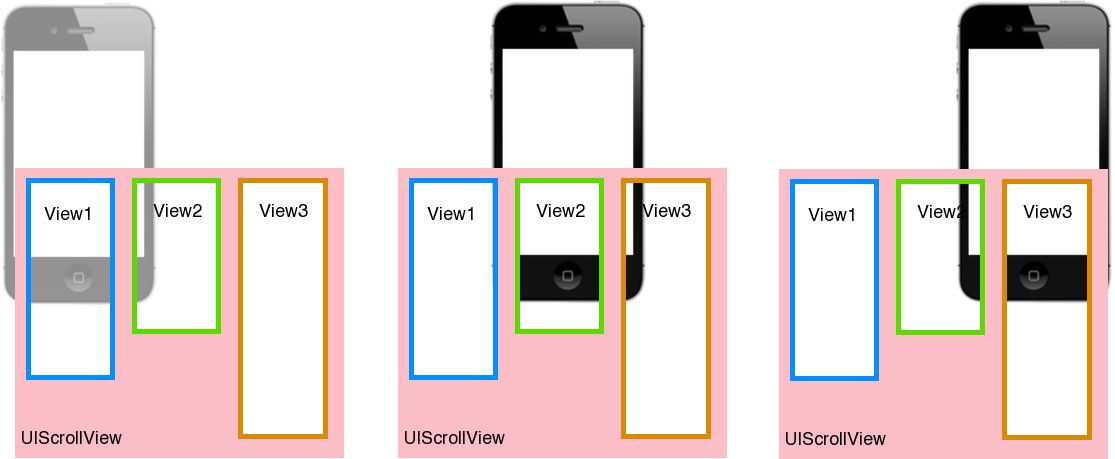
从纸上看,这似乎是极其琐碎的事,但我似乎无法使它发挥作用。
回答 1
Stack Overflow用户
回答已采纳
发布于 2012-09-14 22:27:58
我不确定我是否误解了您的需求--但这可能是了解如何设置它的起点:
- (void)viewDidLoad
{
  [super viewDidLoad];

  CGRect viewBounds      = self.view.bounds;
  CGRect scrollViewFrame = CGRectMake(0, 0, floorf(CGRectGetWidth(viewBounds) / 2.2), CGRectGetHeight(viewBounds));
  UIScrollView *scrollView = [[UIScrollView alloc] initWithFrame:scrollViewFrame];

  scrollView.center        = self.view.center;
  scrollView.contentSize   = CGSizeMake(CGRectGetWidth(viewBounds) * 3, CGRectGetHeight(viewBounds) * 3);
  scrollView.pagingEnabled = YES;
  scrollView.clipsToBounds = NO;

  UIPanGestureRecognizer *gestureRecognizer = scrollView.panGestureRecognizer;
  [self.view addGestureRecognizer:gestureRecognizer];

  for (int i = 0; i < 3; i++) {
    CGRect frame = CGRectMake(10.f + (i * CGRectGetWidth(scrollView.bounds)), 10.f, CGRectGetWidth(scrollView.bounds) - 20.f, (CGRectGetHeight(scrollViewFrame) * 3) - 20.f);
    UIView *view = [[UIView alloc] initWithFrame:frame];
    view.backgroundColor = [UIColor redColor];
    [scrollView addSubview:view];
  }

  [self.view addSubview:scrollView];
}把它放在一个空的viewController的viewDidLoad:中
要注意的关键是
contentSize需要对所有面板都足够宽clipsToBounds应该是NO,所以您可以看到其他视图- 滚动视图的边界实质上是主要的视图端口。
- 应该设置
pagingEnabled - 我从滚动视图中抓取了
panGestureRecognizer并将其附加到包含视图,以便在包含视图的边界(更大的视图)中检测到平移,否则只能检测滚动视图范围内的滚动。
页面原文内容由Stack Overflow提供。腾讯云小微IT领域专用引擎提供翻译支持
原文链接:
https://stackoverflow.com/questions/12430956
复制相关文章
相似问题
腾讯云开发者

Copyright © 2013 - 2026 Tencent Cloud. All Rights Reserved. 腾讯云 版权所有
深圳市腾讯计算机系统有限公司 ICP备案/许可证号:粤B2-20090059  粤公网安备44030502008569号
腾讯云计算(北京)有限责任公司 京ICP证150476号 | 京ICP备11018762号