
JavaScript中的单色抖动(拜耳,阿特金森,弗洛伊德-斯坦伯格)
我在HTML5中玩摄像头过滤器。有一台阿特金森抖动能很好的适应旧式的Mac感觉。
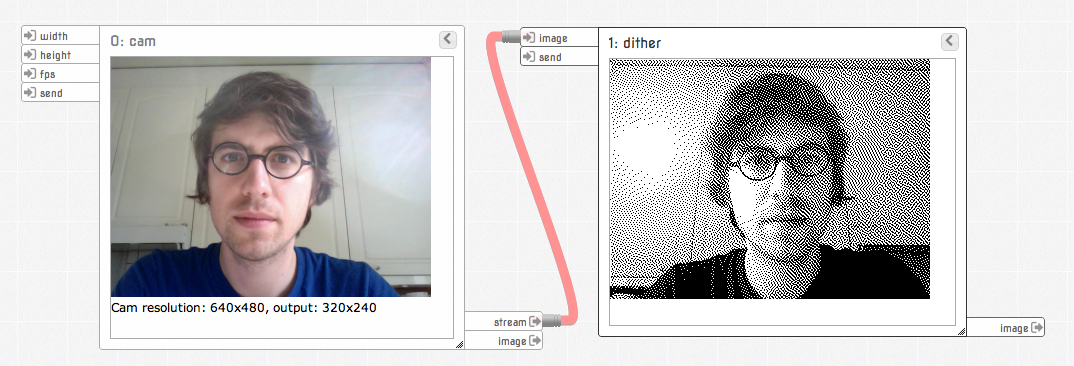
活着 x- 代码
现在,我正试图做出一个拜耳定购抖动的选择,1989年的游戏男孩的感觉。
我是读一读算法,但我很难将这个伪代码转换为JavaScript:
for each y
  for each x
    oldpixel := pixel[x][y] + threshold_map_4x4[x mod 4][y mod 4]
    newpixel := find_closest_palette_color(oldpixel)
pixel[x][y] := newpixel在AS3、PHP或JS中有什么例子吗?你能解释一下threshold_map_4x4[x mod 4][y mod 4]是怎么回事吗
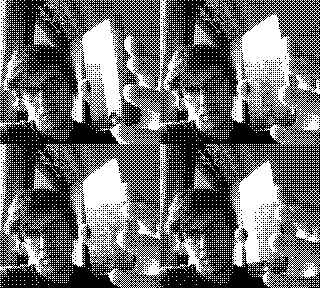
(用Meemoo Gameboy GIFerizer制作)
弄明白了。维基百科中写道:“例如,在单色渲染中,如果像素值(缩放到0-9范围)小于矩阵对应单元格中的数字,则将该像素绘制为黑色,否则,将其绘制为白色。”在js中,通过将当前像素(0-255)和映射的值(15-240)进行平均值并将其与阈值(通常为129)进行比较,我获得了很好的结果:
var map = (imageData.data[currentPixel] + bayerThresholdMap[x%4][y%4]) / 2;
imageData.data[currentPixel] = (map < threshold) ? 0 : 255;
以下是我使用不同算法的整个单色函数:
var bayerThresholdMap = [
  [  15, 135,  45, 165 ],
  [ 195,  75, 225, 105 ],
  [  60, 180,  30, 150 ],
  [ 240, 120, 210,  90 ]
];

var lumR = [];
var lumG = [];
var lumB = [];
for (var i=0; i<256; i++) {
  lumR[i] = i*0.299;
  lumG[i] = i*0.587;
  lumB[i] = i*0.114;
}

function monochrome(imageData, threshold, type){

  var imageDataLength = imageData.data.length;

  // Greyscale luminance (sets r pixels to luminance of rgb)
  for (var i = 0; i <= imageDataLength; i += 4) {
    imageData.data[i] = Math.floor(lumR[imageData.data[i]] + lumG[imageData.data[i+1]] + lumB[imageData.data[i+2]]);
  }

  var w = imageData.width;
  var newPixel, err;

  for (var currentPixel = 0; currentPixel <= imageDataLength; currentPixel+=4) {

    if (type === "none") {
      // No dithering
      imageData.data[currentPixel] = imageData.data[currentPixel] < threshold ? 0 : 255;
    } else if (type === "bayer") {
      // 4x4 Bayer ordered dithering algorithm
      var x = currentPixel/4 % w;
      var y = Math.floor(currentPixel/4 / w);
      var map = Math.floor( (imageData.data[currentPixel] + bayerThresholdMap[x%4][y%4]) / 2 );
      imageData.data[currentPixel] = (map < threshold) ? 0 : 255;
    } else if (type === "floydsteinberg") {
      // Floyd–Steinberg dithering algorithm
      newPixel = imageData.data[currentPixel] < 129 ? 0 : 255;
      err = Math.floor((imageData.data[currentPixel] - newPixel) / 16);
      imageData.data[currentPixel] = newPixel;

      imageData.data[currentPixel       + 4 ] += err*7;
      imageData.data[currentPixel + 4*w - 4 ] += err*3;
      imageData.data[currentPixel + 4*w     ] += err*5;
      imageData.data[currentPixel + 4*w + 4 ] += err*1;
    } else {
      // Bill Atkinson's dithering algorithm
      newPixel = imageData.data[currentPixel] < threshold ? 0 : 255;
      err = Math.floor((imageData.data[currentPixel] - newPixel) / 8);
      imageData.data[currentPixel] = newPixel;

      imageData.data[currentPixel       + 4 ] += err;
      imageData.data[currentPixel       + 8 ] += err;
      imageData.data[currentPixel + 4*w - 4 ] += err;
      imageData.data[currentPixel + 4*w     ] += err;
      imageData.data[currentPixel + 4*w + 4 ] += err;
      imageData.data[currentPixel + 8*w     ] += err;
    }

    // Set g and b pixels equal to r
    imageData.data[currentPixel + 1] = imageData.data[currentPixel + 2] = imageData.data[currentPixel];
  }

  return imageData;
}
我很感激优化提示。
回答 2
Stack Overflow用户
发布于 2013-05-03 03:13:57
以下是我所有的单色抖动功能,可作为web工作人员使用:https://github.com/meemoo/meemooapp/blob/master/src/nodes/image-monochrome-worker.js
使用摄像头的现场演示:http://meemoo.org/iframework/#gist/3721129
Stack Overflow用户
发布于 2012-09-14 11:36:14
我将此作为调试代码执行:
var canvas = document.createElement('canvas');
var ctx    = canvas.getContext('2d');

var img    = new Image();
img.src    = "http://i.stack.imgur.com/tHDY8.png";
img.onload = function() {
    canvas.width  = this.width;
    canvas.height = this.height;
    ctx.drawImage( this, 0, 0, this.width, this.height );

    var imageData  = ctx.getImageData( 0, 0, this.width, this.height);
    var depth      = 32;


    // Matrix
    var threshold_map_4x4 = [
        [  1,  9,  3, 11 ],
        [ 13,  5, 15,  7 ],
        [  4, 12,  2, 10 ],
        [ 16,  8, 14,  6 ]
    ];

    // imageData
    var width  = imageData.width;
    var height = imageData.height;
    var pixel  = imageData.data;
    var x, y, a, b;

    // filter
    for ( x=0; x<width; x++ )
    {
        for ( y=0; y<height; y++ )
        {
            a    = ( x * height + y ) * 4;
            b    = threshold_map_4x4[ x%4 ][ y%4 ];
            pixel[ a + 0 ] = ( (pixel[ a + 0 ]+ b) / depth | 0 ) * depth;
            pixel[ a + 1 ] = ( (pixel[ a + 1 ]+ b) / depth | 0 ) * depth;
            pixel[ a + 2 ] = ( (pixel[ a + 2 ]+ b) / depth | 0 ) * depth;
            //pixel[ a + 3 ] = ( (pixel[ a + 3 ]+ b) / depth | 3 ) * depth;
        }
    }

    ctx.putImageData( imageData, 0, 0);

};

document.body.appendChild(canvas);
而且它似乎工作得很好,您可以更改深度变量来更改后期化。
https://stackoverflow.com/questions/12422407
复制相似问题
腾讯云开发者

Copyright © 2013 - 2026 Tencent Cloud. All Rights Reserved. 腾讯云 版权所有
深圳市腾讯计算机系统有限公司 ICP备案/许可证号:粤B2-20090059  粤公网安备44030502008569号
腾讯云计算(北京)有限责任公司 京ICP证150476号 | 京ICP备11018762号