
FragmentTransaction什么也不做
我正在学习片段,下面是我的第一个片段程序。一个简单的项目,我有两个屏幕。当我点击第一个屏幕的下一个按钮时,需要显示第二个按钮。
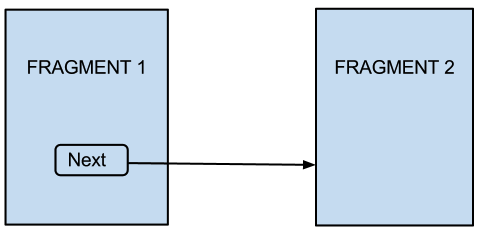
我的目标是Android2.1及以上版本和,使用兼容性软件包
AppMainFragmentActivity.java
public class AppMainFragmentActivity extends FragmentActivity {
  @Override
  protected void onCreate(Bundle arg0) {
    super.onCreate(arg0);
    setContentView(R.layout.app_main_layout);
  }
}
app_main_layout.xml
<?xml version="1.0" encoding="utf-8"?>
<LinearLayout xmlns:android="http://schemas.android.com/apk/res/android"
  android:layout_width="fill_parent" android:layout_height="fill_parent"
  android:orientation="vertical" android:id="@+id/fragment_container">

   <fragment class="com.research.fragmentstudy.FirstFragment"
      android:layout_width="fill_parent"
      android:layout_height="fill_parent"
      android:id="@+id/id_first_fragment"/>

</LinearLayout>
FirstFragment.java
public class FirstFragment extends Fragment {
  @Override
  public View onCreateView(LayoutInflater inflater, ViewGroup container,
            Bundle savedInstanceState) {
     View view = inflater.inflate(R.layout.first_fragment_layout
                 , container,false);

     Button nextButton =(Button) view.findViewById(R.id.button);
     nextButton.setOnClickListener(nextListener);
     return view;
  }

  private OnClickListener nextListener  =   new OnClickListener() {
     @Override
     public void onClick(View v) {
        FragmentManager fm = ((AppMainFragmentActivity)FirstFragment.this
                           .getActivity()).getSupportFragmentManager();
        SecondFragment fragment = new SecondFragment();
        FragmentTransaction ft = fm.beginTransaction();
        ft.add(R.id.fragment_container, fragment);
        ft.commit();
     }
  };
}
first_fragment_layout.xml
<?xml version="1.0" encoding="utf-8"?>
<LinearLayout xmlns:android="http://schemas.android.com/apk/res/android"
   android:layout_width="fill_parent" android:layout_height="fill_parent"
   android:orientation="vertical" android:id="@+id/first_fragment_root">

   <TextView android:layout_height="wrap_content"
       android:layout_width="fill_parent"
       android:text="Fragment 1" android:gravity="center_horizontal" />

   <Button android:layout_height="wrap_content"
       android:layout_gravity="center_horizontal"
       android:layout_width="wrap_content" android:id="@+id/button"
       android:text="Next" />

</LinearLayout>
SecondFragment.java
public class SecondFragment extends Fragment {
   @Override
   public View onCreateView(LayoutInflater inflater, ViewGroup container,
            Bundle savedInstanceState) {
      View view = inflater.inflate(R.layout.second_fragment_layout,
                     container,false);
      return view;
   }
}
second_fragment_layout.xml
<LinearLayout xmlns:android="http://schemas.android.com/apk/res/android"
   android:layout_width="fill_parent" android:layout_height="fill_parent"
   android:orientation="vertical" android:id="@+id/first_fragment_root">

   <TextView android:layout_height="wrap_content"
      android:layout_width="fill_parent"
      android:text="Fragment 2" android:gravity="center_horizontal" />

</LinearLayout>
嗯,我得到了第一个屏幕,好吧。现在,
从我对碎片的理解来看,我所期望的
- 当我单击屏幕1中的Next按钮时,将创建SecondFragment,调用它的
onCreate()和onCreateView()。 - SecondFragment被显示,FirstFragment被销毁(因为我没有将它添加到后台)。不会有任何动画,因为默认的片段事务没有动画。
发生了什么
- SecondFragment正在被创建,它的
onCreate()和onCreateView()被调用了。 - 但是FirstFragment仍然在屏幕上,而第二个则没有显示出来。
现在我对碎片的理解可能是错误的。但是我相信,当我们提交()一个片段事务时,第一个片段应该被第二个片段替换(第一个片段要么被隐藏,要么被销毁)。似乎什么都没发生。为什么会这样呢?我们应该手动销毁/隐藏第一个片段吗?
注:我知道对于这样一个基本的问题来说,这是一个很长的问题。但我把我的全部代码,因为我不知道我在哪里搞砸了。
回答 3
Stack Overflow用户
发布于 2012-09-18 12:34:35
我让它起作用了。这两个问题的答案都正确地说明了我的代码不能按预期工作的一个原因。但我的代码中有两个错误。
使用fragmentTransaction.add()不会在旧片段上显示新片段。您需要调用替换()。给出的答案是正确的。
但我的代码中还有一个错误。不能替换在xml中静态创建的片段。所以我改变了
app_main_layout.xml
<?xml version="1.0" encoding="utf-8"?>
<LinearLayout xmlns:android="http://schemas.android.com/apk/res/android"
  android:layout_width="fill_parent" android:layout_height="fill_parent"
  android:orientation="vertical" android:id="@+id/fragment_container">

</LinearLayout>
和
AppMainFragmentActivity.java
public class AppMainFragmentActivity extends FragmentActivity {

    @Override
    protected void onCreate(Bundle arg0) {
        super.onCreate(arg0);
        setContentView(R.layout.app_main_layout);

        FragmentManager fragmentManager = getSupportFragmentManager();
        FirstFragment fragment = new FirstFragment();
        FragmentTransaction fragmentTransaction = fragmentManager.beginTransaction();
        fragmentTransaction.add(R.id.fragment_container,fragment);
        fragmentTransaction.commit();
    }
}Stack Overflow用户
发布于 2012-09-14 04:44:04
您试过使用ft.replace(R.id.fragment_container,片段)而不是添加吗?add将不会删除现有的片段。
Stack Overflow用户
发布于 2012-09-14 04:55:54
您正试图在fragment_container中再添加一个片段,它正在添加,但是您的片段将不可见,因为您已经将id_first_fragment的宽度和高度指定为fill_parent,因此尝试为id_first_fragment片段设置wrap_content。单击按钮时,可以看到下一个片段。如果要关闭第一个片段并显示第二个片段,则需要替换而不是添加。
https://stackoverflow.com/questions/12418060
复制相似问题
腾讯云开发者

Copyright © 2013 - 2026 Tencent Cloud. All Rights Reserved. 腾讯云 版权所有
深圳市腾讯计算机系统有限公司 ICP备案/许可证号:粤B2-20090059  粤公网安备44030502008569号
腾讯云计算(北京)有限责任公司 京ICP证150476号 | 京ICP备11018762号