
将PropertyChangeListener添加到JComboBox
将PropertyChangeListener添加到JComboBox
提问于 2012-08-24 23:58:24
如何将PropertyChangeListener与JComboBox结合使用?当我用可编辑的JComboBox编写时,我会立即编写文本,因为我更改了组合框箭头按钮的图标;而关键侦听器不再工作了。这是我试过的,但我不知道如何完成:
editor = (JTextComponent) jComboBox1.getEditor().getEditorComponent();

editor.addPropertyChangeListener(new PropertyChangeListener()
{
    @Override
    public void propertyChange(PropertyChangeEvent evt)
    {

    }

});回答 1
Stack Overflow用户
发布于 2012-08-25 01:18:22
很难理解你想从你的帖子中得到什么,但是如果你有兴趣知道什么时候编辑内容被改变了,你可以试试
final JComboBox combo = new JComboBox();
combo.setEditable(true);
((JTextComponent) combo.getEditor().getEditorComponent()).getDocument().addDocumentListener(new DocumentListener() {
    protected void updatePopup() {

        if (combo.isDisplayable()) {

            if (!combo.isPopupVisible()) {

                combo.showPopup();

            }

        }

    }

    @Override
    public void insertUpdate(DocumentEvent e) {
        updatePopup();
    }

    @Override
    public void removeUpdate(DocumentEvent e) {
        updatePopup();
    }

    @Override
    public void changedUpdate(DocumentEvent e) {
        updatePopup();
    }
});
通常,我会创建一个"DocumentHandler“作为一个具体的类,然后使用它,但是这个示例演示了基本的思想
用UI示例更新的
public class TestComboBox extends JFrame {

    public TestComboBox() {

        setTitle("Test");
        setSize(200, 200);
        setLayout(new GridBagLayout());
        setDefaultCloseOperation(EXIT_ON_CLOSE);
        setLocationRelativeTo(null);

        final JComboBox combo = new JComboBox();

        /**** You have to do this first
         **** Doing this invalidates any previous listeners
         ****/
        combo.setUI(ColorArrowUI.createUI(combo));

        combo.setEditable(true);
        ((JTextComponent) combo.getEditor().getEditorComponent()).getDocument().addDocumentListener(new DocumentListener() {
            protected void updatePopup() {

                if (combo.isDisplayable()) {

                    if (!combo.isPopupVisible()) {

                        combo.showPopup();

                    }

                }

            }

            @Override
            public void insertUpdate(DocumentEvent e) {
                updatePopup();
            }

            @Override
            public void removeUpdate(DocumentEvent e) {
                updatePopup();
            }

            @Override
            public void changedUpdate(DocumentEvent e) {
                updatePopup();
            }
        });

        combo.setModel(createComboBoxModel());

        add(combo);

        setVisible(true);

    }

    protected ComboBoxModel createComboBoxModel() {

        DefaultComboBoxModel model = new DefaultComboBoxModel();

        File file = new File("../TestWords/Words.txt");
        BufferedReader reader = null;

        try {

            reader = new BufferedReader(new FileReader(file));
            String text = null;
            while ((text = reader.readLine()) != null) {

                model.addElement(text);

            }

        } catch (Exception e) {
        } finally {

            try {
                reader.close();
            } catch (Exception e) {
            }

        }

        return model;

    }

    /**
     * @param args the command line arguments
     */
    public static void main(String[] args) {
        try {
            for (javax.swing.UIManager.LookAndFeelInfo info : javax.swing.UIManager.getInstalledLookAndFeels()) {
                if ("Nimbus".equals(info.getName())) {
                    javax.swing.UIManager.setLookAndFeel(info.getClassName());
                    break;
                }
            }
        } catch (ClassNotFoundException ex) {
        } catch (InstantiationException ex) {
        } catch (IllegalAccessException ex) {
        } catch (javax.swing.UnsupportedLookAndFeelException ex) {
        }
        new TestComboBox();
    }

    public static class ColorArrowUI extends BasicComboBoxUI {

        public static ComboBoxUI createUI(JComponent c) {
            return new ColorArrowUI();
        }

        @Override
        protected JButton createArrowButton() {
            return new BasicArrowButton(
                            BasicArrowButton.SOUTH,
                            Color.cyan, Color.magenta,
                            Color.yellow, Color.blue);
        }
    }
}
使用UI设置
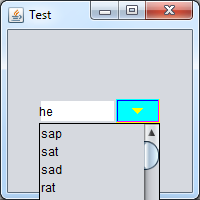
用油漆机
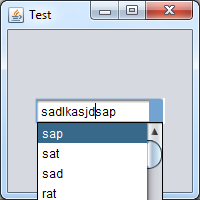
更新的
这是克莱奥帕特拉给你看的密码
Painter painter = new Painter<JComponent>() {

    @Override
    public void paint(Graphics2D g, JComponent object, int width, int height) {

        g.setColor(Color.WHITE);
        g.fillRect(0, 0, width, height);

    }

};

JButton org = null;
for (int i = 0; i < combo.getComponentCount(); i++) {
    if (combo.getComponent(i) instanceof JButton) {
        org = (JButton) combo.getComponent(i);
        UIDefaults buttonDefaults = new UIDefaults();
        buttonDefaults.put("ComboBox:\"ComboBox.arrowButton\"[Enabled].foregroundPainter", painter);
        org.putClientProperty("Nimbus.Overrides.InheritDefaults", false);
        org.putClientProperty("Nimbus.Overrides", buttonDefaults);
        break;
    }
}页面原文内容由Stack Overflow提供。腾讯云小微IT领域专用引擎提供翻译支持
原文链接:
https://stackoverflow.com/questions/12118060
复制相关文章
相似问题
腾讯云开发者

Copyright © 2013 - 2026 Tencent Cloud. All Rights Reserved. 腾讯云 版权所有
深圳市腾讯计算机系统有限公司 ICP备案/许可证号:粤B2-20090059  粤公网安备44030502008569号
腾讯云计算(北京)有限责任公司 京ICP证150476号 | 京ICP备11018762号