
MVC4工程图像不显示
我刚刚将我的第一个MVC4项目从我的开发机器部署到我的生产IIS7.5服务器上,我在使图像在服务器上正确显示方面遇到了一些问题。
这是否是IIS7中的权限问题?
<input type="image" src="Content/Images/Product.png" runat="server" />

当我在我的桌面上运行这个程序时,图像将被正确地显示出来,但是当我部署到服务器上时,我会得到标准的坏链接映像。我已经确认了图像在服务器上的正确路径。
我也尝试过将src更改为使用倾斜字符src="~/Content/Images/Product.png",但它仍然不起作用。
这也开始影响site.css文件的加载。
<head>
    <meta charset="utf-8" />
    <title>@ViewData("Title")</title>
    <link href="@Url.Content("~/Content/Site.css")" rel="stylesheet" type="text/css" />
    <script src="@Url.Content("~/Scripts/jquery-1.6.2.min.js")" type="text/javascript"></script>
    <script src="@Url.Content("~/Scripts/modernizr-2.0.6-development-only.js")" type="text/javascript"></script>
</head>
在Chrome中,我发现了一个错误,它没有被找到,也没有在任何浏览中加载,但是我已经确认了它在磁盘上。
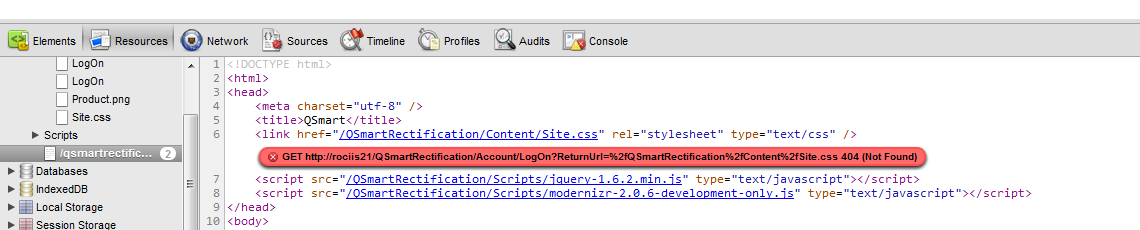
这里发生了奇怪的事..。
Web.Config
<?xml version="1.0"?>
<!--
  For more information on how to configure your ASP.NET application, please visit
  http://go.microsoft.com/fwlink/?LinkId=152368
  -->
<configuration>
  <configSections>
    <!-- For more information on Entity Framework configuration, visit http://go.microsoft.com/fwlink/?LinkID=237468 -->
    <section name="entityFramework" type="System.Data.Entity.Internal.ConfigFile.EntityFrameworkSection, EntityFramework, Version=4.4.0.0, Culture=neutral, PublicKeyToken=b77a5c561934e089" requirePermission="false"/>
  </configSections>
  <appSettings>
    <add key="webpages:Version" value="1.0.0.0"/>
    <add key="ClientValidationEnabled" value="true"/>
    <add key="UnobtrusiveJavaScriptEnabled" value="true"/>
  </appSettings>
  <system.web>
    <compilation debug="true" targetFramework="4.0"/>
    <authentication mode="Forms">
      <forms loginUrl="~/Account/LogOn" timeout="2880"/>
    </authentication>
    <pages controlRenderingCompatibilityVersion="4.0">
      <namespaces>
        <add namespace="System.Web.Helpers"/>
        <add namespace="System.Web.Mvc"/>
        <add namespace="System.Web.Mvc.Ajax"/>
        <add namespace="System.Web.Mvc.Html"/>
        <add namespace="System.Web.Routing"/>
        <add namespace="System.Web.WebPages"/>
      </namespaces>
    </pages>
    <profile defaultProvider="DefaultProfileProvider">
      <providers>
        <add name="DefaultProfileProvider" type="System.Web.Providers.DefaultProfileProvider, System.Web.Providers, Version=1.0.0.0, Culture=neutral, PublicKeyToken=31bf3856ad364e35" connectionStringName="DefaultConnection" applicationName="/"/>
      </providers>
    </profile>
    <membership defaultProvider="DefaultMembershipProvider">
      <providers>
        <add name="DefaultMembershipProvider" type="System.Web.Providers.DefaultMembershipProvider, System.Web.Providers, Version=1.0.0.0, Culture=neutral, PublicKeyToken=31bf3856ad364e35" connectionStringName="DefaultConnection" enablePasswordRetrieval="false" enablePasswordReset="true" requiresQuestionAndAnswer="false" requiresUniqueEmail="false" maxInvalidPasswordAttempts="5" minRequiredPasswordLength="6" minRequiredNonalphanumericCharacters="0" passwordAttemptWindow="10" applicationName="/"/>
      </providers>
    </membership>
    <roleManager defaultProvider="DefaultRoleProvider">
      <providers>
        <add name="DefaultRoleProvider" type="System.Web.Providers.DefaultRoleProvider, System.Web.Providers, Version=1.0.0.0, Culture=neutral, PublicKeyToken=31bf3856ad364e35" connectionStringName="DefaultConnection" applicationName="/"/>
      </providers>
    </roleManager>
    <sessionState mode="InProc" customProvider="DefaultSessionProvider">
      <providers>
        <add name="DefaultSessionProvider" type="System.Web.Providers.DefaultSessionStateProvider, System.Web.Providers, Version=1.0.0.0, Culture=neutral, PublicKeyToken=31bf3856ad364e35" connectionStringName="DefaultConnection"/>
      </providers>
    </sessionState>
  </system.web>
  <system.webServer>
    <validation validateIntegratedModeConfiguration="false"/>
    <modules runAllManagedModulesForAllRequests="true"/>
  </system.webServer>
  <runtime>
    <assemblyBinding xmlns="urn:schemas-microsoft-com:asm.v1">
      <dependentAssembly>
        <assemblyIdentity name="System.Web.Mvc" publicKeyToken="31bf3856ad364e35"/>
        <bindingRedirect oldVersion="1.0.0.0-2.0.0.0" newVersion="3.0.0.0"/>
      </dependentAssembly>
    </assemblyBinding>
  </runtime>
  <entityFramework>
    <defaultConnectionFactory type="System.Data.Entity.Infrastructure.SqlConnectionFactory, EntityFramework"/>
  </entityFramework>
  <connectionStrings>
    <add name="DefaultConnection" providerName="System.Data.SqlClient" connectionString="Data Source=(LocalDb)\v11.0;Initial Catalog=aspnet-QSmartRectification-20120731104636;Integrated Security=SSPI;AttachDBFilename=|DataDirectory|\aspnet-QSmartRectification-20120731104636.mdf"/>
  </connectionStrings>
  <system.serviceModel>
    <bindings>
      <basicHttpBinding>
        <binding name="Synchronise" />
      </basicHttpBinding>
    </bindings>
    <client>
      <endpoint address="http://172.30.66.20/QSmart/Synchronise/" binding="basicHttpBinding"
        bindingConfiguration="Synchronise" contract="QSmartRectificationProvider.ISyncProvider"
        name="Synchronise" />
    </client>
  </system.serviceModel>
</configuration>回答 4
Stack Overflow用户
发布于 2012-08-23 09:42:09
这可能是绝对路径的问题。如果页面是一个视图ActionResult,并且应用了默认的路由规则,那么您可以尝试"../../content/product.png“。或者,您可以使用helper @Url.Content("~/content/product.png")。您可以始终使用浏览器检查绝对路径。
还检查路由规则,看看它是否将内容文件夹映射到控制器。
Stack Overflow用户
发布于 2012-08-23 09:30:14
你把图像打到哪去了?如果您位于“查看”文件夹之一,则应尝试src="../../Content/Images/Product.png"
注意:每个..意味着一个文件夹向上。
Stack Overflow用户
发布于 2012-08-23 09:54:11
你试过在前面加上"/“的前缀吗?
<input type="image" src="/Content/Images/Product.png" runat="server" />另一个猜测是,您可能在路由中将RouteExistingFiles属性设置为true,因此css和图像没有加载。
https://stackoverflow.com/questions/12088565
复制相似问题
腾讯云开发者

Copyright © 2013 - 2026 Tencent Cloud. All Rights Reserved. 腾讯云 版权所有
深圳市腾讯计算机系统有限公司 ICP备案/许可证号:粤B2-20090059  粤公网安备44030502008569号
腾讯云计算(北京)有限责任公司 京ICP证150476号 | 京ICP备11018762号