
非双亲像素上的ImageView ColorFilter。夹
我有一个带有位图的ImageView。此位图具有alpha通道和透明像素。当我尝试使用ColorFiter与Mode.OVERLAY (自蜂巢)提供的颜色覆盖整个图像视图(整个rect),但我只想覆盖不透明的像素。如何剪辑图像视图的画布以在我想要的地方执行过滤器?
更新
我在巴布亚新几内亚有一个灰色的形象:
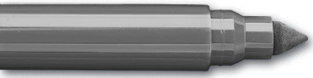
当我尝试使用MODE_ATOP时,我得到:

当我使用覆盖时,我得到:

我想要的是:
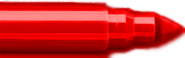
回答 2
Stack Overflow用户
发布于 2012-08-22 16:32:44
可能有一种更有效的方法(可能通过创建一个ColorMatrixColorFilter来近似它),但是由于Mode.OVERLAY似乎是否则很难简化,下面的示例代码应该实现您想要的东西:
public class MyActivity extends Activity {

    @Override
    protected void onCreate(Bundle savedInstanceState) {
        super.onCreate(savedInstanceState);

        final ImageView imageView = new ImageView(this);
        setContentView(imageView);

        final Paint paint = new Paint();
        Canvas c;

        final Bitmap src = BitmapFactory.decodeResource(getResources(),
                android.R.drawable.sym_def_app_icon);
        final int overlayColor = Color.RED;

        final Bitmap bm1 = Bitmap.createBitmap(src.getWidth(), src.getHeight(), Config.ARGB_8888);
        c = new Canvas(bm1);
        paint.setColorFilter(new PorterDuffColorFilter(overlayColor, PorterDuff.Mode.OVERLAY));
        c.drawBitmap(src, 0, 0, paint);

        final Bitmap bm2 = Bitmap.createBitmap(src.getWidth(), src.getHeight(), Config.ARGB_8888);
        c = new Canvas(bm2);
        paint.setColorFilter(new PorterDuffColorFilter(overlayColor, PorterDuff.Mode.SRC_ATOP));
        c.drawBitmap(src, 0, 0, paint);

        paint.setColorFilter(null);
        paint.setXfermode(new AvoidXfermode(overlayColor, 0, Mode.TARGET));
        c.drawBitmap(bm1, 0, 0, paint);

        imageView.setImageBitmap(bm2);
    }

}总之,我们使用OVERLAY模式绘制源位图和颜色,然后使用第二位图(使用SRC_ATOP模式组合),我们结合使用AvoidXfermode来不绘制透明像素。
原始图像:

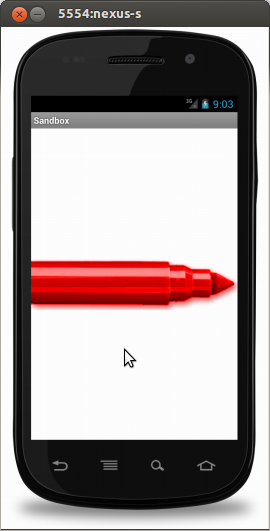
结果:
Stack Overflow用户
发布于 2019-10-14 22:26:37
您可以使用覆盖模式,然后使用DST_ATOP xFerMode提取曾经具有相同位图的透明区域。https://developer.android.com/reference/android/graphics/PorterDuff.Mode
private fun applyFilterToImage() {

    val bitmapCopy = Bitmap.createBitmap(originalImage.width, originalImage.height, Bitmap.Config.ARGB_8888)
    val canvas = Canvas(bitmapCopy)

    val rnd = java.util.Random()
    val randomColor = Color.rgb(rnd.nextInt(256), rnd.nextInt(256), rnd.nextInt(256))

    val paint = Paint()
    val porterDuffMode = PorterDuff.Mode.OVERLAY
    paint.colorFilter = PorterDuffColorFilter(randomColor, porterDuffMode)

    val maskPaint = Paint()
    maskPaint. xfermode = PorterDuffXfermode(PorterDuff.Mode.DST_ATOP)

    canvas.drawBitmap(originalImage, 0f, 0f, paint)

    canvas.drawBitmap(originalImage, 0f, 0f, maskPaint) //clips out the background that used to be transparent.

    imageView.setImageBitmap(bitmapCopy)
}
https://stackoverflow.com/questions/11968040
复制相似问题
腾讯云开发者

Copyright © 2013 - 2026 Tencent Cloud. All Rights Reserved. 腾讯云 版权所有
深圳市腾讯计算机系统有限公司 ICP备案/许可证号:粤B2-20090059  粤公网安备44030502008569号
腾讯云计算(北京)有限责任公司 京ICP证150476号 | 京ICP备11018762号