
线高影响第一行以上和最后一行后的间距
我有一条边标题有多行的文字。希望这两条线的间距增加,所以我设置了一条线高.当我这样做的时候,它不仅增加了两行之间的空间,还增加了第一行以上的间距(可能在第二行以下)。我怎样才能增加这两条线之间的间距,而不增加上面和下面的距离。
我知道这是Line-height的行为。但只是好奇是否有什么好的解决办法。
,这只是我所要求的例子。
Jsfiddle:http://jsfiddle.net/jitendravyas/V3eWV/
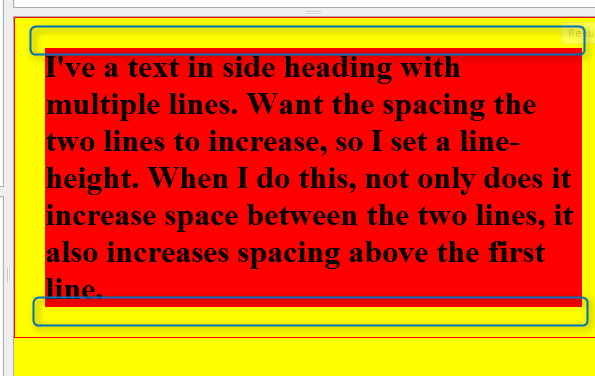
回答 1
Stack Overflow用户
发布于 2012-08-01 07:17:22
您可以对此使用负边距,但要记住的是:
line-height是一件有趣的事情。根据CSS2.1,它没有指定行高,而是指定了行块的最小高度:
在内容由内联级别元素组成的块容器元素上,“行高度”指定元素中行框的最小高度。最小高度由基线之上的最小高度和基线下的最小深度组成,就好像每个行框都以零宽度内嵌框开始,其中包含元素的字体和行高属性。我们称那个想象中的盒子为“骄傲”。(这个名字是受TeX启发的。)
在9.4.2内联格式上下文中定义了行框
在内联格式上下文中,框是水平排列的,一个接一个,从包含块的顶部开始。在这些框之间尊重水平边距、边框和填充。盒子可以以不同的方式垂直对齐:它们的底部或顶部可以对齐,或者其中的文本基线可能是对齐的。包含形成直线的框的矩形区域称为行框.。
这在CSS3非常喜欢中不会改变,至少如果不更改line-stacking的话。但是,没有直接针对您的问题的属性:您不能更改line-height的::first-line,它总是会被应用。
也就是说,暂时使用负利润率。更好的是,将元素包装在一个通用容器中。通过使用:first-child和:last-child,您可以添加任意数量的元素。
<div>
    <h1>I've a text in side heading with multiple lines. Want the spacing the two lines to increase, so I set a line-height. When I do this, not only does it increase space between the two lines, it also increases spacing above the first line.</h1>
    <h1>I've a text in side heading with multiple lines. Want the spacing the two lines to increase, so I set a line-height. When I do this, not only does it increase space between the two lines, it also increases spacing above the first line.</h1>
</div>body {padding:30px;background:yellow;border:1px solid red;margin:0}
div{background:red;margin:0;padding:0;border:1px solid green;}
h1{line-height:2em;}
div > h1:first-child{
margin-top:-.25em;
}
div > h1:last-child{
margin-bottom:-.25em;
}https://stackoverflow.com/questions/11753740
复制相似问题
腾讯云开发者

Copyright © 2013 - 2026 Tencent Cloud. All Rights Reserved. 腾讯云 版权所有
深圳市腾讯计算机系统有限公司 ICP备案/许可证号:粤B2-20090059  粤公网安备44030502008569号
腾讯云计算(北京)有限责任公司 京ICP证150476号 | 京ICP备11018762号