
无法添加CSS文件
请看下面的JavaFX和CSS代码。
Login2.java
package helloworld;

import javafx.application.Application;
import javafx.stage.*;
import javafx.scene.*;
import javafx.event.*;
import javafx.geometry.Pos;
import javafx.scene.control.*;
import javafx.scene.layout.GridPane;
import javafx.scene.layout.HBox;
import javafx.scene.paint.Color;
import javafx.scene.text.Text;

public class Login2 extends Application
{
    private Text welcome, message;
    private Label userName, password;
    private Button btn;
    private GridPane grid;
    private TextField userNameField;
    private PasswordField passwordField;
    private Scene scene;
    private HBox hbox, hbox2;


    public static void main(String[]args)
    {
        launch(args);
    }

    @Override
    public void start(Stage stage)
    {
        //Intializing instance Varaibles
        welcome = new Text("Welcome");
        message = new Text();

        userName = new Label("User Name: ");
        password = new Label("Password: ");

        btn = new Button("Submit");
        btn.setOnAction(new Action());

        userNameField = new TextField();
        passwordField = new PasswordField();

        grid = new GridPane();
        grid.setAlignment(Pos.CENTER);
        grid.setVgap(10);
        grid.setHgap(10);


        //Creating the GUI

        hbox = new HBox();
        hbox.getChildren().add(btn);
        hbox.setAlignment(Pos.BOTTOM_RIGHT);

        hbox2 = new HBox();
        hbox2.getChildren().add(message);
        hbox2.setAlignment(Pos.BOTTOM_RIGHT);

        grid.add(welcome,0,0);
        grid.add(userName,0,1);
        grid.add(userNameField,1,1);
        grid.add(password,0,2);
        grid.add(passwordField,1,2);
        grid.add(hbox,1,3);
        grid.add(hbox2,1,4);


        scene = new Scene(grid,300,275);


        stage.setTitle("Welcome Form");
        stage.setScene(scene);

        scene.getStylesheets().add(Login2.class.getResource("Login.css").toExternalForm());
        stage.show();
    }

    private class Action implements EventHandler<ActionEvent>
    {
        public void handle(ActionEvent ae)
        {
            message.setFill(Color.CRIMSON);
            message.setText("You pressed the button");
        }
    }
}
Login.css
/*
    Document   : Login
    Created on : Jul 14, 2012, 8:04:31 PM
    Author     : Yohan
    Description:
        Purpose of the stylesheet follows.
*/

.root {

   -fx-background-image: url(Desert.jpg);
}
当我运行这个程序时,我会得到以下错误。
应用程序启动方法中的异常线程“com.sun.javafx.application.LauncherImpl.launchApplication1(Unknown”中的异常( java.lang.RuntimeException:在应用程序启动方法中的异常)(在com.sun.javafx.application.LauncherImpl.access$000(Unknown源))在java.lang.Thread.run(Thread.java:722)中引起的异常,原因是: java.lang.NullPointerException在helloworld.Login2.start(Login2.java:80)(在com.sun.javafx.application.LauncherImpl$5.run(Unknown源代码)在com.sun.javafx.application.PlatformImpl$4.run(Unknown源代码)在com.sun.javafx.application.PlatformImpl$3.run(Unknown源代码)在com.sun.glass.ui.win.WinApplication._runLoop(Native方法)在com.sun.glass.ui.win.WinApplication.access$100(Unknown源代码).1更多的com.sun.javafx.application.PlatformImpl$3.run(Unknown结果:1
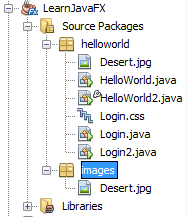
上传的图像显示了我的文件夹结构。
我为什么要犯这个错误?我不明白!这是我的第三个JavaFX代码。请帮帮我!
回答 2
Stack Overflow用户
发布于 2012-07-14 16:16:30
在Netbeans中,在默认的项目设置中,大多数情况下,当将非java资源文件添加到包结构时,需要从头开始重新构建项目。这样,新的资源将被复制到编译后的java文件存储和运行的"build“文件夹中(没有NullPointerException)。重建可以通过右键单击项目并执行“清洁和构建”来完成。
Stack Overflow用户
发布于 2012-07-14 15:37:33
我不得不承认,包结构有点棘手,因为它太容易忘记它是如何完成的,它必须花一个小时在线阅读示例,以使您的必要结构工作。
我会尝试以下几种方法。创建一个名为helloworld.support的新包(或其他一些合适的名称),然后将CSS文件移动到其中。然后,您应该能够通过调用:
Login2.class.getResource("/helloworld/support/Login.css")(为了清楚起见,删除了周围语句的其余部分)。
我将CSS文件移出源代码包的原因是,几个月前我意识到,每当我使用“Clean&Build”(在Netbeans 7中)时,它就会从我的源代码包中删除任何非Java文件,所以我所有的图像都丢失了,我不得不再次将它们移回来。有一次,我给了他们自己的图片包Netbeans让他们一个人。
https://stackoverflow.com/questions/11484745
复制相似问题
腾讯云开发者

Copyright © 2013 - 2026 Tencent Cloud. All Rights Reserved. 腾讯云 版权所有
深圳市腾讯计算机系统有限公司 ICP备案/许可证号:粤B2-20090059  粤公网安备44030502008569号
腾讯云计算(北京)有限责任公司 京ICP证150476号 | 京ICP备11018762号