
用鼠标旋转QGraphicsPixmapItem
我正在用PyQt编写一个应用程序,允许用户选择放置在QGraphicsScene上的图像(使用自定义的QGraphicsPixmapItem)。在选择时,我希望旋转手柄出现在图像上,用户可以用鼠标“抓取”并旋转,从而旋转QGraphicsPixmapItem。基本上,我正在寻找旋转处理功能,您在PowerPoint中获得的选择形状。这似乎是很多人都会实现的一个非常基本的特性,但我在网上找不到任何好的例子。谁能给我指明正确的方向?
回答 1
Stack Overflow用户
发布于 2016-11-08 13:54:34
让我们先把问题分成小的,然后再把所有的东西组合起来。我在这个解决方案中使用PyQt5。
1.旋转QGraphicsItem
为此,您需要在项目上使用setRotation设置旋转角度的度数。旋转将围绕setTransformOriginPoint指定的点。通常情况下,一个人会采取一个形状的中心。如果不指定此点,则通常采用形状的左上角。
2.拖动QGraphicsItem
由于性能原因,QGraphicsItems是不可移动的,也不会将位置更改发送到事件框架。通过设置适当的标志QtWidgets.QGraphicsItem.ItemIsMovable | QtWidgets.QGraphicsItem.ItemSendsScenePositionChanges,您可以更改它。此外,QGraphicsItem不是从QObject继承的,因此对于使用信号,我通常有一个从QObject继承的附加对象。
3.绘制一个手柄项目并确定旋转角度以旋转
在下面的示例中,我有一个很小的矩形作为句柄,您当然可以使用任何您喜欢的QGraphicsItem。我的方法make_GraphicsItem_draggable接受任何QGraphicsItem派生类并使其可拖放。要确定给定可拖动手柄项的当前位置和要旋转项目的转换来源的旋转角度,请使用math.atan2以及这些位置的x和y坐标的差异。
示例
import math
from PyQt5 import QtCore, QtWidgets

class DraggableGraphicsItemSignaller(QtCore.QObject):

    positionChanged = QtCore.pyqtSignal(QtCore.QPointF)

    def __init__(self):
        super().__init__()

def make_GraphicsItem_draggable(parent):

    class DraggableGraphicsItem(parent):

        def __init__(self, *args, **kwargs):
            """
            By default QGraphicsItems are not movable and also do not emit signals when the position is changed for
            performance reasons. We need to turn this on.
            """
            parent.__init__(self, *args, **kwargs)
            self.parent = parent
            self.setFlags(QtWidgets.QGraphicsItem.ItemIsMovable | QtWidgets.QGraphicsItem.ItemSendsScenePositionChanges)
            self.signaller = DraggableGraphicsItemSignaller()

        def itemChange(self, change, value):
            if change == QtWidgets.QGraphicsItem.ItemPositionChange:
                self.signaller.positionChanged.emit(value)

            return parent.itemChange(self, change, value)

    return DraggableGraphicsItem

def rotate_item(position):
    item_position = item.transformOriginPoint()
    angle = math.atan2(item_position.y() - position.y(), item_position.x() - position.x()) / math.pi * 180 - 45 # -45 because handle item is at upper left border, adjust to your needs
    print(angle)
    item.setRotation(angle)


DraggableRectItem = make_GraphicsItem_draggable(QtWidgets.QGraphicsRectItem)

app = QtWidgets.QApplication([])

scene = QtWidgets.QGraphicsScene()
item = scene.addRect(0, 0, 100, 100)
item.setTransformOriginPoint(50, 50)

handle_item = DraggableRectItem()
handle_item.signaller.positionChanged.connect(rotate_item)
handle_item.setRect(-40, -40, 20, 20)
scene.addItem(handle_item)

view = QtWidgets.QGraphicsView(scene)
view.setFixedSize(300, 200)
view.show()

app.exec_()
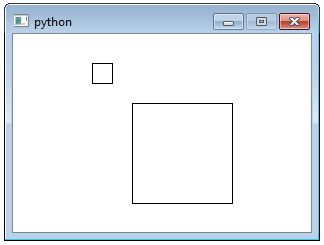
开始(项目=大矩形和句柄=小矩形)
拖动手柄后旋转(小矩形)
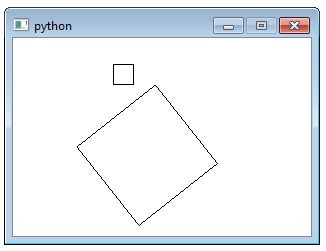
缺少的一点是:手柄与项目位置没有固定的距离(也就是说,您可以将其拖得更远或更近,而不是在一个圆圈中移动)。虽然这不会改变旋转角度,但它看起来并不完美。但要点在这里涵盖,并应使你走上正确的轨道。
https://stackoverflow.com/questions/11147443
复制相似问题
腾讯云开发者

Copyright © 2013 - 2026 Tencent Cloud. All Rights Reserved. 腾讯云 版权所有
深圳市腾讯计算机系统有限公司 ICP备案/许可证号:粤B2-20090059  粤公网安备44030502008569号
腾讯云计算(北京)有限责任公司 京ICP证150476号 | 京ICP备11018762号