
如何在iTunes连接中测试我的跟踪
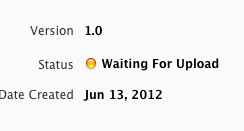
我在iOS sdk中进行应用程序内购买,我完成了所有步骤,比如在iTunes中创建应用程序和在管理中创建非自耗应用程序,iTunes connect.my应用程序状态是等待上传,就像下面的屏幕截图:
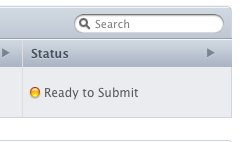
而且我的is状态是准备提交
代码内嵌-购买功能完成,但,我的应用程序是SKProductsRequest返回没有找到的产品.!
我的主要应用程序包id就像com.mycompany.myapp,
以及我的应用程序包id (如com.mycompany.paidapp. )
他们如何测试的内装购买步骤,可以任何一个可以指导我,请!
我的示例代码在这里:
- (void)loadStore {

    if ([SKPaymentQueue canMakePayments]) {
        NSLog(@"Parental-controls are disabled");

        request = [[SKProductsRequest alloc] initWithProductIdentifiers:[NSSet setWithObject:@"com.mycompany.paidapp"]];
        //request.delegate = self;
        [request setDelegate:self];
        [request start];


    }
    else {
        NSLog(@"Parental-controls are enabled");
    }

}

- (void)productsRequest:(SKProductsRequest *)request didReceiveResponse:(SKProductsResponse *)response {

    SKProduct *validProduct = nil;
    int count = [response.products count];
    if (count > 0)
    {
        validProduct = [response.products objectAtIndex:0];
        NSLog(@"Products found!");
        [[NSNotificationCenter defaultCenter] postNotificationName:kProductsLoadedNotification object:@"Product Found..!"];

    } else if (!validProduct)
    {
        NSLog(@"No products available");
        [[NSNotificationCenter defaultCenter] postNotificationName:kProductsLoadedNotification object:@"Product Not Found..!"];

    }

}
命令提示符返回nslog,始终低于输出:
No products available
回答 2
Stack Overflow用户
发布于 2012-06-14 13:46:12
为了测试in-App,您可以在发布应用程序之前创建一个AppID和一些In-App内容,这样就可以很好地检查它。
因此,我遵循的原则是: 1.首先上传一个应用程序。2.添加应用程序内容。3.自己拒绝二进制文件。一旦您对应用程序测试满意,然后将新的二进制文件重新加载到iTunes中。
希望这能有所帮助。
Stack Overflow用户
发布于 2012-06-14 11:37:00
应用程序包名称和iTunes应用程序包名称应该是相同的。产品必须存在于iTunes上。试试下面的代码:
[productIdentifierList addObject:@"CB001"];
[productIdentifierList addObject:@"CB002"];
[productIdentifierList addObject:@"CB003"];

        SKProductsRequest *request = [[SKProductsRequest alloc] initWithProductIdentifiers:[NSSet setWithArray:productIdentifierList]];
        request.delegate = self;
        [request start];
CB001,CB002是您iTunes上的产品标识。
对我来说很好。
https://stackoverflow.com/questions/11031975
复制相似问题
腾讯云开发者

Copyright © 2013 - 2026 Tencent Cloud. All Rights Reserved. 腾讯云 版权所有
深圳市腾讯计算机系统有限公司 ICP备案/许可证号:粤B2-20090059  粤公网安备44030502008569号
腾讯云计算(北京)有限责任公司 京ICP证150476号 | 京ICP备11018762号