
为什么winform不更新其运行时的宽度和高度?
我不太清楚该如何准确地回答这个问题,但在我解释问题所在之后,你会明白的。
我有一个像长方形,椭圆形,直线等形状的曲线图,就像下面的形状一样。之后,我将这些形状保存到一个二进制文件中。
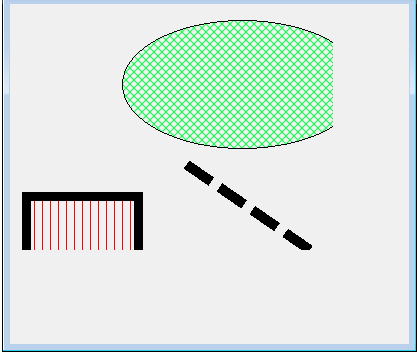
但是,如果您注意到当我的程序启动并打开保存的形状时,由于一些奇怪的原因,winform将保持其设计时的宽度和高度,以显示形状看起来被分割掉的形状,即使winform有足够的油漆面积来完全绘制所有形状。
此外,如果我重新加载的winform,它使用其当前的宽度和高度绘制形状。因此,winform看起来就像我所期望的那样,如下所示。
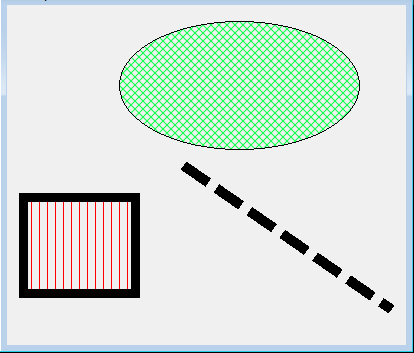
我错过了什么或者需要做什么?因此,winform将在运行时始终更新到其当前的宽度和高度。
更新:
下面是绘制矩形的代码。矩形是我程序设计中一个类的对象。因此,每个对象都有自己的绘制方法。因此,在画图事件中,列表中的所有对象都调用如下所示的绘制方法。
method ViewFrmpas.ViewFrmpas_Paint(sender: System.Object; e: System.Windows.Forms.PaintEventArgs);
begin
     myObjects.Draw;
end;
下面是我在winform上绘制矩形的实际绘制方法。
method TMakerRect.Draw;
var
  outpoints:Array of point;
  inpoints:Array of point;
  r,fr:Rectangle;
  midx,midy:integer;
  theBrush1:HatchBrush;
  theBrush2:SolidBrush;
begin
  r := bounds;
  fr := bounds;

  if (theBrushStyle = HatchStyle.Wave) then
     theBrush1 := new HatchBrush(theBrushStyle,Color.Transparent,color.Transparent)
  else if (theBrushStyle = HatchStyle.ZigZag) then
     thebrush2 := new SolidBrush(FillColor)
  else
     theBrush1 := new HatchBrush(theBrushStyle,FillColor,color.Transparent);

  if (thePen.DashStyle = DashStyle.Custom) then
    thepen.Color := Color.Transparent;

  outpoints := new point[5];
  inpoints := new point[4];
  with r do
  begin
    midx := ((right - left) div 2) + left;
    midy := ((bottom - top) div 2) + top;
    inpoints[0].x := left; inpoints[0].y := top;
    inpoints[1].x := right; inpoints[1].y := top;
    inpoints[2].x := right; inpoints[2].y := bottom;
    inpoints[3].x := left; inpoints[3].y := bottom;
  end;

  if Active then
  begin
    Fill(var fr);
    with fr do
    begin
      outpoints[0].x := r.Left; outpoints[0].y := r.Top;
      outpoints[1].x := left; outpoints[1].y := top;
      outpoints[2].x := right; outpoints[2].y := top;
      outpoints[3].x := right; outpoints[3].y := bottom;
      outpoints[4].x := left; outpoints[4].y := bottom;
    end;

    Scale(var inpoints,4,midx,midy);
    Rotate( var inpoints,4,midx,midy);
    Translate(var inpoints,4);

    Scale(var outpoints,5,midx,midy);
    Rotate( var outpoints,5,midx,midy);
    Translate(var outpoints,5);

    if Visible then
    begin
        if theBrushStyle = HatchStyle.ZigZag then
            g.FillPolygon(theBrush2,inpoints)
        else
            g.FillPolygon(thebrush1,inpoints);

      g.DrawPolygon(thepen,outpoints);
    end;
  end
  else
  begin
      outpoints[0].x := r.Left; outpoints[0].y := r.Top;
      outpoints[1].x := r.left; outpoints[1].y := r.top;
      outpoints[2].x := r.right; outpoints[2].y := r.top;
      outpoints[3].x := r.right; outpoints[3].y := r.bottom;
      outpoints[4].x := r.left; outpoints[4].y := r.bottom;

    if theBrushStyle = HatchStyle.ZigZag then
        g.FillPolygon(thebrush2,inpoints)
    else
        g.FillPolygon(theBrush1,inpoints);

    g.DrawPolygon(thepen,outpoints);
  end;
end;回答 1
Stack Overflow用户
发布于 2012-06-05 13:06:26
g.FillPolygon(theBrush2,inpoints)g变量从天而降,目前尚不清楚它来自何处。但是从结果来看,您可能犯了早期初始化它的错误,可能是通过使用CreateGraphics()。这不能正常工作,Graphics对象将从窗口的设备上下文中初始化,该设备上下文表示创建窗口时窗口的大小。调整窗口大小不能再更改Graphics.ClipBounds。
您必须使用在Paint事件处理程序中传递的e.Graphics对象。只需将其作为参数传递以进行绘制()。这不仅是为了确保剪辑边界是正确的,这也是非常重要的是,使双缓冲工作正常。
https://stackoverflow.com/questions/10853411
复制相似问题
腾讯云开发者

Copyright © 2013 - 2026 Tencent Cloud. All Rights Reserved. 腾讯云 版权所有
深圳市腾讯计算机系统有限公司 ICP备案/许可证号:粤B2-20090059  粤公网安备44030502008569号
腾讯云计算(北京)有限责任公司 京ICP证150476号 | 京ICP备11018762号