
安卓泰米尔字体在英文单词之间
我有一个TextView,它之间有一个巨大的文本,我有一个泰米尔语单词,我知道如何将泰米尔语字体嵌入到单独的文本视图.but中,我需要在英文单词之间加上泰米尔语单词,请提前感谢。
文本视图中我的部分文本:
像欢迎(நல்வரவு)这样的季节性信息被用于科兰。在寺庙里自愿画柯兰有时是在奉献者的时候
回答 4
Stack Overflow用户
发布于 2012-05-17 14:27:23
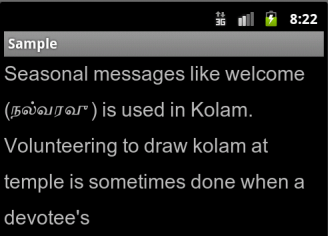
尝试通过Akshar.ttf将此TextView字体设置为setTypeface,它同时支持英语和泰米尔语。
结果如下:
或者,寻找支持这两种语言的类似字体。
第二个解决方案是使用SpannableStringBuilder.为这个小的泰米尔文本部分使用图像。
将自定义字体设置为TextView的代码:
假设您在Akshar.ttf文件夹中的字体文件夹下的资产文件夹:
 Typeface tf = Typeface.createFromAsset(getAssets(), "fonts/Akshar.ttf");
    TextView tv = (TextView) findViewById(R.id.CustomFontText);
    tv.setTypeface(tf);
tv.setText("Seasonal messages like welcome (நல்வரவு) is used in Kolam. Volunteering to draw kolam at temple is sometimes done when a devotee's");Stack Overflow用户
发布于 2012-05-24 15:45:45
如果希望在TextView中支持多个字体,但在单个ttf中不支持它们,还有另一种解决方案:
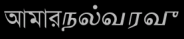
使用以下代码:(我使用的是班加罗语和泰米尔语字体)
  TextView txt = (TextView) findViewById(R.id.custom_fonts);
        txt.setTextSize(30);
        Typeface font = Typeface.createFromAsset(getAssets(), "Akshar.ttf");
        Typeface font2 = Typeface.createFromAsset(getAssets(), "bangla.ttf");
        SpannableStringBuilder SS = new SpannableStringBuilder("আমারநல்வரவு");
        SS.setSpan (new CustomTypefaceSpan("", font2), 0, 4,Spanned.SPAN_EXCLUSIVE_INCLUSIVE);
        SS.setSpan (new CustomTypefaceSpan("", font), 4, 11,Spanned.SPAN_EXCLUSIVE_INCLUSIVE);
        txt.setText(SS);
其结果是:
CustomTypefaceSpan类:
package my.app;
import android.graphics.Paint;
import android.graphics.Typeface;
import android.text.TextPaint;
import android.text.style.TypefaceSpan;

public class CustomTypefaceSpan extends TypefaceSpan {

private final Typeface newType;

public CustomTypefaceSpan(String family, Typeface type) {
    super(family);
    newType = type;
}

@Override
public void updateDrawState(TextPaint ds) {
    applyCustomTypeFace(ds, newType);
}

@Override
public void updateMeasureState(TextPaint paint) {
    applyCustomTypeFace(paint, newType);
}

private static void applyCustomTypeFace(Paint paint, Typeface tf) {
    int oldStyle;
    Typeface old = paint.getTypeface();
    if (old == null) {
        oldStyle = 0;
    } else {
        oldStyle = old.getStyle();
    }

    int fake = oldStyle & ~tf.getStyle();
    if ((fake & Typeface.BOLD) != 0) {
        paint.setFakeBoldText(true);
    }

    if ((fake & Typeface.ITALIC) != 0) {
        paint.setTextSkewX(-0.25f);
    }

    paint.setTypeface(tf);
}
}Stack Overflow用户
发布于 2012-06-30 09:28:46
我在Android4.0中遇到了这个问题。我发现这是由于csc(国家代码)。如果是印度人,那么泰米尔人就正常工作,否则就不工作了。我可以证实这一点。
https://stackoverflow.com/questions/10635516
复制相似问题
腾讯云开发者

Copyright © 2013 - 2026 Tencent Cloud. All Rights Reserved. 腾讯云 版权所有
深圳市腾讯计算机系统有限公司 ICP备案/许可证号:粤B2-20090059  粤公网安备44030502008569号
腾讯云计算(北京)有限责任公司 京ICP证150476号 | 京ICP备11018762号