
获取选定的文本asp.net自定义服务器控件
我需要获得javascript在自定义控件中设置的最新文本。当我试图从服务器控件获取选定的文本时,它总是返回默认文本,而不是修改后的文本。如何在服务器控制中保留javascript设置的最新值?下面是供您参考的完整代码。
ServerControl1.cs
[assembly: WebResource("ServerControl1.Scripts.JScript1.js", "text/javascript")]
namespace ServerControl1
{
[DefaultProperty("Text")]
[ToolboxData("<{0}:ServerControl1 runat=server></{0}:ServerControl1>")]
public class ServerControl1 : WebControl
{
    public List<string> ListItems
    {
        get
        {
            return ViewState["items"] as List<string>;
        }
        set
        {
            ViewState["items"] = value;
        }
    }

    public string Text
    {
        get
        {
            return (FindControl("middleDiv").FindControl("anchorID") as HtmlAnchor).InnerText;
        }
        set
        {
            ((FindControl("middleDiv").FindControl("anchorID") as HtmlAnchor)).InnerText = value;
        }
    }

    protected override void CreateChildControls()
    {
        base.CreateChildControls();

        HtmlGenericControl selectedTextContainer = new HtmlGenericControl("div");
        selectedTextContainer.ClientIDMode = System.Web.UI.ClientIDMode.Static;
        selectedTextContainer.ID = "middleDiv";

        HtmlAnchor selectedTextAnchor = new HtmlAnchor();
        selectedTextAnchor.ClientIDMode = System.Web.UI.ClientIDMode.Static;
        selectedTextAnchor.ID = "anchorID";
        selectedTextAnchor.HRef = "";
        selectedTextContainer.Controls.Add(selectedTextAnchor);

        HtmlGenericControl unList = new HtmlGenericControl("ul");

        foreach (string item in ListItems)
        {
            HtmlGenericControl li = new HtmlGenericControl("li");
            HtmlAnchor anchor = new HtmlAnchor();
            anchor.HRef = "";
            anchor.Attributes.Add("onclick", "updateData()");
            anchor.InnerText = item;
            li.Controls.Add(anchor);
            unList.Controls.Add(li);
        }

        selectedTextContainer.Controls.Add(unList);
        Controls.Add(selectedTextContainer);

        ChildControlsCreated = true;
    }

    protected override void OnPreRender(EventArgs e)
    {
        base.OnPreRender(e);
        string resourceName = "ServerControl1.Scripts.JScript1.js";

        ClientScriptManager cs = this.Page.ClientScript;
        cs.RegisterClientScriptResource(typeof(ServerControl1), resourceName);
    }
 }
}
JScript1.js
function updateData() {
var evt = window.event || arguments.callee.caller.arguments[0];
var target = evt.target || evt.srcElement;
var anchor = document.getElementById("anchorID");
anchor.innerText = target.innerText;
return false;
}
TestPage编解码器
protected void Page_Load(object sender, EventArgs e)
{
  if (!Page.IsPostBack)
  {
     List<string> items = GetDataSource();
     ServerControl1.ListItems = items;
     ServerControl1.Text = "Select ..";
  }
}
protected void ClientButton_Click(object sender, EventArgs e)
{
   string selectedText = ServerControl1.Text;
}回答 1
Stack Overflow用户
发布于 2012-05-24 18:32:07
除非您将更改发布给他,否则服务器将不会得到您的客户端更改。您的HtmlAnchors以<a>控件的形式呈现,并且这些类型的控件不会向服务器发布任何内容。
您将需要一个<input>控件将更改输入到服务器(这就是为什么它们最终被称为输入控件)。我建议使用<input type=hidden>来保存anchor.innerText的值并保持其状态。
您的Javascript函数需要修改,这样它就可以更新anchor.innerText并更新隐藏的输入值。这样,当页面回发到服务器时,您可以从隐藏字段中检索更新的和客户端修改的值。
首先,您需要将selectedTextAnchor和要插入的hiddenField定义为私有字段。这是因为您需要在CreateChildControls方法以及yout属性的getter和setter中访问它们。在很大程度上,部分设计器类定义了您希望在代码隐藏中可用的控件。
ServerControl.cs
private HtmlAnchor selectedTextAnchor;
private HtmlInputHidden hiddenField;
在CreateChildControls方法中,需要插入隐藏字段。
您会注意到,我删除了ClientIDMode.Static的使用。使用这种模式将使客户端控件具有相同的固定in和Javascript,当您在一个页面中拥有多个ServerControl副本时,可能会混淆,从而失去自定义控件的可重用性。
相反,您需要为Javascript函数提供它需要修改的控件的ClientID。这里的关键是,在尝试获取它们的ClientID.之前,需要将控件附加到控件的层次结构中
一旦您完成this.Controls.Add(dummyControl),您将使dummyControl成为页面的一部分,并且它的dummyControl.ClientID将突然被更改以反映您要将其附加到的页面的层次结构。
我更改了控件连接到控件集合的顺序,以便在构建onclick属性时获取它们的ClientID,并传递参数,以便Javascript函数知道要影响哪个锚点和hiddenField。
ServerControl.cs
protected override void CreateChildControls()
{
    base.CreateChildControls();

    // Instantiate the hidden input field to include
    hiddenField = new HtmlInputHidden();
    hiddenField.ID = "ANCHORSTATE";

    // Insert the hiddenfield into the Control's Collection hierarchy
    // to ensure that hiddenField.ClientID contains all parent's NamingContainers
    Controls.Add(hiddenField);

    HtmlGenericControl selectedTextContainer = new HtmlGenericControl("div");
    // REMOVED: selectedTextContainer.ClientIDMode = System.Web.UI.ClientIDMode.Static;
    selectedTextContainer.ID = "middleDiv";

    selectedTextAnchor = new HtmlAnchor();
    // REMOVED: selectedTextAnchor.ClientIDMode = System.Web.UI.ClientIDMode.Static;
    selectedTextAnchor.ID = "anchorID";
    selectedTextAnchor.HRef = "";
    selectedTextContainer.Controls.Add(selectedTextAnchor);

    // Insert the selectedTextContainer (and its already attached selectedTextAnchor child)
    // into the Control's Collection hierarchy
    // to ensure that selectedTextAnchor.ClientID contains all parent's NamingContainers
    Controls.Add(selectedTextContainer);

    HtmlGenericControl unList = new HtmlGenericControl("ul");

    foreach (string item in ListItems)
    {
        HtmlGenericControl li = new HtmlGenericControl("li");
        HtmlAnchor anchor = new HtmlAnchor();
        anchor.HRef = "";

        // The updateData function is provided with parameters that will help
        // to know who's triggering and to find the anchor and the hidden field.
        // ClientID's are now all set and resolved at this point.
        anchor.Attributes.Add("onclick", "updateData(this, '" + selectedTextAnchor.ClientID + "', '" + hiddenField.ClientID + "')");
        anchor.InnerText = item;
        li.Controls.Add(anchor);
        unList.Controls.Add(li);
    }

    selectedTextContainer.Controls.Add(unList);
}注意关键字this在updateData函数中的使用,它将帮助我们获取触发操作的对象。还请注意,两个Id都以字符串的形式传递(带有单引号)
Javascript函数需要修改,以便更新锚点和隐藏的输入字段。
JScript1.js
    function updateData(sender, anchorId, hidFieldId) {
            // Update the anchor
            var anchor = document.getElementById(anchorId);
            anchor.innerText = sender.innerText;
            // Update the hidden Input Field
            var hidField = document.getElementById(hidFieldId);
            hidField.value = sender.innerText;
            return false;
        }
最后要做的是改变设置和获取文本属性的方式。
当您获得属性时,您需要检查它是否是回发,如果是,则需要检查来自浏览器的所有信息中是否有您的HiddenInputField。您可以在请求对象(更具体地说,在Request.Form中)获取来自客户端的所有信息。
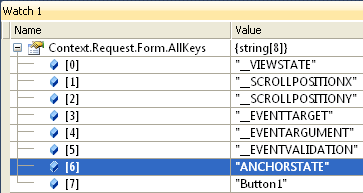
页面上所有已启用的输入控件都将是Request.Form集合的一部分,您可以使用Request.Form[anyInputControl.UniqueID]获取它们的值。注意,用于此对象的键是UniqueID,而不是ClientID。
一旦从隐藏的输入中获得客户端修改的值,就将它的值分配给selectedTextAnchor,否则它将返回到原来的“Select……”文本。
当设置属性时,只需将其分配给selectedTextAnchor即可。
在中,GET和SET都需要调用EnsureChildControls(),它实际上将调用CreateChildControls(),以确保在尝试获取selectedTextAnchor和hiddenField控件的某些属性之前实例化它们。这与在复合控制中所做的几乎一样。
ServerControl.cs
public string Text
{
    get
    {
        EnsureChildControls();
        if (this.Page.IsPostBack)
        {
            string HiddenFieldPostedValue = Context.Request.Form[hiddenField.UniqueID];
            // Assign the value recovered from hidden field to the Anchor
            selectedTextAnchor.InnerText = HiddenFieldPostedValue;
            return HiddenFieldPostedValue;
        }
        else
        {
            return selectedTextAnchor.InnerText;
        }
    }
    set
    {
        EnsureChildControls();
        selectedTextAnchor.InnerText = value;
    }
}
这样,您就可以有一个控件来识别客户端中所做的更改。记住,除非你注意到他,否则服务器不会知道客户端的任何变化。
另一种方法是每次通过ajax请求单击链接时都会注意到服务器,但这需要全新的不同代码。
祝好运!
https://stackoverflow.com/questions/10367847
复制相似问题
腾讯云开发者

Copyright © 2013 - 2026 Tencent Cloud. All Rights Reserved. 腾讯云 版权所有
深圳市腾讯计算机系统有限公司 ICP备案/许可证号:粤B2-20090059  粤公网安备44030502008569号
腾讯云计算(北京)有限责任公司 京ICP证150476号 | 京ICP备11018762号