
多个启动项目之间的Visual延迟?
如何在解决方案中增加启动项目之间的延迟?
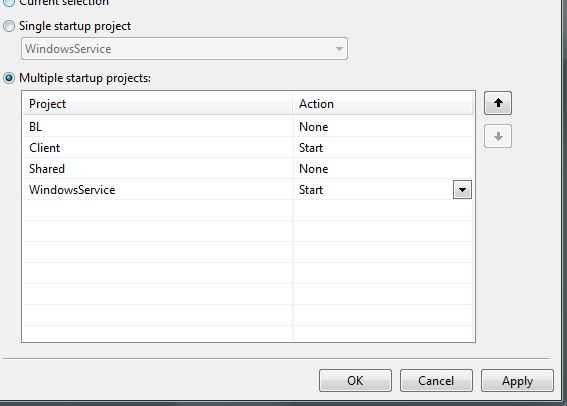
我希望客户端项目在启动WindowsService后2-3秒后启动。
为什么我需要这个?
WindowsService运行套接字服务器,客户端运行套接字连接服务器。WindowsService的加载速度比客户端慢,当连接到尚未运行的
服务器时,这将在客户端造成异常。
回答 9
Stack Overflow用户
发布于 2012-06-22 05:58:57
我可能会在客户机中添加一个重试机制。这样,它不仅在“从Visual启动”的情况下有所帮助--如果服务器在真正的客户端连接时碰巧重新启动,也会有所帮助。服务器位于速度更快的机器上这一事实并不意味着服务器将永远不需要重新启动,对吗?
实际上,您很可能希望添加这种重试机制,这样即使服务器连接时重新启动,客户端也可以恢复。当然,这取决于项目正在做什么。
Stack Overflow用户
发布于 2012-04-27 13:12:51
可以使用Mutex锁定来同步两个启动项目。
项目1 (StartUp项目1):
    namespace ConsoleApplication1
{
    using System;
    using System.Collections.Generic;
    using System.Linq;
    using System.Text;
    using System.Threading;

    class Program1
    {
        private static  bool isNewMutexCreated = true;
        private static Mutex mutex;
        static void Main(string[] args)
        {
            mutex = new Mutex(true, "Global\\ConsoleApplication1", out isNewMutexCreated);
            AppDomain.CurrentDomain.ProcessExit += new EventHandler(CurrentDomain_ProcessExit);
            Console.WriteLine("Application1 executed on " + DateTime.Now.ToString());

            Console.ReadKey();
        }

        static void CurrentDomain_ProcessExit(Object sender, EventArgs e)
        {
            if (isNewMutexCreated)
            {
                Console.WriteLine("Mutex Released");
                mutex.ReleaseMutex();
            }
        }

    }
}
项目2 (StartUp项目2):
namespace ConsoleApplication2
{
    using System;
    using System.Collections.Generic;
    using System.Linq;
    using System.Text;
    using System.IO;
    using System.Threading;

    class Program2
    {
        static void Main(string[] args)
        {
            Mutex mutex = null;
            Thread.Sleep(5000);

            while (mutex == null)
            {
                try
                {
                    mutex = Mutex.OpenExisting("Global\\ConsoleApplication1");

                }
                catch (Exception)
                {
                    Console.WriteLine("Mutex not found on " + DateTime.Now.ToString());
                    Thread.Sleep(3000);
                }


            }
            Console.WriteLine("Application2 executed on " + DateTime.Now.ToString());
            Console.ReadKey();
        }
    }
}Stack Overflow用户
发布于 2012-06-22 19:54:21
另一个更简单的测试选项是,如果调试器附加如下所示,只需延迟客户机:
if (System.Diagnostics.Debugger.IsAttached)
{
    System.Threading.Thread.Sleep(2000);
}如果您愿意,可以将其包装在#if DEBUG块中。无论如何,我认为这应该是最少的工作量:)
https://stackoverflow.com/questions/10349311
复制相似问题
腾讯云开发者

Copyright © 2013 - 2026 Tencent Cloud. All Rights Reserved. 腾讯云 版权所有
深圳市腾讯计算机系统有限公司 ICP备案/许可证号:粤B2-20090059  粤公网安备44030502008569号
腾讯云计算(北京)有限责任公司 京ICP证150476号 | 京ICP备11018762号