
TDateTimePicker的样式属性
TDateTime选择器是将下拉列表替换为日历的ComboBox。我使用XE2 VCL样式,更改样式不会影响TDateTimePicker颜色和字体颜色。我已经用这个问题更改了日历样式,但是对于ComboBox来说,解决方案是不行的,知道吗?现在,我计划继承一个TComboBox,以便与TMonthCalendar一起使用,但我会知道是否有人有更好的解决方案。
回答 2
Stack Overflow用户
发布于 2012-04-26 17:16:56
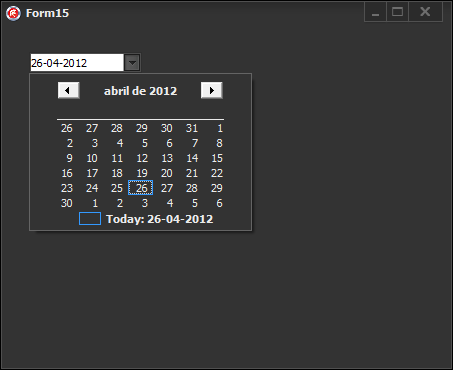
为了使用CalColors属性的解决方案,必须在TDateTimePicker组件的下拉窗口中禁用TDateTimePicker主题,因为必须使用DTM_GETMONTHCAL消息获取窗口句柄。
查看此示例应用程序
unit Unit15;

interface

uses
  Winapi.Windows, Winapi.Messages, System.SysUtils, System.Variants, System.Classes, Vcl.Graphics,
  Vcl.Controls, Vcl.Forms, Vcl.Dialogs, Vcl.ImgList, Vcl.StdCtrls, Vcl.ComCtrls;

type
  TForm15 = class(TForm)
    DateTimePicker1: TDateTimePicker;
    procedure DateTimePicker1DropDown(Sender: TObject);
    procedure FormCreate(Sender: TObject);
  private
    { Private declarations }
  public
    { Public declarations }
  end;

var
  Form15: TForm15;

implementation


{$R *.dfm}

uses
  Winapi.CommCtrl,
  Vcl.Styles,
  Vcl.Themes,
  uxTheme;

Procedure SetVclStylesColorsCalendar( DateTimePicker: TDateTimePicker);
Var
  LTextColor, LBackColor : TColor;
begin
   uxTheme.SetWindowTheme(DateTimePicker.Handle, '', '');//disable themes in the calendar
   //get the vcl styles colors
   LTextColor:=StyleServices.GetSystemColor(clWindowText);
   LBackColor:=StyleServices.GetSystemColor(clWindow);

   DateTimePicker.Color:=LBackColor;
   //set the colors of the calendar
   DateTimePicker.CalColors.BackColor:=LBackColor;
   DateTimePicker.CalColors.MonthBackColor:=LBackColor;
   DateTimePicker.CalColors.TextColor:=LTextColor;
   DateTimePicker.CalColors.TitleBackColor:=LBackColor;
   DateTimePicker.CalColors.TitleTextColor:=LTextColor;
   DateTimePicker.CalColors.TrailingTextColor:=LTextColor;
end;


procedure TForm15.DateTimePicker1DropDown(Sender: TObject);
var
  hwnd: WinAPi.Windows.HWND;
begin
  hwnd := SendMessage(TDateTimePicker(Sender).Handle, DTM_GETMONTHCAL, 0,0);
  uxTheme.SetWindowTheme(hwnd, '', '');//disable themes in the drop down window
end;

procedure TForm15.FormCreate(Sender: TObject);
begin
  SetVclStylesColorsCalendar( DateTimePicker1);
end;

end.
更新1
更改TDateTimePicker的“组合框”的背景色是一个受windows自身限制的任务,因为在其他因素之间
- 此控件不具有所有者提取的能力,
- 如果您尝试使用
SetBkColor函数,由于此控件不处理WM_CTLCOLOREDIT消息,因此在此控件中不起作用。
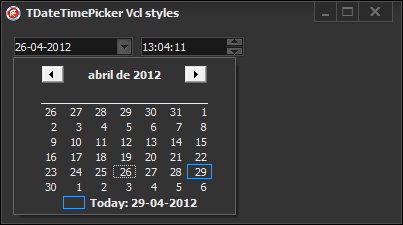
因此,一个可能的解决方案是拦截WM_PAINT和WM_ERASEBKGND消息,并编写自己的代码来绘制控件。当您使用Vcl样式时,可以使用样式挂钩来处理这些消息。
检查此代码(仅作为概念的证明)
uses
  Winapi.Windows, Winapi.Messages, System.SysUtils, System.Variants, System.Classes, Vcl.Graphics,
  Vcl.Controls, Vcl.Forms, Vcl.Dialogs, Vcl.ImgList, Vcl.StdCtrls, Vcl.ComCtrls;

type
  TForm15 = class(TForm)
    DateTimePicker1: TDateTimePicker;
    DateTimePicker2: TDateTimePicker;
    procedure DateTimePicker1DropDown(Sender: TObject);
    procedure FormCreate(Sender: TObject);
  private
    { Private declarations }
  end;


var
  Form15: TForm15;

implementation


{$R *.dfm}

uses
  Winapi.CommCtrl,
  Vcl.Styles,
  Vcl.Themes,
  Winapi.uxTheme;

type
 TDateTimePickerStyleHookFix= class(TDateTimePickerStyleHook)
 private
    procedure WMPaint(var Message: TMessage); message WM_PAINT;
    procedure PaintBackground(Canvas: TCanvas); override;
 public
    constructor Create(AControl: TWinControl); override;
 end;

 TDateTimePickerStyleHookHelper = class helper for TDateTimePickerStyleHook
 public
    function GetButtonRect_: TRect;
 end;


Procedure SetVclStylesColorsCalendar( DateTimePicker: TDateTimePicker);
Var
  LTextColor, LBackColor : TColor;
begin
   Winapi.uxTheme.SetWindowTheme(DateTimePicker.Handle, '', '');//disable themes in the calendar
   //get the vcl styles colors
   LTextColor:=StyleServices.GetSystemColor(clWindowText);
   LBackColor:=StyleServices.GetSystemColor(clWindow);

   DateTimePicker.Color:=LBackColor;
   //set the colors of the calendar
   DateTimePicker.CalColors.BackColor:=LBackColor;
   DateTimePicker.CalColors.MonthBackColor:=LBackColor;
   DateTimePicker.CalColors.TextColor:=LTextColor;
   DateTimePicker.CalColors.TitleBackColor:=LBackColor;
   DateTimePicker.CalColors.TitleTextColor:=LTextColor;
   DateTimePicker.CalColors.TrailingTextColor:=LTextColor;
end;


procedure TForm15.DateTimePicker1DropDown(Sender: TObject);
var
  hwnd: WinAPi.Windows.HWND;
begin
  hwnd := SendMessage(TDateTimePicker(Sender).Handle, DTM_GETMONTHCAL, 0,0);
  Winapi.uxTheme.SetWindowTheme(hwnd, '', '');//disable themes in the drop down window
end;

procedure TForm15.FormCreate(Sender: TObject);
begin
  //set the colors for the TDateTimePicker
  SetVclStylesColorsCalendar( DateTimePicker1);
  SetVclStylesColorsCalendar( DateTimePicker2);
end;


{ TDateTimePickerStyleHookHelper }
function TDateTimePickerStyleHookHelper.GetButtonRect_: TRect;
begin
 Result:=Self.GetButtonRect;
end;

{ TDateTimePickerStyleHookFix }
constructor TDateTimePickerStyleHookFix.Create(AControl: TWinControl);
begin
  inherited;
  OverrideEraseBkgnd:=True;//this indicates which this style hook will call the PaintBackground method when the WM_ERASEBKGND message is sent.
end;

procedure TDateTimePickerStyleHookFix.PaintBackground(Canvas: TCanvas);
begin
  //use the proper style color to paint the background
  Canvas.Brush.Color := StyleServices.GetStyleColor(scEdit);
  Canvas.FillRect(Control.ClientRect);
end;

procedure TDateTimePickerStyleHookFix.WMPaint(var Message: TMessage);
var
  DC: HDC;
  LCanvas: TCanvas;
  LPaintStruct: TPaintStruct;
  LRect: TRect;
  LDetails: TThemedElementDetails;
  sDateTime  : string;
begin
  DC := Message.WParam;
  LCanvas := TCanvas.Create;
  try
    if DC <> 0 then
      LCanvas.Handle := DC
    else
      LCanvas.Handle := BeginPaint(Control.Handle, LPaintStruct);
    if TStyleManager.SystemStyle.Enabled then
    begin
      PaintNC(LCanvas);
      Paint(LCanvas);
    end;
    if DateMode = dmUpDown then
      LRect := Rect(2, 2, Control.Width - 2, Control.Height - 2)
    else
      LRect := Rect(2, 2, GetButtonRect_.Left, Control.Height - 2);
    if ShowCheckBox then LRect.Left := LRect.Height + 2;
    IntersectClipRect(LCanvas.Handle, LRect.Left, LRect.Top, LRect.Right, LRect.Bottom);
    Message.wParam := WPARAM(LCanvas.Handle);

    //only works for DateFormat = dfShort
    case TDateTimePicker(Control).Kind of
     dtkDate : sDateTime:=DateToStr(TDateTimePicker(Control).DateTime);
     dtkTime : sDateTime:=TimeToStr(TDateTimePicker(Control).DateTime);
    end;

    //draw the current date/time value
    LDetails := StyleServices.GetElementDetails(teEditTextNormal);
    DrawControlText(LCanvas, LDetails, sDateTime, LRect, DT_VCENTER or DT_LEFT);

    if not TStyleManager.SystemStyle.Enabled then
      Paint(LCanvas);
    Message.WParam := DC;
    if DC = 0 then
      EndPaint(Control.Handle, LPaintStruct);
  finally
    LCanvas.Handle := 0;
    LCanvas.Free;
  end;
  Handled := True;
end;


initialization
  TStyleManager.Engine.RegisterStyleHook(TDateTimePicker, TDateTimePickerStyleHookFix);

end.
注意:这个样式钩子不会在TDateTimePicker的内部文本控件(combobox)中绘制焦点(选定的)元素,我让您完成这个任务。
更新2
我刚刚编写了一个vcl样式钩子,它包含了将vcl样式正确应用于TDateTimePicker组件的所有逻辑,而不使用表单的OnDropDown事件或OnCreate事件。您可以找到vcl样式的钩子这里 (作为vcl样式实用程序项目的一部分)
要使用它,必须将Vcl.Styles.DateTimePickers单元添加到项目中,并以这种方式注册钩子。
TStyleManager.Engine.RegisterStyleHook(TDateTimePicker, TDateTimePickerStyleHookFix);Stack Overflow用户
发布于 2012-04-26 17:15:23
为了日历本身..。基于你的另一个问题。
procedure SetVclStylesMonthCalColors( calColors: TMonthCalColors);
var
  LTextColor, LBackColor : TColor;
begin
   //get the vcl styles colors
   LTextColor:=StyleServices.GetSystemColor(clWindowText);
   LBackColor:=StyleServices.GetSystemColor(clWindow);

   //set the colors of the calendar
   calColors.BackColor:=LBackColor;
   calColors.MonthBackColor:=LBackColor;
   calColors.TextColor:=LTextColor;
   calColors.TitleBackColor:=LBackColor;
   calColors.TitleTextColor:=LTextColor;
   calColors.TrailingTextColor:=LTextColor;
end;

Procedure SetVclStylesColorsCalendar( MonthCalendar: TMonthCalendar);
Var
  LTextColor, LBackColor : TColor;
begin
   uxTheme.SetWindowTheme(MonthCalendar.Handle, '', '');//disable themes in the calendar
   MonthCalendar.AutoSize:=True;//remove border

   SetVclStylesMonthCalColors(MonthCalendar.CalColors);
end;


procedure TForm1.dtp1DropDown(Sender: TObject);
var
  rec: TRect;
begin
  uxTheme.SetWindowTheme(DateTime_GetMonthCal(dtp1.Handle), '', '');
  MonthCal_GetMinReqRect(DateTime_GetMonthCal(dtp1.Handle), rec);
  SetWindowPos(GetParent(DateTime_GetMonthCal(dtp1.Handle)), 0, rec.Left, rec.Top, rec.Width, rec.Height,0);
  SetWindowPos(DateTime_GetMonthCal(dtp1.Handle), 0, rec.Left, rec.Top, rec.Width, rec.Height,0);
  SetVclStylesMonthCalColors(dtp1.CalColors);
end;https://stackoverflow.com/questions/10335310
复制相似问题
腾讯云开发者

Copyright © 2013 - 2026 Tencent Cloud. All Rights Reserved. 腾讯云 版权所有
深圳市腾讯计算机系统有限公司 ICP备案/许可证号:粤B2-20090059  粤公网安备44030502008569号
腾讯云计算(北京)有限责任公司 京ICP证150476号 | 京ICP备11018762号