
AppleScript -系统事件错误:禁用对辅助设备的访问
AppleScript -系统事件错误:禁用对辅助设备的访问
提问于 2012-04-13 11:55:11
我对AppleScript和系统事件有问题。
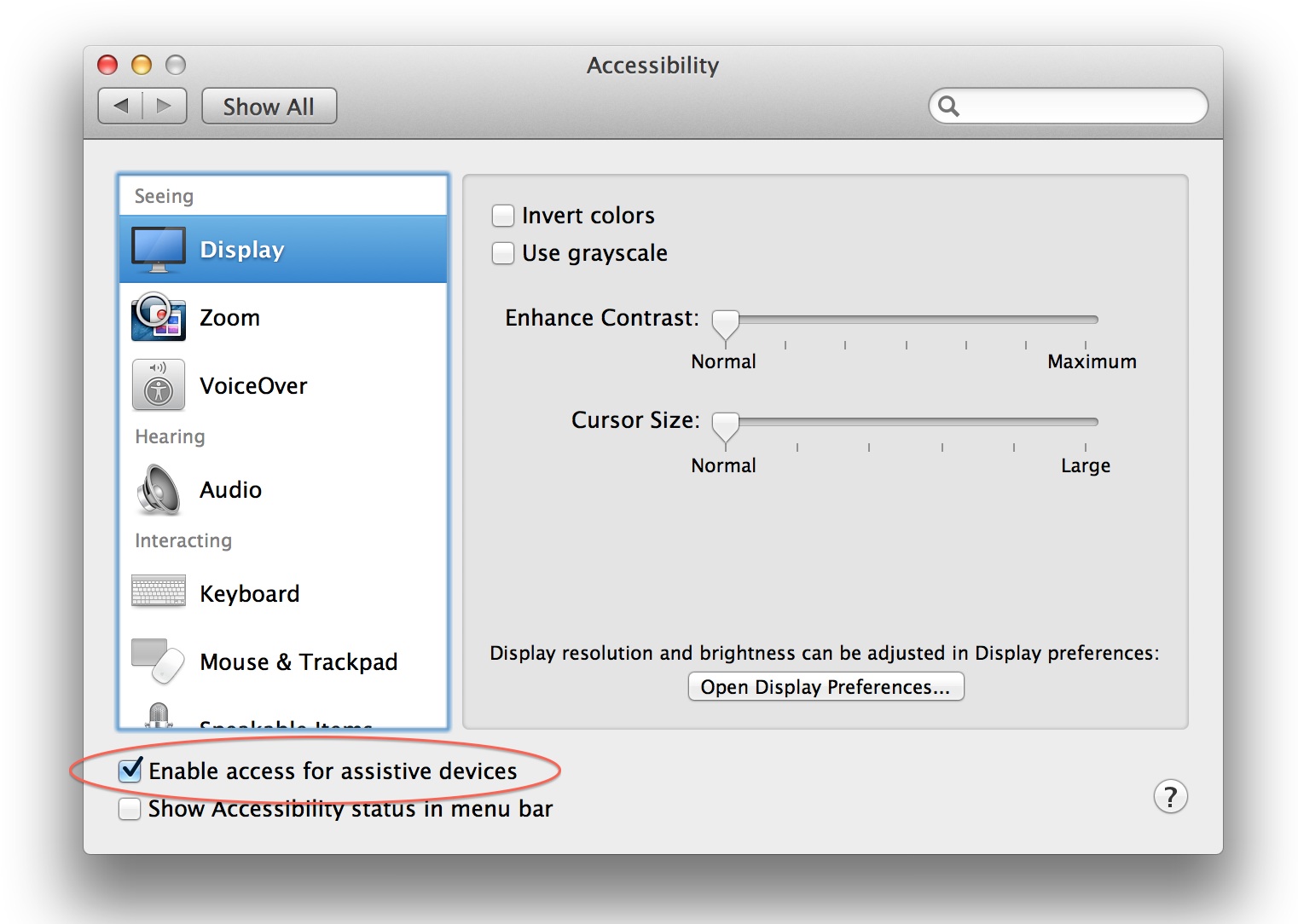
我在系统首选项中的“通用访问”首选项窗格中检查了“启用辅助设备访问”。
当我尝试:
arch -i386 osascript -e‘告诉应用程序’系统事件‘以获取每个进程的每个窗口的位置’
我有一个错误:
系统事件出错:禁用了对辅助设备的访问。(-25211)
你知不知道?
非常感谢
回答 2
Stack Overflow用户
回答已采纳
发布于 2012-04-13 12:24:11
问题不在于辅助装置。当AppleScript试图访问一个永远没有窗口的进程的窗口时,它似乎错误地返回了错误代码(在我的例子中,它是“”)。
你需要抓住错误。这对我来说很管用:
tell application "System Events"
    set procs to processes
    set windowPositions to {}
    repeat with proc in procs
        try
            if exists (window 1 of proc) then
                repeat with w in windows of proc
                    copy w's position to the end of windowPositions
                end repeat
            end if
        end try -- ignore errors
    end repeat
end tell
return windowPositions
返回一个坐标对的列表,例如{{1067,22},{31,466},{27,56},{63,22},{987,22}--这就是你想要得到的吗?
Stack Overflow用户
发布于 2014-02-01 20:24:05
类似于此页面中有关MacOSX10.9(小牛)的文章,为了解决MacOSX10.8上的此问题(也可能在早期版本的OS上),您需要确保“启用辅助设备访问”选项已在系统首选项的可访问性窗格中启用。
页面原文内容由Stack Overflow提供。腾讯云小微IT领域专用引擎提供翻译支持
原文链接:
https://stackoverflow.com/questions/10140334
复制相关文章
相似问题
腾讯云开发者

Copyright © 2013 - 2026 Tencent Cloud. All Rights Reserved. 腾讯云 版权所有
深圳市腾讯计算机系统有限公司 ICP备案/许可证号:粤B2-20090059  粤公网安备44030502008569号
腾讯云计算(北京)有限责任公司 京ICP证150476号 | 京ICP备11018762号