
JQGrid:基于某些键对子网格值进行排序
我有一个带有子网格的jqGrid。我想对子网格进行排序,以便在子网格中按排序顺序显示重要的细节。
排序顺序:EBFNUM,VERSION & APPLIEDDATETIME
下面是屏幕截图
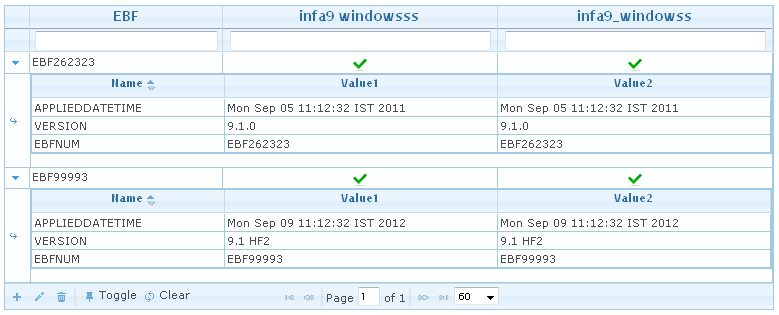
可选:过滤器适用于elementName、isPresentinXml1和isPresentinXml2。是否存在相同的过滤器可以用于name、firstValue & secondValue (子网格列)?
网格代码
_starHeader="infa9 windowsss";
_header1="infa9_windowss";
 grid = jQuery("#ebfList");
             grid.jqGrid({
                 datastr : compareEBFData,
                 datatype: 'jsonstring',
                 colNames:['EBF','',_starHeader, _header1],
                 colModel:[
                     {name:'elementName',index:'elementName', width:188},
                     {name:'subCategory',index:'subCategory',hidden:true, width:1},
                     {name:isPresentinXml1,index:isPresentinXml1, width:270, align:'center', formatter: patchPresent},
                     {name:isPresentinXml2,index:isPresentinXml2, width:270, align:'center', formatter: patchPresent}
                 ],
                 pager : '#ebfGridpager',
                 rowNum:60,
                 rowList:[60,120,240],
                 scrollOffset:0,
                 height: 'auto',
                 autowidth:true,
                 viewrecords: false,
                 gridview: true,
                 loadonce:true,

                 jsonReader: {
                    repeatitems: false,
                    page: function() { return 1; },
                     root: "response"
                 },
                 subGrid: true,
                 // define the icons in subgrid
                 subGridOptions: {
                     "plusicon"  : "ui-icon-triangle-1-e",
                     "minusicon" : "ui-icon-triangle-1-s",
                     "openicon"  : "ui-icon-arrowreturn-1-e",
                     //expand all rows on load
                     "expandOnLoad" : false
                 },

                 loadComplete: function() {
                     if (this.p.datatype !== 'local') {
                         setTimeout(function () {
                            grid.trigger('reloadGrid');
                        }, 0);
                     } else {
                        $("#compareEBFDiv").show();
                     }
                 },

                 subGridRowExpanded: function(subgrid_id, row_id) {
                    var subgrid_table_id, pager_id, iData = -1;
                     subgrid_table_id = subgrid_id+"_t";
                     $("#"+subgrid_id).html("<table id='"+subgrid_table_id+"' style='overflow-y:auto' class='scroll'></table><div id='"+pager_id+"' class='scroll'></div>");

                     $.each(compareEBFData.response,function(i,item){
                         if(item.id === row_id) {
                             iData = i;
                             return false;
                         }

                     });
                     if (iData == -1) {
                         return; // no data for the subgrid
                     }

                     jQuery("#"+subgrid_table_id).jqGrid({
                         datastr : compareEBFData.response[iData],
                         datatype: 'jsonstring',
                         colNames: ['Name','Value1','Value2'],
                         colModel: [
                             {name:"name",index:"name",width:70},
                             {name:firstValue,index:firstValue,width:100},
                             {name:secondValue,index:secondValue,width:100}
                         ],
                         rowNum:10,
                         //pager: pager_id,
                         sortname: 'name',
                         sortorder: "asc",
                         height: 'auto',
                         autowidth:true,
                         jsonReader: {
                             repeatitems: false,
                             //page: function() { return 1; },
                             root: "attribute"
                         }
                     });

                     jQuery("#"+subgrid_table_id).jqGrid('navGrid',{edit:false,add:false,del:false});
                 }
             });

             grid.jqGrid('navGrid', '#ebfGridpager', { search: false, refresh: false });
             grid.jqGrid('navButtonAdd',"#ebfGridpager",{caption:"Toggle",title:"Toggle Search Toolbar", buttonicon :'ui-icon-pin-s',
                onClickButton:function(){
                    grid[0].toggleToolbar();
                }
             });
             grid.jqGrid('navButtonAdd',"#ebfGridpager",{caption:"Clear",title:"Clear Search",buttonicon :'ui-icon-refresh',
                onClickButton:function(){
                    grid[0].clearToolbar();
                }
             });
             grid.jqGrid('filterToolbar',
                    {stringResult: true, searchOnEnter: false, defaultSearch: 'cn'});
Json反应
    {
  "response": [
    {
      "id": "1",
      "elementName": "EBF262323",
      "category": "Product",
      "subCategory": "EBFINFO",
      "isEqual": false,
      "isPrasentinXml1": true,
      "isPrasentinXml2": true,
      "isPrasentinXml3": false,
      "attribute": [
        {
          "name": "APPLIEDDATETIME",
          "firstValue": "Mon Sep 05 11:12:32 IST 2011",
          "secondValue": "Mon Sep 05 11:12:32 IST 2011"
        },
        {
          "name": "VERSION",
          "firstValue": "9.1.0",
          "secondValue": "9.1.0"
        },
        {
          "name": "EBFNUM",
          "firstValue": "EBF262323",
          "secondValue": "EBF262323"
        }

      ]
    },
    {
      "id": "2",
      "elementName": "EBF99993",
      "category": "Product",
      "subCategory": "EBFINFO",
      "isEqual": false,
      "isPrasentinXml1": true,
      "isPrasentinXml2": true,
      "isPrasentinXml3": false,
      "attribute": [
        {
          "name": "APPLIEDDATETIME",
          "firstValue": "Mon Sep 09 11:12:32 IST 2012",
          "secondValue": "Mon Sep 09 11:12:32 IST 2012"
        },
        {
          "name": "VERSION",
          "firstValue": "9.1 HF2",
          "secondValue": "9.1 HF2"
        },
        {
          "name": "EBFNUM",
          "firstValue": "EBF99993",
          "secondValue": "EBF99993"
        }
      ]
    }
  ],
  "xls_path": "/files/modifiedServices.xls"
}
更新
我尝试了下面的代码,在我的内部网格中,但没有任何效果。
var orderOfEBFSubCategory = [
    "EBFNUM",
    "PRODUCT",
    "VERSION"
];

{name:"name",index:"name",width:70,
                                sorttype: function (value) {
                                    var order = $.inArray(value, orderOfEBFSubCategory);
                                    return order;
}},回答 1
Stack Overflow用户
发布于 2012-04-01 09:58:13
通常,如果需要实现自定义排序顺序,使用sorttype作为函数的方法是正确的。问题只是在子网格中使用了datatype: 'jsonstring'和datastr。重要的是要理解,将来自datastr 的的数据解释为已排序的。如果您有未排序的数据,则应该使用datatype: 'local'。在这种情况下,应该删除jsonReader参数。所以子网格的代码应该是
jQuery("#" + subgrid_table_id).jqGrid({
    data: compareEBFData.response[iData].attribute,
    datatype: 'local',
    gridview: true,
    idPrefix: 's' + row_id + '_',
    colNames: ['Name', 'Value1', 'Value2'],
    colModel: [
        {name: "name", index: "name", width: 70,
            sorttype: function (value) {
                var order = $.inArray(value, orderOfEBFSubCategory);
                return order;
            }},
        {name: firstValue, index: firstValue, width: 100},
        {name: secondValue, index: secondValue, width: 100}
    ],
    rowNum: 10,
    sortname: 'name',
    sortorder: "asc",
    height: 'auto',
    autowidth: true
});
哪里
var orderOfEBFSubCategory = [
        "EBFNUM",
        "VERSION",
        "APPLIEDDATETIME"
];见演示。您的主要问题可能是只排序项,而不是自定义排序项。在这种情况下,您可以删除sorttype函数,并在使用datatype: 'local'的情况下使用字母排序的名称。
值得一提的是,我在您的原始代码中添加了其他选项,从而解决了一个更重要的问题。首先,我添加了gridview: true以提高性能,第二,我添加了idPrefix: 's' + row_id + '_'选项。演示中的代码没有为网格行定义任何id。所以主网格的行有ids: 1,2,.子网格也没有定义id。因此,如果要打开原始网格中的第一个和第二个子网格,则至少有三个id重复的:在主网格和所有子网格中,id为1、2、.idPrefix可以用来解决这个问题。例如,在固定网格中,您现在可以在每个子网格中选择行,在主网格中选择一个行,而不会发生任何冲突。
https://stackoverflow.com/questions/9962931
复制相似问题
腾讯云开发者

Copyright © 2013 - 2026 Tencent Cloud. All Rights Reserved. 腾讯云 版权所有
深圳市腾讯计算机系统有限公司 ICP备案/许可证号:粤B2-20090059  粤公网安备44030502008569号
腾讯云计算(北京)有限责任公司 京ICP证150476号 | 京ICP备11018762号