
Android操作栏选项卡-内部片段事务问题
我已经成功地在Action中建立了选项卡,使用了下面的例子,来自谷歌自己在http://developer.android.com/resources/samples/ApiDemos/src/com/example/android/apis/app/FragmentTabs.html作为一个基础。我的代码是这样的:
public class Main extends SherlockFragmentActivity {

/** Called when the activity is first created. */
@Override
public void onCreate(Bundle savedInstanceState) {
    super.onCreate(savedInstanceState);

    getSupportActionBar().setNavigationMode(ActionBar.NAVIGATION_MODE_TABS);

    ActionBar.Tab tab1 = getSupportActionBar().newTab();
    tab1.setIcon(R.drawable.ic_tab_example_selected);
    tab1.setTabListener(new TabListener<Tab1>(this, "A", Tab1.class));
    getSupportActionBar().addTab(tab1);

    ActionBar.Tab tab2 = getSupportActionBar().newTab();
    tab2.setIcon(R.drawable.ic_tab_example_selected);
    tab2.setTabListener(new TabListener<Tab2>(this, "B", Tab2.class));
    getSupportActionBar().addTab(tab2);

    ActionBar.Tab tab3 = getSupportActionBar().newTab();
    tab3.setIcon(R.drawable.ic_tab_example_selected);
    tab3.setTabListener(new TabListener<Tab3>(this, "C", Tab3.class));
    getSupportActionBar().addTab(tab3);

    ActionBar.Tab tab4 = getSupportActionBar().newTab();
    tab4.setIcon(R.drawable.ic_tab_example_selected);
    tab4.setTabListener(new TabListener<Tab4>(this, "D", Tab4.class));
    getSupportActionBar().addTab(tab4);
}

@Override
public boolean onCreateOptionsMenu(Menu menu) {
    MenuInflater inflater = getSupportMenuInflater();
    inflater.inflate(R.menu.menu, menu);
    return true;
}

public class TabListener<T extends Fragment> implements ActionBar.TabListener {
    private Fragment mFragment;
    private final SherlockFragmentActivity mActivity;
    private final String mTag;
    private final Class<T> mClass;

    /** Constructor used each time a new tab is created.
      * @param activity  The host Activity, used to instantiate the fragment
      * @param tag  The identifier tag for the fragment
      * @param clz  The fragment's Class, used to instantiate the fragment
      */
    public TabListener(SherlockFragmentActivity activity, String tag, Class<T> clz) {
        mActivity = activity;
        mTag = tag;
        mClass = clz;
    }

    /* The following are each of the ActionBar.TabListener callbacks */

    public void onTabSelected(Tab tab, FragmentTransaction ft) {

        // Check if the fragment is already initialized
        if (mFragment == null) {
            // If not, instantiate and add it to the activity
            mFragment = Fragment.instantiate(mActivity, mClass.getName());
            ft.add(android.R.id.content, mFragment, mTag);
        } else {
            // If it exists, simply attach it in order to show it
            ft.attach(mFragment);
        }
    }

    public void onTabUnselected(Tab tab, FragmentTransaction ft) {

        if (mFragment != null) {
            // Detach the fragment, because another one is being attached
            ft.detach(mFragment);
        }
    }

    public void onTabReselected(Tab tab, FragmentTransaction ft) {
        // User selected the already selected tab. Usually do nothing.
    }
}
}
有了这个选项卡,我就有了多个选项卡,在每个选项卡中的不同片段之间切换。但是,当在选项卡中并在选项卡中更改片段时,我的问题就开始了。这就是问题所在:
当我在Tab 1中时,我用一个新片段交换加载在选项卡中的初始片段。然后我转到Tab 2,它显示了它的初始片段。但是,在Tab 1中交换到的片段的视图仍然显示在Tab 2片段后面:
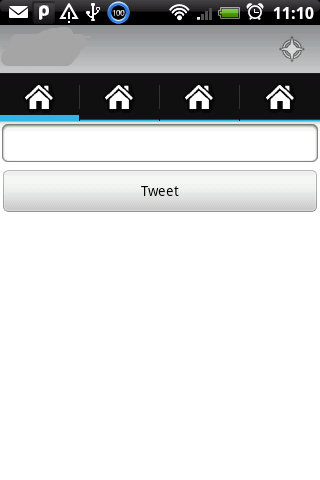
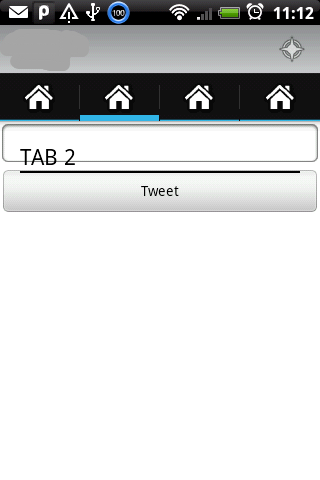
这是我目前用于从Tab 1中更改片段的代码。
// Create new fragment and transaction
    FragmentTransaction transaction = ctx.getFragmentManager().beginTransaction();
    transaction.setCustomAnimations(R.anim.slide_in_left, R.anim.slide_out_right);

    // Replace whatever is in the fragment_container view with this fragment,
    // and add the transaction to the back stack
    transaction.replace(container, fragment, tag);

    if(addToBackStack)
        transaction.addToBackStack(tag);

    // Commit the transaction
    transaction.commit();
所有这些都是通过ActionBar神探夏洛克和谷歌v4支持库完成的。
回答 1
Stack Overflow用户
发布于 2012-04-16 18:21:52
好的,这个答案假设每次交换选项卡时都要删除每个选项卡的历史记录。我的意思是,Tab 1从frag 1开始,然后单击并将其更改为frag 2。如果选择Tab 2,您将取消Tab 1的历史记录,下一次单击Tab 1时,您将返回到frag 1。
下面是解决方案:用下面的方法替换onTabUnselected
public void onTabUnselected(Tab tab, FragmentTransaction ft) {
        if (mFragment != null) {
            //this segment removes the back history of everything in the tab you are leaving so when you click on the tab again you go back to a fresh start
            FragmentManager man = mActivity.getFragmentManager();
            if(man.getBackStackEntryCount()>0) //this check is required to prevent null point exceptions when clicking off of a tab with no history
                man.popBackStack(man.getBackStackEntryAt(0).getName(), FragmentManager.POP_BACK_STACK_INCLUSIVE); //this pops the stack back to index 0 so you can then detach and then later attach your initial fragment
            //also it should be noted that if you do popbackstackimmediate here instead of just popbackstack you will see a flash as the gui changes back to the first fragment when the code executes
            //end
            ft.detach(mFragment);
        }
}https://stackoverflow.com/questions/9941172
复制相似问题
腾讯云开发者

Copyright © 2013 - 2026 Tencent Cloud. All Rights Reserved. 腾讯云 版权所有
深圳市腾讯计算机系统有限公司 ICP备案/许可证号:粤B2-20090059  粤公网安备44030502008569号
腾讯云计算(北京)有限责任公司 京ICP证150476号 | 京ICP备11018762号