
数据映射到Excel文件
我在一个文件夹中有635个文本文件。我想把这些数据读入excel。这并不像一开始听起来那么简单。我一直在努力将文件导出到excel(借助stackoverflow:),现在我已经完成了这个工作,我想完成我的应用程序。以下是参数:
- 我的输出excel电子表格将有637列,数据将从第三列开始输入。您可以猜到,每一列(3-639)将表示635个子文件夹中的一个.
- 电子表格中有73902行,数据将从第三行开始写入。
- 现在,要写入的数据来自635个文件。每个文件有2列。例如,要填写excel表中的第5列(对应于5-2 =635中的第3个文件),我们转到第3文件,并从该文件中的there.The第一列中获取值,确定要在excel表中填写哪些单元格。要填写的值取自该文件的第二列(如果单词列变得混乱,对不起)。我们需要为工作表上的每一列填写73900行(每列为1文件)。然后对635列重复此操作。
如果第三个文件如下所示:
5849 66883
395 4492863
681 1835871
817 4039961
835 3246671
868 4041156
889 1891481
1305 4467688
1317 175306
1361 3252611
2101 174589
4364 4053046
4897 4466547
4991 3879532
5327 3992891
5397 175328
6067 3881675
6075 176782
6906 2358727
7497 1838021然后,我们将填写行5849, 385, 681,817,所以on...We用文件中第二列的相应值填充这些单元格。因此,excel表中的第5列将用值5849, 385, 681,817...填充单元格66883,4492863,1835871,4039961...。
我附上一张excel工作表的图片,以使情况更清楚。
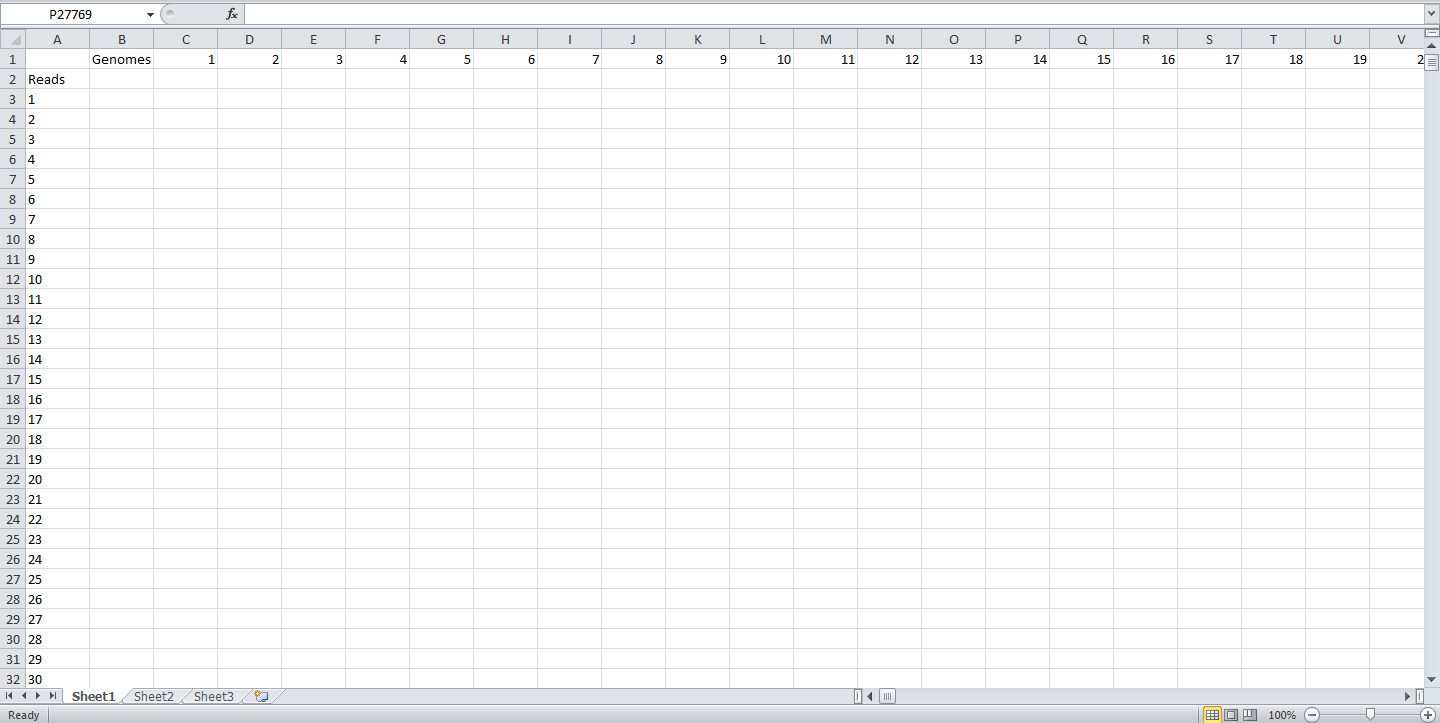
到目前为止,我已经使用Visual代码将文本文件导入Excel,但实际上并没有处理上面讨论的任何信息。我也有一个小MATLAB脚本来做同样的(这不是完全的功能)来写数据到excel。我正在粘贴下面的两个字。
Sub ReadFilesIntoActiveSheet()
Dim fso As FileSystemObject
Dim folder As folder
Dim file As file
Dim FileText As TextStream
Dim TextLine As String
Dim Items() As String
Dim i As Long
Dim cl As Range

' Get a FileSystem object
Set fso = New FileSystemObject

 ' get the directory you want
  Set folder = fso.GetFolder("D:\275_25bp")

' set the starting point to write the data to
 Set cl = ActiveSheet.Cells(1, 1)

' Loop thru all files in the folder
For Each file In folder.Files
' Open the file
Set FileText = file.OpenAsTextStream(ForReading)

' Read the file one line at a time
Do While Not FileText.AtEndOfStream
    TextLine = FileText.ReadLine

    ' Parse the line into | delimited pieces
    Items = Split(TextLine, " ")

    ' Put data on one row in active sheet
    For i = 0 To UBound(Items)
        cl.Offset(0, i).Value = Items(i)
    Next

    ' Move to next row
    Set cl = cl.Offset(1, 0)
Loop

' Clean up
FileText.Close
Next file

Set FileText = Nothing
Set file = Nothing
Set folder = Nothing
Set fso = Nothing

End Sub
SCRIPT################################ ####################### MATLAB
dirname = uigetdir;#
Files = dir(fullfile(dirname,'*.txt'))
for i=1:numel(Files)
filename = fullfile(dirname,Files(k).name);
[col1,col2] = textread( filename, '%d%d' )
%pos1 = strcat('A',num2str(i));
%pos2 = strcat('B',num2str(i));
xlswrite('sample_output',col1,'Sheet1','A1:CI1')
xlswrite('sample_output',col2,'Sheet1','A2:CI2')
end
文件名没有通用的命名模式,只是它们是唯一的名称。该文件夹按字母顺序包含它们,因此文件1(以A开头)和文件635(将以Z开头).Sample文件名:
Acidothermus_cellulolyticus_11B-list.txt
Frankia_alni_ACN14a-list.txt ... Zymomonas_mobilis_ZM4-list.txt
使用哪种语言并不重要,但最好是在UNIX中使用(我知道这不是一种语言:P )或MATLAB(因为我一直在用这两种语言做这个项目)。
我非常感谢在这方面的帮助。如果您需要澄清需要做什么,请让我来做。谢谢!
回答 2
Stack Overflow用户
发布于 2012-03-23 04:49:41
由于您可以使用PERL,下面是我为创建一个CSV文件而生成的PERL代码/脚本,该文件可以根据上面的信息被Excel接收。所有的文件都必须在同一个目录中。我已经检查了语法。您可能需要在glob函数中进行一些编辑,以实现二进路径和文件名(例如名称的通配符为*)。glob的输入将在本地目录中找到具有.dat扩展名的所有文件。如果您在路径中放置反斜杠,请务必使用反斜杠。这些文件将按照字母顺序进行处理,就像排序函数执行一种按量排序的方法。
如果使用的是Window 7,则可能需要查看ActiveState PERL。这样你就不用下载和安装cygwin了。您可以从命令窗口运行它。这是我以前用来检查PERL脚本的语法,我有Windows 7,64位。
*注意:将下面的代码更新为使用cygwin PERL的代码。工作中仍然存在调试项。*
use strict;
#use File::Glob ':glob';

# Array to save the data
my @savedData = ();

# Get the files to process and sort them
# NOTE: Edit for where the files exist if not
# local directory from where script is run
my @files = sort <*.txt>;
print "number of files " . scalar(@files) . "\n"; # should be <*.txt>
# Will shift columns on the output
my $column = 0;
# Save the numbers from the line
my @numbers = ();
my $lineNumber = 0;

# Go through the files
foreach my $f ( @files )
{
  # Open the file
  #print "Processing file: $f\n";
  my %temp = ();
  open INFILE,$f or die "Unable to open file: $f";

  # Read a line from the file
  while ( <INFILE> )
  {
    # Increment the line number, remove the carriage return
    $lineNumber++;
    chomp;
    # Get the numbers from the line
    @numbers = split("\\s+");
    # Check for error in amount of items
    if ( 2 != scalar(@numbers))
    {
      die "ERROR: Line not well formed in file: $f Line: $lineNumber\n";
    }
    # Save the information using the first number as the row
    $savedData[$numbers[0]][$column] = $numbers[1];
    $temp{$numbers[0]} = 1;
    #print "$column $savedData[$numbers[0]][$column] ";
    #print "@numbers\n";
  }

  # Close the file and increment the column by 2
  close(INFILE);
  $column++;
  my @keys = keys %temp;
  @keys = sort { $a <=> $b} @keys;
  #thisprint "Range of row indexes is: $keys[0] $keys[$#keys]\n "; # gives the range of rows
}

# Loop Control Variable
my $lcv = 0;
# Variable to save output
my $output = "";
# Open output file
# NOTE: File will be opened in current directory
open OUTFILE,">output.csv" or die "Unable to open output file: output.csv";

# TO PRINT ROWS FROM 3RD POSTION
#print OUTFILE ",,,\n,,,\n"; # can remove this

#print "Scalar is " . scalar(@savedData) . "\n";
# For each row in the matrix

# For each row in the matrix
#for( $lcv = 1; $lcv < scalar(@savedData) ; $lcv++ )
#{
# construct the output for all of the columns
# Two columns is to shift the output over by 2 columns
#my $lcv2;
#$output = ",";
#print "items is: " . ref($savedData[$lcv]) . "\n";
#for($lcv2=0;$lcv2 < scalar(@files); $lcv2++)
#{
#$output .= ",$savedData[$lcv][$lcv2]";
#}
# write it to file
#print OUTFILE "$output\n";
#}

#close(OUTFILE);

# For each row in the matrix
for( $lcv = 1; $lcv < scalar(@savedData) ; $lcv++ )
{
  # construct the output for all of the columns
  # Two columns is to shift the output over by 2 columns
  my $lcv2;
  $output = ",";
  for($lcv2=0;$lcv2 < scalar(@files); $lcv2++)
  {
    $savedData[$lcv][$lcv2] = int($savedData[$lcv][$lcv2] + 0);
    $output .= ",$savedData[$lcv][$lcv2]";
  }
  # write it to file
  print OUTFILE "$output\n";
}

close(OUTFILE);
更改以实现映射,而不是数组,因为程序似乎内存不足。
这是修改后的代码。
use strict;

# Map to save the data
my %savedData = ();

# Get the files to process and sort them
# NOTE: Edit for where the files exist if not
# local directory from where script is run
my @files = sort <*.txt>;
print "number of files " . scalar(@files) . "\n"; # should be <*.txt>
# Will shift columns on the output
my $column = 0;
# Save the numbers from the line
my @numbers = ();
my $lineNumber = 0;
my $lastRow = 0;
my $fileCount = 0;

# Go through the files
foreach my $f ( @files )
{
  # Open the file
  $fileCount++;
  print "$fileCount: Processing file: $f\n";
  my %temp = ();
  open INFILE,$f or die "Unable to open file: $f";

  # Read a line from the file
  while ( <INFILE> )
  {
    # Increment the line number, remove the carriage return
    $lineNumber++;
    chomp;
    # Get the numbers from the line
    @numbers = split("\\s+");
    # Check for error in amount of items
    if ( 2 != scalar(@numbers))
    {
      die "ERROR: Line not well formed in file: $f Line: $lineNumber\n";
    }
    # Save the information using the first number as the row
    $savedData{$numbers[0]}{$column} = $numbers[1];
    $temp{$numbers[0]} = 1;
    # Determine the last item in rows.  Save it for
# future use
    if ( $lastRow < $numbers[0] )
    {
      $lastRow = $numbers[0];
    }

    #print "$column $savedData{$numbers[0]}{$column} ";
    #print "@numbers\n";
  }

  # Close the file and increment the column by 2
  close(INFILE);
  $column++;
  my @keys = keys %temp;
  @keys = sort { $a <=> $b} @keys;
  #thisprint "Range of row indexes is: $keys[0] $keys[$#keys]\n "; # gives the range of rows
}

# Loop Control Variable
my $lcv = 0;
# Variable to save output
my $output = "";
# Open output file
# NOTE: File will be opened in current directory
open OUTFILE,">output_map.csv" or
   die "Unable to open output file: output_map.csv";

# For each row in the matrix
for( $lcv = 1; $lcv < $lastRow ; $lcv++ )
{
  # construct the output for all of the columns
  # Two columns is to shift the output over by 2 columns
  my $lcv2;
  my $data = "";
  $output = ",";
  for($lcv2=0;$lcv2 < scalar(@files); $lcv2++)
  {
    if ( exists $savedData{$lcv}{$lcv2} )
    {
      $data = int($savedData{$lcv}{$lcv2} + 0);
      $output .= ",$data";
    }
    else
    {
      $output .= ",0";
    }
  }
  # write it to file
  print OUTFILE "$output\n";
}

close(OUTFILE);Stack Overflow用户
发布于 2012-03-23 05:11:26
我会将问题与“获取数据”和“将其放入excel”的问题分开。您似乎知道如何将数据放入Excel中,这是非常好的,所以我将重点讨论第一个。
最重要的是,你基本上有一个大的表或矩阵,而Matlab喜欢矩阵。唯一可能是问题的是,你的矩阵很大,可能大部分是零。这很好,我们可以在matlab中使用稀疏矩阵。
data = sparse(nRowMax, nFiles);然后,算法简单明了:
- 对于每个文件..。
- 确定列号
col。 - 每一行..。
- 将这一行读为
row和value - 将
value插入data(row, col)
- 将这一行读为
- 确定列号
1. Repeat 2 until all the lines are read
- 重复1,直到所有文件都被读取。
data现在以excel电子表格中所需的格式包含所有数据。出口。
Matlab代码:
for col = 1:nFiles
    filename = files(k).filename;
    fileID = fopen(filename);
    filedata = textscan(fileID, "%d %d");

    rownumbers = filedata{1};
    values = filedata{2};

    for i = 1:length(rownumbers)
        row = rownumbers(i);
        value = values(i);
        data(row, col) = value;
    end
endhttps://stackoverflow.com/questions/9833967
复制相似问题
腾讯云开发者

Copyright © 2013 - 2026 Tencent Cloud. All Rights Reserved. 腾讯云 版权所有
深圳市腾讯计算机系统有限公司 ICP备案/许可证号:粤B2-20090059  粤公网安备44030502008569号
腾讯云计算(北京)有限责任公司 京ICP证150476号 | 京ICP备11018762号