
延长TActionManager -油漆梯度?
我喜欢使用在XPStyle中找到的TActionManager来创建我的菜单界面。
在不使用第三方组件的情况下,我真正想做的一件事是在菜单的一侧呈现一个渐变:
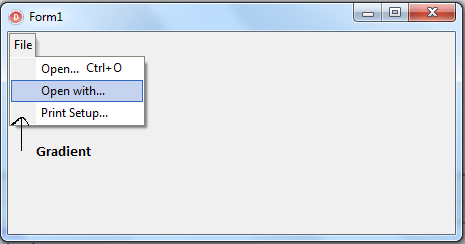
XPColorMap似乎没有改变这一点所需的属性,除非我忽略了一些非常明显的东西。
如果可能的话,我该怎么做呢?
谢谢。
更新
感谢wp_1233996提供的优秀信息和代码示例,结果如下:
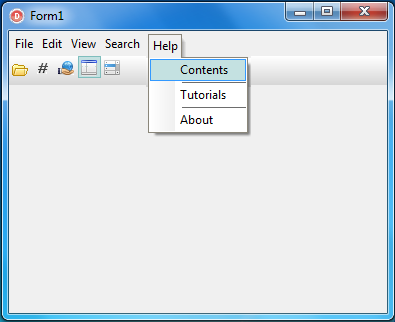
我不认为这是一个讨厌的XP风格菜单的Windows 7?我个人认为它看起来很好:)
回答 1
Stack Overflow用户
发布于 2012-02-26 15:54:33
http://edn.embarcadero.com/article/33461链接到Jeremy的一篇伟大文章,文章解释了actionbar组件背后的一些神奇之处。我的解决方案基于本文。
首先,负责绘制菜单项的类是TXPStyleMenuItem (在单元Vcl.XPActnCtrls中)。创建一个从TXPStyleMenuItem继承的新类,并重写DrawBackground方法。新方法应该如下所示:
uses
  ..., Vcl.XPActnCtrls, Vcl.GraphUtil, ...;

type
  TMyStyleMenuItem = class(TXPStyleMenuItem)
  protected
    procedure DrawBackground(var PaintRect: TRect); override;
end;

procedure TMyStyleMenuItem.DrawBackground(var PaintRect: TRect);
// Some lines are copied from Delphi's TXPStyleMenuItem.DrawBackground.
var
  BannerRect: TRect;
  StartCol, EndCol: TColor;
begin
  inherited;

  BannerRect := PaintRect;
  BannerRect.Right := 25;
  StartCol := clGray; //or: Actionbar.ColorMap.UnusedColor;
  EndCol := clSilver; //or: Actionbar.ColorMap.Color;
  GradientFillCanvas(Canvas, StartCol, EndCol, BannerRect, gdHorizontal);

  if (Selected and Enabled) or (Selected and not MouseSelected) then
  begin
    if Enabled and not ActionBar.DesignMode then
      if not Separator or (Separator and ActionBar.DesignMode) then
        Canvas.Brush.Color := Menu.ColorMap.SelectedColor;
    Dec(PaintRect.Right, 1);
  end;
  if (not ActionBar.DesignMode and Separator) then exit;
  if not Mouse.IsDragging and ((Selected and Enabled) or
     (Selected and not MouseSelected)) then
  begin
    Canvas.FillRect(PaintRect);
    Canvas.Brush.Color := ActionBar.ColorMap.BtnFrameColor;
    Inc(PaintRect.Right);
    Canvas.FrameRect(PaintRect);
  end;
end;
在此代码中,渐变开始和结束颜色是硬编码的。为了获得更好的灵活性,最好按照注释中的指示从颜色图中提取颜色。
为了使用这个新类而不是旧的XPStyleMenuItem,为ActionMainMenubar的事件OnGetControlClass实现一个事件处理程序:
procedure TForm1.ActionMainMenuBar1GetControlClass(Sender: TCustomActionBar;
  AnItem: TActionClient; var ControlClass: TCustomActionControlClass);
begin
  if ControlClass.InheritsFrom(TXPStyleMenuItem) then
    ControlClass := TMyStyleMenuItem;
end;https://stackoverflow.com/questions/9438285
复制相似问题
腾讯云开发者

Copyright © 2013 - 2026 Tencent Cloud. All Rights Reserved. 腾讯云 版权所有
深圳市腾讯计算机系统有限公司 ICP备案/许可证号:粤B2-20090059  粤公网安备44030502008569号
腾讯云计算(北京)有限责任公司 京ICP证150476号 | 京ICP备11018762号