
固定的GC实例--无法从我的托管代码中跟踪
因此,我使用WPF3.5和MVVM + DataTemplate方法在GUI上加载2个视图。我注意到,当内存分析时,作为项容器中的一部分生成的项被固定在内存中,即使在视图卸载之后也不会获得GCed!
我刚做了测试,发现即使是最简单的代码也是可以复制的.你们自己去查吧。
XAML:
<Window x:Class="ContentControlVMTest.Window2"
        xmlns="http://schemas.microsoft.com/winfx/2006/xaml/presentation"
        xmlns:x="http://schemas.microsoft.com/winfx/2006/xaml"
        xmlns:local="clr-namespace:ContentControlVMTest"
        Title="Window2" Height="300" Width="300">
    <DockPanel LastChildFill="True">

        <CheckBox Click="CheckBox_Click" Content="Test1?"
                  DockPanel.Dock="Top" Margin="5"/>

        <ContentControl x:Name="contentControl">
            <ContentControl.Resources>

                <DataTemplate DataType="{x:Type local:Test3}">
                    <TextBlock Text="{Binding C}" Margin="5"/>
                </DataTemplate>

                <DataTemplate DataType="{x:Type local:Test1}">
                    <DockPanel LastChildFill="True" Margin="5">
                        <TextBlock Text="{Binding A}"
                                   DockPanel.Dock="Top"
                                   Margin="5"/>
                        <ListBox ItemsSource="{Binding Bs}"
                                 DisplayMemberPath="B"
                                 Margin="5"/>
                    </DockPanel>
                </DataTemplate>
            </ContentControl.Resources>
        </ContentControl>
    </DockPanel>
</Window>
代码背后:
public class Test3
{
    public string C { get; set; }
}

public class Test2
{
    public string B { get; set; }
}

public class Test1
{
    public string A { get; set; }

    private List<Test2> _Bs;
    public List<Test2> Bs
    {
        get
        {
            return _Bs;
        }

        set
        {
            _Bs = value;
        }
    }
}

public partial class Window2 : Window
{
    public Window2()
    {
        InitializeComponent();
        this.KeyDown += Window_KeyDown;
    }

    private void Window_KeyDown
            (object sender, System.Windows.Input.KeyEventArgs e)
    {
        if (Keyboard.IsKeyDown(Key.LeftCtrl))
            if (Keyboard.IsKeyDown(Key.LeftShift))
                if (Keyboard.IsKeyDown(Key.LeftAlt))
                    if (Keyboard.IsKeyDown(Key.G))
                    {
                        GC.Collect(2, GCCollectionMode.Forced);
                        GC.WaitForPendingFinalizers();
                        GC.Collect(2, GCCollectionMode.Forced);
                        GC.WaitForPendingFinalizers();
                        GC.Collect(3, GCCollectionMode.Forced);
                        GC.WaitForPendingFinalizers();
                        GC.Collect(3, GCCollectionMode.Forced);
                    }
    }

    private void CheckBox_Click(object sender, RoutedEventArgs e)
    {
        if (((CheckBox)sender).IsChecked.GetValueOrDefault(false))
        {
            var x = new Test1() { A = "Test1 A" };
            x.Bs = new List<Test2>();
            for (int i = 1; i < 10000; i++ )
            {
                x.Bs.Add(new Test2() { B = "Test1 B " + i });
            }
            contentControl.Content = x;
        }
        else
        {
            contentControl.Content = new Test3() { C = "Test3 C" };
        }
    }
}
我通过左Shift + Alt + Ctrl + G执行强制GC。Test1或Test3视图和视图模型的所有项在正确卸载后都会死掉。因此,这是预期的。
但是在Test1模型(包含Test2对象)中生成的集合仍然被固定在内存中。它指示数组是列表框的items容器所使用的数组,因为它显示了列表框中的去虚拟化项的数量!当我们在Test1视图模式下最小化或恢复视图时,这个固定数组改变了它的大小!一次是16项,下一次是69项。
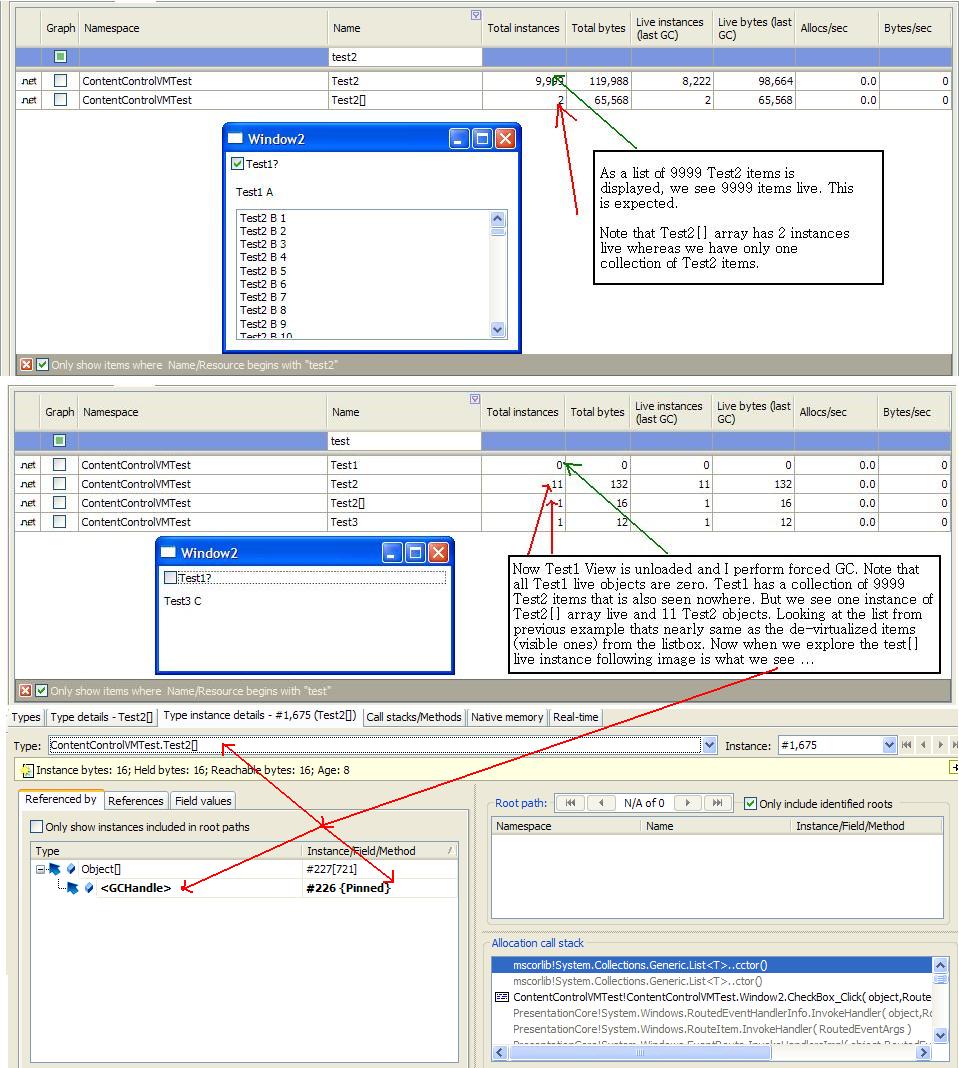
这意味着WPF执行在items控件中生成的项的固定!有人能解释一下吗?这有什么明显的缺点吗?
经常这样。
回答 1
Stack Overflow用户
发布于 2012-02-23 18:04:18
在上面的示例代码中,我没有看到您在哪里卸载任何可视文件?
但是,假设您正在卸载整个视图,这仍然是可预测的。您没有考虑的因素是调度员。Dispatcher是一个优先级事件队列,对于该队列中的每个委托,它都维护对这些委托所指向的对象的引用。这意味着您的视图中的某些内容非常可能在卸载事件之后出现在队列中,因此在GC中有一个合法的引用。你可以GC.Collect,直到你的脸是蓝色的,它将永远不会收集对象与其他引用。
因此,您必须做的是泵调度员,然后调用GC.Collect。就像这样:
void Control_Unloaded(object sender, RoutedEventArgs e)
{
  // flush dispatcher
  this.Dispatcher.BeginInvoke(new Action(DoMemoryAnalysis), DispatcherPriority.ContextIdle);
}

private static void DoMemoryAnalysis()
{
  GC.Collect();
  GC.WaitForPendingFinalizers();

  // do memory analysis now.
}
.net中另一个真正常见的内存泄漏原因是附加事件,而不是正确地取消它们。在上面的示例中,我没有看到您这样做,但是如果您要附加事件,请确保在卸载或处置或最合适的地方卸载它们。
https://stackoverflow.com/questions/9378183
复制相似问题
腾讯云开发者

Copyright © 2013 - 2026 Tencent Cloud. All Rights Reserved. 腾讯云 版权所有
深圳市腾讯计算机系统有限公司 ICP备案/许可证号:粤B2-20090059  粤公网安备44030502008569号
腾讯云计算(北京)有限责任公司 京ICP证150476号 | 京ICP备11018762号