
如何在没有扩展的情况下获得文件名?
我试图在Omnigraffle 5中不扩展当前文档文件的情况下获得文件名。
tell application "OmniGraffle Professional 5"
    set _document to front document
    set _path to path of _document

    -- Get filename without extension
    tell application "Finder"
        set {_filename, _extension, _ishidden} to the
             {displayed_name, name_extension, extension_hidden} of the _path
    end tell
end tell这给了我以下错误:error "Can’t get displayed_name of \"/Users/ca/Downloads/Feb 8.graffle\"." number -1728 from displayed_name of "/Users/ca/Downloads/Feb 8.graffle"。
我找到了一些相关的问题和页面,但我有点迷茫,真的不明白为什么它不工作。
- Applescript:在没有扩展名的文件夹中获取文件名
- Applescript Help...Just文件名
谢谢你的帮忙!
回答 2
Stack Overflow用户
发布于 2012-02-09 02:24:13
您需要将其更改为以下内容:
tell application "OmniGraffle Professional 5"
    set _document to front document
    set _path to path of _document

    -- Get filename without extension
    tell application "Finder"
    set {_filename, _extension, _ishidden} to the ¬
               {displayed name, name extension, extension hidden} ¬
                of ((the _path as POSIX file) as alias)
    end tell
    if (_extension ≠ missing value) then
        set baseName to text 1 thru -((length of _extension) + 2) of _filename
    end if

end tell
“前端文档的路径”返回文件的POSIX路径,这只是一个简单的字符串。为了能够获得关于某一项的信息,Finder将需要对所述文件的别名引用。当您传递一个普通字符串时,它会得到一个错误,因为普通字符串不具有这些属性。要获得别名,您需要先将普通路径强制到POSIX文件,然后将POSIX文件强制使用别名。
除非在其他地方定义了这些变量,否则需要删除{displayed_name、name_extension、extension_hidden}中的下划线。当您查看带有下划线的“已编译”代码时,如下所示:
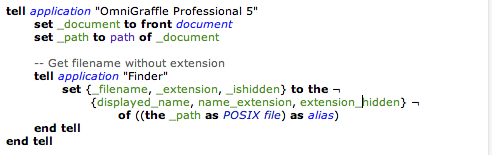
因此,AppleScript将displayed_name解释为变量,而不是属性。现在,如果您已经在其他地方定义了这些变量,比如在属性中的脚本顶部,那就可以了。但如果没有,则需要删除下划线,因为Finder项的属性名称中没有下划线。删除下划线时,颜色显示正确(属性为紫色,变量为绿色)。
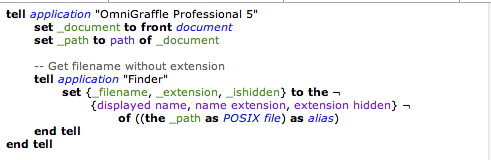
请注意,这仍然不会给您的文件名没有扩展名。要做到这一点,您需要像我在添加的行中使用text n thru m那样做一些事情
if (_extension ≠ missing value) then
    set baseName to text 1 thru -((length of _extension) + 2) of _filename
end ifStack Overflow用户
发布于 2012-02-09 02:13:41
首先,您需要为您所针对的任何应用程序的属性使用正确的标签--这些标签可以在应用程序脚本字典中找到。下一个问题是,Finder不知道任何关于POSIX路径的信息,这显然是OmniGraffle为文档路径返回的内容,因此您需要强制使用Finder所知道的路径,比如别名。
tell application "Finder"
    set {_filename, _extension, _ishidden} to the {displayed name, name extension, extension hidden} of (_path as POSIX file as alias)
end tellhttps://stackoverflow.com/questions/9203985
复制相似问题
腾讯云开发者

Copyright © 2013 - 2026 Tencent Cloud. All Rights Reserved. 腾讯云 版权所有
深圳市腾讯计算机系统有限公司 ICP备案/许可证号:粤B2-20090059  粤公网安备44030502008569号
腾讯云计算(北京)有限责任公司 京ICP证150476号 | 京ICP备11018762号