
DataGridColumn头内容WPF
我想定位一个演示文稿,而且我对这份报告的大脑已经冻结了。我使用的是标记扩展,所以不要使用这个:
<DataGridTextColumn Header="Number" Binding="{Binding Number}" Width="60" CellStyle="{StaticResource NumberStyle}" />我想要这个:
<DataGridTextColumn Header="{Resx Key=Header_Number}" Binding="{Binding Number}" Width="60" CellStyle="{StaticResource NumberStyle}" />其中,经过良好测试的标记将只返回当前区域性的正确文本。但它不起作用。我想我需要一个HeaderStyle或者HeaderTemplate但是..。
解决办法是什么?
干杯,
贝瑞尔
编辑
我的意思是,在英语中,它不是返回文本"Number“,而是返回一个默认值(即”#Header_Number“)。
我的意思是,我的意思是
<Label FontWeight="Bold" Grid.Row="0" Grid.Column="0" Content="{Resx Key=Label_Amount}"/>用英语返回“金额”。
最终编辑
糟糕的是,这实际上更多的是由于WPF数据网格列没有继承其父列的DataContext。
标记扩展有一个ResxName属性,我喜欢为整个窗口设置一个属性:
    resx:ResxProperty.Name="NMoneys.Presentation.Resources.AllocatorView"
    Title="{Resx Key=Window_Title}"
但是,由于数据网格中的标头不是可视树的一部分(尽管它们看起来确实应该是!),所以我必须再次明确地将Resx的名称放在
<DataGridTextColumn Header="{Resx ResxName=NMoneys.Presentation.Resources.AllocatorView, Key=ColumnHeader_Number}" Binding="{Binding Number}" Width="60" CellStyle="{StaticResource NumberStyle}" />我以前遇到过这种情况,并且看到了一些转发DC的技术,但在这种情况下,这不值得。
干杯,
贝瑞尔
回答 1
Stack Overflow用户
发布于 2012-01-30 09:19:35
我猜你有模型代表你的实体。我所做的是使用数据注释。这是一个例子。编辑:提供带有屏幕截图的MVVM类
模型
using System.ComponentModel.DataAnnotations;

using Silverlight.Infrastructure.Properties;

namespace Silverlight.Infrastructure.Models
{
    public class Customer
    {
        [Display(ResourceType = typeof(Resources), Name = "CustomerIdHeader")]
        public int Id { get; set; }

        // There must be an entry CustomerNameHeader in the resources else it
        // will throw an exception
        [Display(ResourceType = typeof(Resources), Name = "CustomerNameHeader")]
        public string Name { get; set; }
    }
}
然后,标头内容将自动绑定到属性的显示。
ViewModel
using Silverlight.Infrastructure.Models

namespace Silverlight.ModuleA.ViewModels
{
    //Prism namespaces
    public class CustomerViewModel : NotificationObject
    {
        public CustomerViewModel()
        {
            // service for my customers.
            CustomeService customerService = new CustomerService();
            Customers = customerService.GetCustomers()
        }

        public ObservableCollection<Customer> Customers {get;set;}
    }
}
视图
<UserControl>
    <Grid x:Name="LayoutRoot">
        <data:DataGrid x:Name="CustomerGrid" ItemsSource="{Binding Customers}" AutoGenerateColumns="False" >
                    <data:DataGrid.Columns>
                        <data:DataGridTextColumn Binding="{Binding Id, Mode=TwoWay}" />
                        <data:DataGridTextColumn Binding="{Binding Name, Mode=TwoWay}"/>
                        <data:DataGridTextColumn Binding="{Binding Surname, Mode=TwoWay}"/>
                        <data:DataGridTextColumn Binding="{Binding Company, Mode=TwoWay}"/>
                    </data:DataGrid.Columns>
            </data:DataGrid>
    </Grid>
</UserControl>
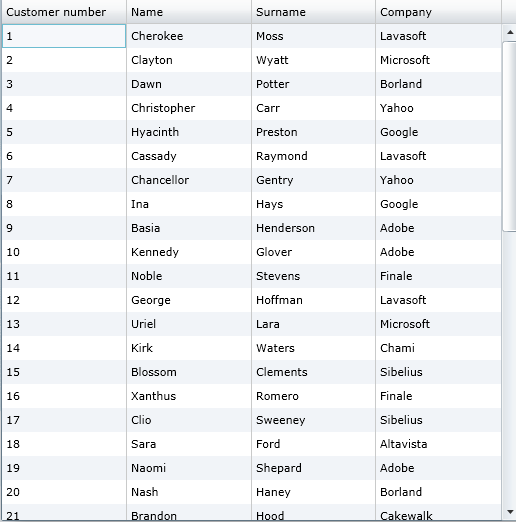
然后是类型(StringLibrary)中的资源
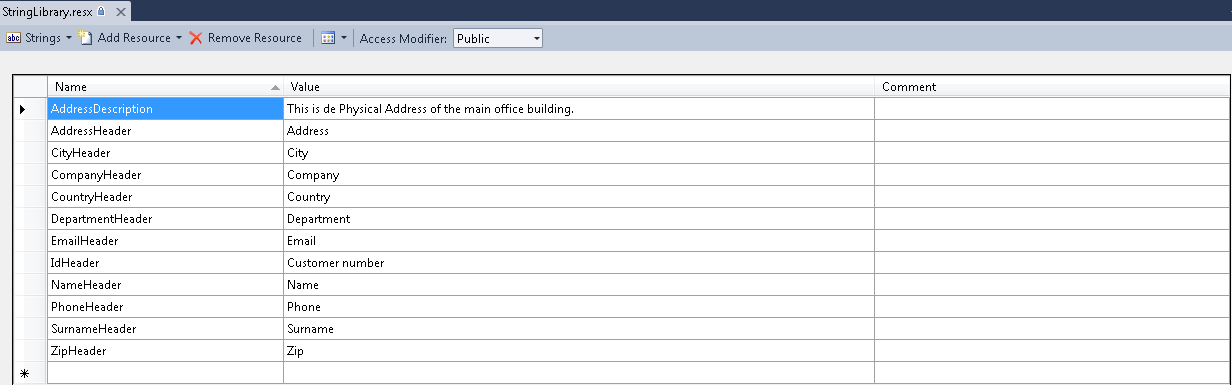
如您所见,显示的名称等于资源文件中的ResourceKey。我在2-3周前使用XML进行开发和测试时,第一次想出了注释。但是,像AutoMapper这样的东西可以将您的对象映射到类似的pocos,或者您甚至可以使用WCF服务,并且您可以有类似的注释。WCF RIA实际上是使用它们的人,但我只是以一种不同的方式使用它们。
这里和那里可能会有一些技巧来实现这一点。但当你这么做的时候,你真的会得到一个简单的解决方案。
我希望我已经提供了足够的信息。
https://stackoverflow.com/questions/9055454
复制相似问题
腾讯云开发者

Copyright © 2013 - 2026 Tencent Cloud. All Rights Reserved. 腾讯云 版权所有
深圳市腾讯计算机系统有限公司 ICP备案/许可证号:粤B2-20090059  粤公网安备44030502008569号
腾讯云计算(北京)有限责任公司 京ICP证150476号 | 京ICP备11018762号